ゴメンナサイ。(最初から謝っちゃいます。)


ここから始まった【TurtleGraphics】シリーズで、Visual StudioからC#5へ移行してサンプルやらTGEditorやらで22投稿したので疲れてしまったのと、GWに差し掛かり、このブログも5周年だったので、余り深く考えずに始めた


【今は昔...】シリーズ。


社会人になった【今は昔...】今昔物語(1)日本橋時代から始めましたが、投稿した後、何故か学生時代に聴いた


にWEBで遭遇し、懐かしさの余り昨日私の「懐メロ」メニューに加えてしまいました。


そんなこととで、「今昔物語(2)」は「最初の転勤地の今」を予定していたのですが、突如余り深く考えずに「学生時代」に退行してしまいました。


しっかし、


発見はあるもので、今聞き返すと、例えばTake it easyとかLyin’sEyesとか


Eaglesって、めっちゃカントリー


なんですね。


いずれにせよ、


Witchy Woman、Desperado、One of These Nights、そしてHotel Californiaと夜中、机に向かっていた時分が 蘇り、結構浸ってしまいました。


ん?


『だから何?』と言わないで


は


Don't say "So what?"


でよいのでしょうか?


今回の真意は、現在も存続する


Eagles


ではありますが、


決して同じではありえない(Everything Must Change)


ということを言いたかったのです。


ps. 次はまた(1)の延長に戻るつもりです。(のつもりですが... 「気分次第で責めないで」)


Golden Week ...とはいえ、今年6回目の年男である私は人混みに出てゆく体力、気力がわきません。(それというのも、ゴールデンウィークの高速の混雑についてトラウマがあるからなんですが...)


そんな時に

「そうそう、今はグーグルビュー(注)があって、何処でも行ったように見えるんだっけ」

注:正しくは「Google MapのStreet View」です。


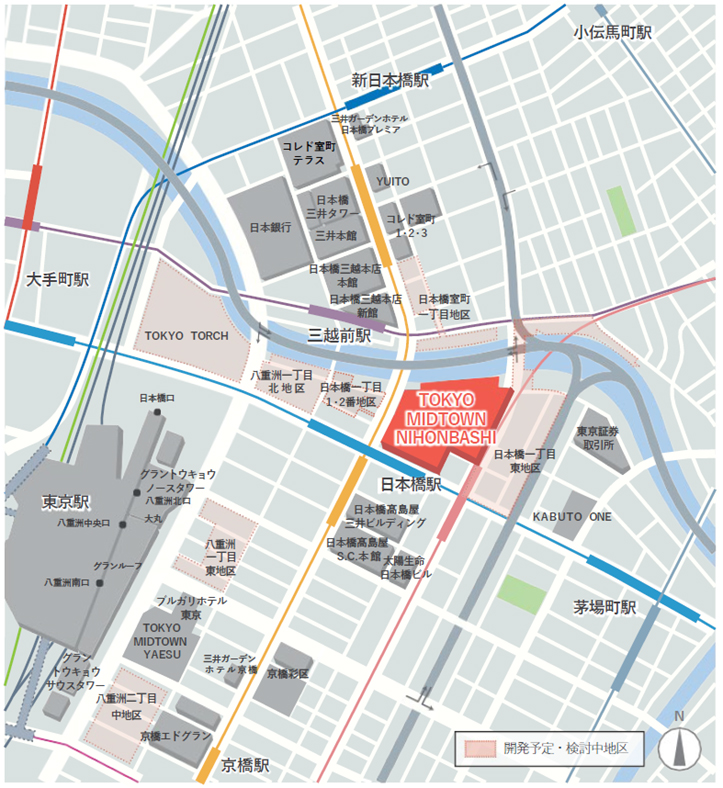
と思い立ち、取り敢えず、学校を卒業して社会人になった1978年から3年間務めた東京、日本橋がどうなっているのか、グーグルマップの人型(so-called "pegman")

を落として、当時の勤務地を探ってみました。すると、


ビル自体が無いっ!(48年前だから当たり前だよな)


ということで、今がどうなっているのかを検索すると、


「日本橋一丁目中地区第一種市街地再開発事業」

という再開発プロジェクトを三井不動産と野村不動産が仕掛け、今年の3月に竣工して


「東京ミッドタウン日本橋」


になっているそーな。


でも、でもよっ!


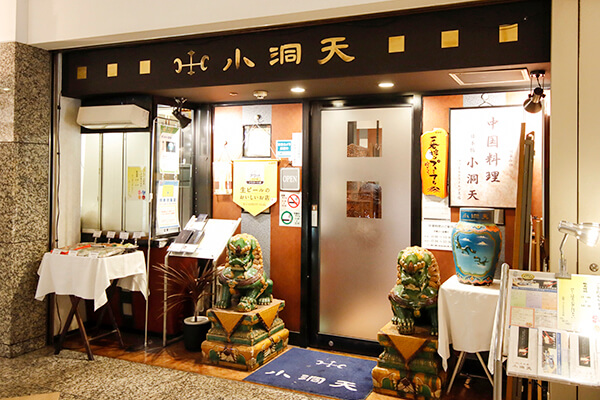
このマップを見ていると、(1978年)当時(お昼の予算は500円で)勤務するビルの(社食で安くあげて矢張り)裏にあった(アマンドに行くか、コーヒーを我慢して行った)中華料理店の


「小洞天」はどうなっちゃったの?


という素朴な疑問が生じます。これも調べてみると、


日本橋小洞天閉店の理由と80年の歴史【1944年創業中華料理店の最後】


ということで、この再開発事業の結果(当然アマンドも同じく)


閉店(ガーン!!!)


になった模様です。それで焦って小洞天のホームページを詳細に調べると残っている店舗は


小洞天 大手町ファーストスクエア店

shop_fs


だけになってしまった模様。(💦)


でも、名物の


シュウマイご飯(Shumai and rice set  シュウマイ4ヶ+ライス+スープ+ザーサイ)

¥1,000


は勿論、当時先輩が「食べろ、食べろ」と煩かった、懐かしい


menu02

五目やわらか焼きそば(Five ingredient soft fried noodle)

¥ 1,300


はまだ健在の模様なので、一度食べに行かなくては!


このブログ、初めての投稿がこれ。なので、14日で


開設5周年!


を迎えます。大体GWに「あ"~、もう〇年ブログを書いたな~」と感じる暦年記念記事は


(1)一年目に祝一周年】ハァハァ、ゼィゼィなどを書いていますが、同時にこんな紹介を書いていますね。

(2)二年目は書いていませんが、ウィンドウズの描画がらみの(後にC#のEaselクラスとなる)こんな記事を書いていますね。

(3)三年目もかいていませんが、(OpenGLだから)矢張り描画がらみでこんな記事をかいています。」

(4)四年目も記念記事はかいていませんが、こんなことを書いています。(しょーもな。)


まぁ、


Anniversaryを祝う気がない


ことはわかりました(笑)が、5月1日に最終回


を迎え、結果的に5周年記念作品になったTGEditorもグラフィック系であることを考えると、「絵心はない」私ですが、描画やグラフィックに関心があることは分かります。事実2022年のこんな紹介(BCCSkeltonのC++プログラム)


でも(より深度の大きい)フラクタルツリーが出ていました。C#でEaselクラスを作った後、手慰みでこんなもの


を作りましたが、矢張り環境ソフト的なものが好きなのでしょうかね?


いずれにせよ、


祝5周年、おめでとー!


前回でTGEditorの最終回としましたが、TGEditorが「独特な関数を用いた描画や、繰り返しネスティングの複雑な描画等には対応できないという限界が明白」ということで、


「独特な関数を用いた描画や、繰り返しネスティングの複雑な描画等はこっちを使いましょう。」


と結びました。以下では↑の青字の典型であるフラクタルや、フラクタル樹形を描画(末尾参照)してみましょう。


【TG_Ala_Carte.cs】

////////////////////////////
// TG_Ala_Carte.cs
// Copyright 2026 by Y-Sama
////////////////////////////

using System;
using System.Windows.Forms;
using System.Drawing;
using System.ComponentModel;
using System.Reflection;                //Assemblyを使う為
using Nakov.TurtleGraphics;                //TurtleGraphicsを使う為

namespace TG_Ala_Carte
{
    class Launcher
    {
        //エントリーポイント
        [STAThread]
        static void Main()
        {
            Application.Run(new TGAC());
        }
    }

    public class TGAC : Form
    {
        //クラスコントロール
        private Button Reset_Button;
        private Button Hide_Button;
        private Button Draw1_Button;
        private Button Draw2_Button;
        private Button Draw3_Button;
        private Button Exit_Button;

        //コントロールの初期化
        private void InitializeControls()
        {
            this.Reset_Button = new Button();
            this.Hide_Button = new Button();
            this.Draw1_Button = new Button();
            this.Draw2_Button = new Button();
            this.Draw3_Button = new Button();
            this.Exit_Button = new Button();
            this.SuspendLayout();
            //Reset_Button
            this.Reset_Button.Anchor = AnchorStyles.Top | System.Windows.Forms.AnchorStyles.Right;
            this.Reset_Button.Location = new Point(713, 12);
            this.Reset_Button.Name = "Reset_Button";
            this.Reset_Button.Size = new Size(75, 30);
            this.Reset_Button.TabIndex = 0;
            this.Reset_Button.Text = "リセット";
            this.Reset_Button.UseVisualStyleBackColor = true;
            this.Reset_Button.Click += new EventHandler(this.Reset_Button_Click);
            //Hide_Button
            this.Hide_Button.Anchor = AnchorStyles.Top | AnchorStyles.Right;
            this.Hide_Button.Location = new Point(713, 44);
            this.Hide_Button.Name = "Hide_Button";
            this.Hide_Button.Size = new Size(75, 30);
            this.Hide_Button.TabIndex = 1;
            this.Hide_Button.Text = "亀表示";
            this.Hide_Button.UseVisualStyleBackColor = true;
            this.Hide_Button.Click += new EventHandler(this.Hide_Button_Click);
            //Draw1_Button
            this.Draw1_Button.Anchor = AnchorStyles.Top | AnchorStyles.Right;
            this.Draw1_Button.Location = new Point(713, 74);
            this.Draw1_Button.Name = "Draw1_Button";
            this.Draw1_Button.Size = new Size(75, 30);
            this.Draw1_Button.TabIndex = 2;
            this.Draw1_Button.Text = "描画1";
            this.Draw1_Button.UseVisualStyleBackColor = true;
            this.Draw1_Button.Click += new EventHandler(this.Draw1_Button_Click);
            //Draw2_Button
            this.Draw2_Button.Anchor = AnchorStyles.Top | AnchorStyles.Right;
            this.Draw2_Button.Location = new Point(713, 104);
            this.Draw2_Button.Name = "Draw2_Button";
            this.Draw2_Button.Size = new Size(75, 30);
            this.Draw2_Button.TabIndex = 3;
            this.Draw2_Button.Text = "描画2";
            this.Draw2_Button.UseVisualStyleBackColor = true;
            this.Draw2_Button.Click += new EventHandler(this.Draw2_Button_Click);
            //Draw3_Button
            this.Draw3_Button.Anchor = AnchorStyles.Top | AnchorStyles.Right;
            this.Draw3_Button.Location = new Point(713, 134);
            this.Draw3_Button.Name = "Draw3_Button";
            this.Draw3_Button.Size = new Size(75, 30);
            this.Draw3_Button.TabIndex = 4;
            this.Draw3_Button.Text = "描画3";
            this.Draw3_Button.UseVisualStyleBackColor = true;
            this.Draw3_Button.Click += new EventHandler(this.Draw3_Button_Click);
            //Exit_Button
            this.Exit_Button.Anchor = AnchorStyles.Bottom | AnchorStyles.Right;
            this.Exit_Button.Location = new Point(713, 410);
            this.Exit_Button.Name = "Exit_Button";
            this.Exit_Button.Size = new Size(75, 30);
            this.Exit_Button.TabIndex = 4;
            this.Exit_Button.Text = "終了";
            this.Exit_Button.UseVisualStyleBackColor = true;
            this.Exit_Button.Click += new EventHandler(this.Exit_Button_Click);
            //TGAC本体
            Assembly myOwn = Assembly.GetEntryAssembly();
            this.Icon = Icon.ExtractAssociatedIcon(myOwn.Location);    //プログラムアイコンをフォームにつける
            this.AutoScaleDimensions = new SizeF(6F, 12F);
            this.AutoScaleMode = AutoScaleMode.Font;
            this.ClientSize = new Size(800, 450);
            this.Controls.Add(this.Hide_Button);
            this.Controls.Add(this.Reset_Button);
            this.Controls.Add(this.Draw1_Button);
            this.Controls.Add(this.Draw2_Button);
            this.Controls.Add(this.Draw3_Button);
            this.Controls.Add(this.Exit_Button);
            this.Name = "TGAC";
            this.Text = "TurtleGraphics Ala Carte";
            this.ResumeLayout(false);
        }

        //コンストラクター
        public TGAC()
        {
            Turtle.Init(this);
            Turtle.Reset();
            InitializeControls();
        }

        //終了処理
        protected override void OnFormClosing(FormClosingEventArgs e)
        {
            base.OnFormClosing(e);
            DialogResult dr = MessageBox.Show("終了しますか?", "確認", MessageBoxButtons.YesNo, MessageBoxIcon.Question);
            if(dr == DialogResult.No)
            {
                e.Cancel = true;
            }
            else
                Environment.Exit(0);    //解説【重要】ウィンドウをクローズしてもプロセスが終了せず、継続してしまう為
        }

        //リセットボタン処理
        private void Reset_Button_Click(object sender, EventArgs e)
        {
            Turtle.Reset();
        }

        //非表示処理
        private void Hide_Button_Click(object sender, EventArgs e)
        {
            if (Turtle.ShowTurtle)
            {
                Turtle.ShowTurtle = false;
                this.Hide_Button.Text = "亀表示";
            }
            else
            {
                Turtle.ShowTurtle = true;
                this.Hide_Button.Text = "亀非表示";
            }
        }

        //描画1ボタン

        private void Draw1_Button_Click(object sender, EventArgs e)
        {
            DisableCtrls();                                //ボタン無効化
            Turtle.Reset();
            Turtle.PenUp();
            Turtle.MoveTo(-100, 200);
            Turtle.PenDown();
            Turtle.Rotate(90);
            fractal(200, 0);

            Turtle.Reset();
            Turtle.PenUp();
            Turtle.MoveTo(-100, 100);
            Turtle.PenDown();
            Turtle.Rotate(90);
            fractal(200, 1);

            Turtle.Reset();
            Turtle.PenUp();
            Turtle.MoveTo(-100, 0);
            Turtle.PenDown();
            Turtle.Rotate(90);
            fractal(200, 2);

            Turtle.Reset();
            Turtle.PenUp();
            Turtle.MoveTo(-100, 0);
            Turtle.PenDown();
            Turtle.Rotate(90);
            fractal(200, 3);
            EnableCtrls();                                //ボタン有効化
        }

        private void fractal(int size, int depth)    //Used by Draw1 abd Draw2
        {
            if(depth <= 0)
                Turtle.Forward(size);
            else
            {
                Turtle.Delay = 50;
                Turtle.PenSize = 2;
                fractal(size / 3, depth - 1);
                Turtle.Rotate(-60);
                fractal(size / 3, depth - 1);
                Turtle.Rotate(120);
                fractal(size / 3, depth - 1);
                Turtle.Rotate(-60);
                fractal(size / 3, depth - 1);
            }
        }

        //描画2ボタン

        private void Draw2_Button_Click(object sender, EventArgs e)
        {
            DisableCtrls();                                //ボタン無効化
            Color[] col = new Color[3] {Color.Red, Color.Green, Color.Blue};
            for(int j = 0; j < 3; j++)
            {
                //Turtle.Reset();
                Turtle.PenUp();
                Turtle.MoveTo(-100 + j * 4, -100 + j * 4);
                Turtle.PenDown();
                Turtle.PenColor = col[j];
                for(int i = 0; i < 5; i++)
                {
                    fractal(200 - j * 4, 3);
                    Turtle.Rotate(360 / 5);
                }
            }
            EnableCtrls();                                //ボタン有効化
        }

        //描画3ボタン

        private void Draw3_Button_Click(object sender, EventArgs e)
        {

            //Fractal  Tree
            DisableCtrls();                                //ボタン無効化
            Turtle.Delay = 10;
            Turtle.PenSize = 2;
            Turtle.MoveTo(0, -150);
            for(int i = 0; i < 100; i++)
            {
                draw(100);
            }
            EnableCtrls();                                //ボタン有効化
        }

        private void draw(int i)    //Used by Draw3_Button_Click
        {
            if(i < 10)
                return;
            else
            {
                Turtle.Forward(i);
                Turtle.Rotate(-30);
                draw(3 * i / 4);
                Turtle.Rotate(60);
                draw(3 * i / 4);
                Turtle.Rotate(-30);
                Turtle.Backward(i);
            }
        }

        //終了ボタン

        private void Exit_Button_Click(object sender, EventArgs e)
        {
            Close();
        }

        //ボタンを無効化する

        private void DisableCtrls()
        {
            Reset_Button.Enabled = false;
            Hide_Button.Enabled = false;
            Draw1_Button.Enabled = false;
            Draw2_Button.Enabled = false;
            Draw3_Button.Enabled = false;
            Exit_Button.Enabled = false;
        }

        //ボタンを有効化する

        private void EnableCtrls()
        {
            Reset_Button.Enabled = true;
            Hide_Button.Enabled = true;
            Draw1_Button.Enabled = true;
            Draw2_Button.Enabled = true;
            Draw3_Button.Enabled = true;
            Exit_Button.Enabled = true;
        }
    }
}
 

【描画1】

(解説:フラクタル深度0、1、2を続く最後の2です。)


【描画2】

(解説:【注意】20分くらいかかるので注意してください。)


【描画3】

(解説:【危険】描画完了まで1時間以上かかります。)


まっ、


眺めて楽しい環境ソフトではありますが、時間が長いのは今風ではないかもしれませんね。(とはいえ、速過ぎるのは興ざめでもあったりして。)


前回でコードについては全て書きましたので、今回は「実際に使ってみるとどうか」、なんて書いてみましょう。


何度も表示していますが、単に起動すると


こんな風になります。又起動時に「実行リスト(実行命令のファイル - *.tge)」をドロップするとそれが読み込まれ、又起動してからドロップしても同様に読み込まれます。「読み込まれているかどうか」の違いはウィンドウ最下部のステータスバーに表示されるファイル名で分かります。

(解説:   ↑ここです。)


ここで「ファイル」-「実行ファイルの新規作成」をメニューやツールバーボタンで選択すると、


と確認が出ます。要すれば「ファイル」メニューの対象ファイルは「実行リスト(TGEクラスインスタンスのtge.ExeListメンバー)」であり、「新規作成」はその初期化だけの意味しかありません。この確認に対して「はい」と答えると、(既にファイルがあってもなくても)次のダイアログが「何をすればよいのか(ToDo)」の操作指示を表示します。(尚、既にファイルを読み込んでいた場合には初期化され「(ファイル名)」状態に戻ります。)


例えば↑の第2パラにある「命令リスト(ダイアログ)」の「命令追加(ボタン)」から「(「命令入力ダイアログ」をつかって)命令セット」を作ります。この操作は画像を含め前にやりましたね?(その結果、PenColor命令入力の仕様変更も行いました。)

又、作成した「命令セット(TGSetクラスインスタンス)」はダイアログを「はい」で終了すると自動的に「命令リスト(「命令セットライブラリー」であるTGEクラスインスタンスのtge.CmdListメンバー)」に追加されるので、即座に「実行」-「命令セットの実行」メニュー(またはツールバーの緑色の横▲ボタン)で「命令セットライブラリー」から選択して実行できます。


単体の描画「命令セット」は部品として「命令セットライブラリー」に登録されるので、


それを好きなように選択し、「実行リスト(TGEクラスインスタンスのtge.ExeListメンバー)」に登録することができ、やや複雑な画像を連続して描画することが可能です。


又それらを「名前を付けて保存」することで、その後に「ファイル」ー「実行ファイルを開く」で読み込んで、「編集]-「実行リスト編集」で追加、削除、編集して新しい「実行リスト」ファイルにすることができ、画像作成の生産効率が向上します。

(解説:最後の2枚は↑で単体で描いた命令セットのPenColor命令と繰り返し回数を変化させたものです。)


このような訳で、最初にやったダイアログへの描画命令記述(注)はWYSWYG化と再利用化が可能となりました

注:【TurtleGraphics】TurtleGraphics01

  【TurtleGraphics】TurtleGraphics02

  【TurtleGraphics】TurtleGraphics03


が、一方


独特な関数を用いた描画や、繰り返しネスティングの複雑な描画等には対応できないという限界も明確になりました。でも、それは「わかった上での設計方針」であったし、それを基に仕様を決めたのだから


No problem/No worries

没問題(メイウェンティ)


なんですが、矢張り対応できないのもちょっと気になるので、


なんくるナイサー


ということで、最初に作ったダイアログを使って


「独特な関数を用いた描画や、繰り返しネスティングの複雑な描画等はこっちを使いましょう。」


ということにしました。それはまた次回。


前回からの続きです。


【TGEditor.cs】

(続き)

        //終了処理
        protected override void OnFormClosing(FormClosingEventArgs e)
        {
            base.OnFormClosing(e);
            DialogResult dr = MessageBox.Show("終了しますか?", "確認", MessageBoxButtons.YesNo, MessageBoxIcon.Question);
            if(dr == DialogResult.No)
            {
                e.Cancel = true;
            }
            //命令セットライブラリー(CmdList.tge)を書き込む(解説:一応システム管理です。上書きではなく、日時を付けて別ファイル処理の方がより安全ですが...)
            tge.CmdList.FileName = ".\\tgeFiles\\CmdList.tge";
            tge.CmdList.WriteFile();
        }

        //「新規作成」処理(解説:実際は「初期化」処理ですね。)
        private void OnNew_Click(object sender, EventArgs e)
        {
            if(tssl[1].Text != "(ファイル名)")
            {
                DialogResult dr = MessageBox.Show("データがありますが、初期化しますか?", "確認", MessageBoxButtons.YesNo, MessageBoxIcon.Question);
                if(dr == DialogResult.Yes)
                {
                    tssl[1].Text = "(ファイル名)";
                    tssl[1].ToolTipText = "(ファイル名)";        //ToolTip設定
                }
                else
                    return;
            }
            tge.Reset();            //Nakov.TurtleGraphics初期化
            tge.ExeList.Clear();    //「実行リスト(ExeList)」初期化
            MessageBox.Show("実行リストを作るには、「実行リストの編集」で「命令リスト」から「命令セット」を選んでください。\r\n" +
                            "「命令リスト」は「命令リスト編集」で編集できます。また、新たに命令セットを作成するには「命令セット" +
                            "作成」または「命令リスト編集」の「命令セット追加」を選んでください。", "ToDo", MessageBoxButtons.OK,
                            MessageBoxIcon.Information);
        }

        //「ファイルを開く」処理
        private void OnOpen_Click(object sender, EventArgs e)
        {
            OpenFileDialog ofDlg = new OpenFileDialog();
            //ファイルフィルターの指定
            ofDlg.Filter = "タートルグラフィックデータファイル|*.tge";
            ofDlg.FilterIndex = 0;
            ofDlg.RestoreDirectory = true;    //初期ディレクトリへ復帰
            ofDlg.CheckPathExists = true;    //ファイルパスの存在チェック
            ofDlg.InitialDirectory = ".\\tgeFiles";            // デフォルトのフォルダーの指定
            ofDlg.Title = "ファイルを開く";    //ダイアログのタイトルを指定する
            if(ofDlg.ShowDialog() == DialogResult.Cancel)    //ダイアログを表示する
            {
                MessageBox.Show("キャンセルされました。", "キャンセル", MessageBoxButtons.OK, MessageBoxIcon.Exclamation);
            }
            else
            {
                if(Path.GetExtension(ofDlg.FileName) == ".tge")
                {
                    tssl[1].Text = ofDlg.FileName;            //ファイル名を記録
                    tssl[1].ToolTipText = ofDlg.FileName;    //ToolTip設定
                    //ExeListを初期化、ファイル読み込み(解説:対象は実行リストファイルです。)
                    tge.ExeList.Clear();
                    tge.ExeList.FileName = tssl[1].Text;
                    tge.ExeList.ReadFile();
                }
                else
                {
                    //エラー処理
                    MessageBox.Show("タートルグラフィックデータファイル(*.tge)ではありません。", "エラー", MessageBoxButtons.OK, MessageBoxIcon.Error);
                }
            }
            //オブジェクトを破棄する
            ofDlg.Dispose();
        }

        //「保存」処理
        private void OnSave_Click(object sender, EventArgs e)
        {
            if(tssl[1].Text == "(ファイル名)")
                OnSaveAs_Click(sender, e);
            else
            {
                //ファイル保存処理
                tge.ExeList.FileName = tssl[1].Text;
                tge.ExeList.WriteFile();
            }
        }

        //「名前を付けて保存」処理
        private void OnSaveAs_Click(object sender, EventArgs e)
        {
            SaveFileDialog sfDlg = new SaveFileDialog();
            //ファイルフィルターの指定
            sfDlg.AddExtension = true;        //拡張子自動付加
            sfDlg.DefaultExt = ".tge";
            sfDlg.Filter = "タートルグラフィックデータファイル|*.tge";
            sfDlg.FilterIndex = 0;
            sfDlg.RestoreDirectory = true;    //初期ディレクトリへ復帰
            sfDlg.CheckPathExists = true;    //ファイルパスの存在チェック
            sfDlg.InitialDirectory = ".\\tgeFiles";            // デフォルトのフォルダーの指定
            sfDlg.Title = "ファイルを保存";    //ダイアログのタイトルを指定する
            sfDlg.OverwritePrompt = true;    //上書き確認
            if(sfDlg.ShowDialog() == DialogResult.Cancel)    //ダイアログを表示する
            {
                MessageBox.Show("キャンセルされました。", "キャンセル", MessageBoxButtons.OK, MessageBoxIcon.Exclamation);
            }
            else
            {
                //ファイル名を記録
                tssl[1].Text = sfDlg.FileName;
                tssl[1].ToolTipText = sfDlg.FileName;    //ToolTip設定
                //ファイル保存処理
                tge.ExeList.FileName = tssl[1].Text;
                tge.ExeList.WriteFile();
            }
            //オブジェクトを破棄する
            sfDlg.Dispose();
        }

        //「終了」処理
        private void OnExit_Click(object sender, EventArgs e)
        {
            Close();    //修了確認はOnClosingメソッドで行う
        }

        //「命令セット作成」処理
        private void OnSetEdit_Click(object sender, EventArgs e)
        {
            //CmdSetDlgによる命令セットの作成
            CmdSetDlg csd = new CmdSetDlg();    //引数無し(新規作成)
            if(csd.ShowDialog(this) == DialogResult.OK)
            {
                tge.CmdList.AddSet(csd.Tgs);    //作成したTGSetはCmdListに追加する
            }
            csd.Dispose();
        }

        //「命令リスト編集」処理
        private void OnListEdit_Click(object sender, EventArgs e)
        {
            //CmdListDlgによる命令セットの編集
            CmdListDlg cld = new CmdListDlg(tge, 1);
            if(cld.ShowDialog(this) == DialogResult.OK)
            {
                MessageBox.Show("命令リストが編集されました", "確認", MessageBoxButtons.OK, MessageBoxIcon.Information);
            }
            cld.Dispose();
        }

        //「実行リスト編集」処理
        private void OnExeListEdit_Click(object sender, EventArgs e)
        {
            //CmdListDlgによる命令セットの編集
            CmdListDlg cld = new CmdListDlg(tge, 2);
            if(cld.ShowDialog(this) == DialogResult.OK)
            {
                MessageBox.Show("実行リストが編集されました", "確認", MessageBoxButtons.OK, MessageBoxIcon.Information);
            }
            cld.Dispose();
        }

        //「命令セット実行」処理
        private void OnSetExe_Click(object sender, EventArgs e)
        {
            //CmdListDlgによる命令セットの選択
            CmdListDlg cld = new CmdListDlg(tge, 0);
            if(cld.ShowDialog(this) == DialogResult.OK)
            {
                //描画初期化
                tge.Reset();
                tge.CmdList.GetSet(cld.Selection).DoThis();
            }
            cld.Dispose();
        }

        //「実行リスト実行」処理
        private void OnExe_List_Click(object sender, EventArgs e)
        {
            //描画初期化
            tge.Reset();
            tge.ExeList.DoSet();
        }

        //「使い方」処理(解説:本当はもっと素敵な表示にしたかったのですが...手抜きでした。)
        private void OnHowtoUse_Click(object sender, EventArgs e)
        {
            MessageBox.Show("TGEditorはNakov.TurtleGraphics用の描画エディターです。\r\n\r\n" +
            "LOGOベースの描画命令を纏めた「命令セット」、その一覧である「命令リスト」及び" +
            "指定する「命令セット」で繰り返しを含め実行順を定めた「実行リスト」を編集し、" +
            "「命令セット」単体や「実行リスト」を実行してウィンドウに描画します。\r\n\r\n" +
            "出来上がった「命令リスト」、「実行リスト」は\"*.tge\"ファイルにすることができ" +
            "\"*.tge\"ファイルで起動したり、また起動後もドラッグアンドドロップすることができます。\r\n\r\n" +
            "【TurtleGraphicsメソッド】\r\n" +
            "Init(arg)-タートルグラフィックスシステムを初期化します。argは描画対象のFormsコントロールで、指定しない場合、アクティブなフォームが描画領域となります。\r\n" +
            "Dispose() / Reset()-タートルグラフィックスシステムを破棄し、関連するすべてのリソースを解放します。\r\n" +
            "Forward(arg)-現在の方向に亀をarg1ピクセル前進させ、ペンが下がっている場合線を描きます。\r\n" +
            "Backward(arg)-現在の方向に亀をarg1ピクセル後退させ、ペンが下がっている場合線を描きます。\r\n" +
            "MoveTo(arg1, arg2)-亀を指定した位置へ移動させます。ペンが下がっている場合線を描きます。\r\n" +
            "Rotate(arg)-現在の向きからarg(度数)亀を回転させます。\r\n" +
            "RotateTo(arg)-亀を指定角度(度数)へ向けます。初期状態の亀の方向(角度)は0度(上向き)です。\r\n" +
            "PenUp()-ペンを描画面から離し、線は描かれません。\r\n" +
            "PenDown()-ペンを描画面に降ろし、線が描かれます。\r\n\r\n" +
            "【TurtleGraphicsプロパティ】\r\n" +
            "X-亀の現在X座標を取得/設定します。初期状態の亀は {0, 0}(画面中央)です。\r\n" +
            "Y-亀の現在Y座標を取得/設定します。初期状態の亀は {0, 0}(画面中央)です。\r\n" +
            "Angle-亀の現在方向(度数)を取得/設定します。(上-0、右-90、下-180、左-270)\r\n" +
            "PenColor-描画色を取得/設定します。既定色はBlue(青)です。\r\n" +
            "PenSize-描画太さ(ピクセル単位)を取得/設定します。規定値は7です。\r\n" +
            "PenVisible-ペンが下がり描画可能であればtrue、ペンが上がればfalseとなります。\r\n" +
            "ShowTurtle-亀の表示可否を取得/設定します。規定値は表示可です。\r\n" +
            "Delay-移動/回転後の待機時間(ミリ秒)を取得/設定します。規定値は0です。",
            "簡単な説明", MessageBoxButtons.OK, MessageBoxIcon.Information);
        }

        //「ショートカットキー」処理
        private void OnShortcutKey_Click(object sender, EventArgs e)
        {
            MessageBox.Show("Ctrl+N-新規作成\r\nCtrl+O-ファイルを開く\r\n" +
            "Ctrl+S-ファイルの保存\r\nCtrl+P-印刷\r\nCtrl+X-終了\r\n\r\n" +
            "Ctrl+T-命令セット編集\r\nCtrl+L-命令リスト編集\r\nCtrl+E-実行リスト編集\r\n\r\n" +
            "Ctrl+H-使い方\r\nF1-ショートカットキーの解説\r\nF2-バージョン情報",
            "ショートカットキーの解説", MessageBoxButtons.OK, MessageBoxIcon.Information);
        }

        //「バージョン」処理
        private void OnVersion_Click(object sender, EventArgs e)
        {
            VersionDlg verDlg = new VersionDlg(this.Icon);    //Versionダイアログ表示
            verDlg.ShowDialog();
            verDlg.Dispose();
        }
    }

    /////////////////////
    //Version ダイアログ
    /////////////////////

    class VersionDlg : Form
    {
        public VersionDlg(Icon ico)
        {
            //ダイアログの属性設定
            this.Text = "バーション情報";
            this.ClientSize = new Size(320, 100);
            this.MaximizeBox = false;        // 最大化ボタン
            this.MinimizeBox = false;        // 最小化ボタン
            this.ShowInTaskbar = false;        //タスクバー上表示
            this.FormBorderStyle = FormBorderStyle.FixedDialog;        // 境界のスタイル
            this.StartPosition = FormStartPosition.CenterParent;    // 親フォームの中央に配置
            //コントロールの属性設定
            Button btnOK = new Button();
            btnOK.Size = new Size(40, 28);
            btnOK.Location = new Point(ClientSize.Width - btnOK.Width - 10, (ClientSize.Height - btnOK.Height) / 2);
            btnOK.Text = "OK";
            btnOK.Click += new EventHandler(OnOK_Click);
            Label imglabel = new Label();
            imglabel.Size = new Size(40, 40);
            imglabel.Location = new Point(10, (ClientSize.Height - imglabel.Height) / 2);
            imglabel.BorderStyle = BorderStyle.Fixed3D;
            imglabel.Image = ico.ToBitmap();                        //親のシステムアイコン
            Label label = new Label();
            label.Size = new Size(ClientSize.Width - imglabel.Width - btnOK.Width - 40, ClientSize.Height- 20);
            label.Location = new Point(imglabel.Width + 20, (ClientSize.Height - label.Height) / 2);
            label.BorderStyle = BorderStyle.Fixed3D;
            label.Text = "TGEditor Version 1.0\r\nCopyright (c) 2026 by Ysama\r\n(written in Microsoft C#)";
            label.TextAlign = ContentAlignment.MiddleCenter;
            label.Font = new Font("Times New Roman", 10, FontStyle.Bold);
            this.Controls.Add(btnOK);
            this.Controls.Add(imglabel);
            this.Controls.Add(label);
        }

        private void OnOK_Click(object sender, EventArgs e)
        {
            Close();
        }
    }
}
 

はー、しんど。


書く方も大変です。次回からは(絵心のない私ですが)少し使い方をやってみましょうか?


さーて、前回で書いた通り、最後の「器プログラム」でプログラムの解説を終了します。今後は自分で使ってみた印象や改良点(てか、もうまた仕様変更しちゃったのですが...テヘ)と番外編が続きます。(尚、また字数制限に引っかかったので分割します。)


【TGEditor.cs】

///////////////////////////////
//        TGEditor.cs
// Copyright (c) 2026 by ysama
///////////////////////////////

using System;
using System.Windows.Forms;
using System.Drawing;
using System.Reflection;                //Assemblyを使う為
using System.Resources;                    //リソース関係クラス等の使用の為
using System.IO;                        //File.ReadAllText使用の為
using System.Text;                        //Encoding.GetEncoding使用の為
using TGE;                                //TGEditクラス使用の為(解説:これがTurtleGraphics機能の肝、になります。)

namespace TGEditor
{
    public class tgEditor : Form
    {
        //クラスメンバーフィールド
        Assembly myOwn = Assembly.GetEntryAssembly();
        TGEdit tge;        //TGEditクラスインスタンス(解説:まだメモリーに生成していないので、「ポインター」の状態です。)
        //クラスメンバーコントロール
        MenuStrip menuStrip;                        //メニュー
        ToolStrip toolStrip;                        //ツールバー
        ToolStripButton[] tsButton;                    //ツールバーボタン
        StatusStrip statusStrip;                    //ステータスバー
        ToolStripStatusLabel[] tssl;                //ステータスバーラベル

        [STAThread]
        public static void Main()                    //エントリーポイント
        {
            Application.Run(new tgEditor());
        }

        public tgEditor()                            //コンストラクター
        {
            this.Icon = Icon.ExtractAssociatedIcon(myOwn.Location);    //プログラムアイコン
            this.Size = new Size(960, 640);
            this.MinimumSize = new Size(480, 320);
            this.Text = "TGEditor";
            //Drag and Dropでの処理
            this.AllowDrop = true;
            this.DragEnter += tgEditor_DragEnter;
            this.DragDrop += tgEditor_DragDrop;
            //起動時処理
            this.Load += tgEditor_Load;
            //TGEditクラスインスタンス作成と描画初期化
            tge = new TGEdit(this);
            tge.Reset();
            //*.tgeファイル用ディレクトリーの作成(初回のみ)
            Directory.CreateDirectory(".\\tgeFiles");    //解説:既にフォールダーがある場合でも例外処理にはなりません。
        }

        private void tgEditor_Load(object sender, EventArgs e)
        {
            //フォームのレイアウトを一時停止
            this.SuspendLayout();
            //ツールバーとステータスバーの設定
            MakeBars();
            //メニューの作成(MenuStripはコントロールであり、上からの並びはDock投入のFILO順となる)
            MakeMenu();
            //フォームのレイアウトを再開
            this.ResumeLayout(false);
            this.PerformLayout();
            //命令セットライブラリー(CmdList.tge)を読み込む(解説:命令セットライブラリーは一応システム管理)
            tge.CmdList.FileName = ".\\tgeFiles\\CmdList.tge";
            tge.CmdList.ReadFile();
            //起動時の引数をチェックし、引数にファイル名があればそれを読み込む(解説:これはExeListとなります。)
            string[] arg = System.Environment.GetCommandLineArgs();
            if(arg.Length > 1)
            {
                if(Path.GetExtension(arg[arg.Length - 1]) == ".tge")
                {
                    //(複数投入であれば最後の)ファイル名を記録
                    tssl[1].Text = arg[arg.Length - 1];
                    tssl[1].ToolTipText = arg[arg.Length - 1];    //ToolTip設定
                    //ExeListを初期化、ファイル読み込み
                    tge.ExeList.Clear();
                    tge.ExeList.FileName = tssl[1].Text;
                    tge.ExeList.ReadFile();
                }
                else
                {
                    //エラー処理
                    MessageBox.Show("タートルグラフィックデータファイル(*.tge)ではありません。", "エラー", MessageBoxButtons.OK, MessageBoxIcon.Error);
                }
            }
        }

        //メニューの作成
        private void MakeMenu()
        {
            //メインメニュー作成
            menuStrip = new MenuStrip();
            menuStrip.SuspendLayout();
            //メインメニューアイテム付加
            ToolStripMenuItem miFile = new ToolStripMenuItem();        //「ファイル」メニュー
            miFile.Text = "ファイル(&F)";
            menuStrip.Items.Add(miFile);
            ToolStripMenuItem miEdit = new ToolStripMenuItem();        //「編集」メニュー
            miEdit.Text = "編集(&E)";
            menuStrip.Items.Add(miEdit);
            ToolStripMenuItem miExeTG = new ToolStripMenuItem();    //「実行」メニュー
            miExeTG.Text = "実行(&E)";
            menuStrip.Items.Add(miExeTG);
            ToolStripMenuItem miHelp = new ToolStripMenuItem();        //「ヘルプ」メニュー
            miHelp.Text = "ヘルプ(&H)";
            menuStrip.Items.Add(miHelp);
            //「ファイル」メニューアイテム付加
            ToolStripMenuItem miNew = new ToolStripMenuItem();        //「新規」メニューアイテム
            miNew.Text = "実行ファイルの新規作成(&N)";
            miNew.Click += OnNew_Click;
            miNew.ShortcutKeys = Keys.Control | Keys.N;
            miFile.DropDownItems.Add(miNew);
            ToolStripMenuItem miOpen = new ToolStripMenuItem();        //「開く」メニューアイテム
            miOpen.Text = "実行ファイルを開く(&O)";
            miOpen.Click += OnOpen_Click;
            miOpen.ShortcutKeys = Keys.Control | Keys.O;
            miFile.DropDownItems.Add(miOpen);
            ToolStripMenuItem miSave = new ToolStripMenuItem();        //「保存」メニューアイテム
            miSave.Text = "実行ファイルを保存(&S)";
            miSave.Click += OnSave_Click;
            miSave.ShortcutKeys = Keys.Control | Keys.S;
            miFile.DropDownItems.Add(miSave);
            ToolStripMenuItem miSaveAs = new ToolStripMenuItem();    //「名前を付けて保存」メニューアイテム
            miSaveAs.Text = "実行ファイルを名前を付けて保存(&A)";
            miSaveAs.Click += OnSaveAs_Click;
            miSaveAs.ShortcutKeys = Keys.Control | Keys.A;
            miFile.DropDownItems.Add(miSaveAs);
            miFile.DropDownItems.Add(new ToolStripSeparator());        //セパレーター
            ToolStripMenuItem miExit = new ToolStripMenuItem();        //「終了」メニューアイテム
            miExit.Text = "終了(&X)";
            miExit.Click += OnExit_Click;
            miExit.ShortcutKeys = Keys.Control | Keys.X;
            miFile.DropDownItems.Add(miExit);
            //「編集」メニューアイテム付加
            miEdit.DropDownItems.Add(new ToolStripSeparator());        //セパレーター
            ToolStripMenuItem miSetEdit = new ToolStripMenuItem();    //「命令セット作成」メニューアイテム
            miSetEdit.Text = "命令セット作成(&T)";
            miSetEdit.Click += OnSetEdit_Click;
            miSetEdit.ShortcutKeys = Keys.Control | Keys.T;
            miEdit.DropDownItems.Add(miSetEdit);
            ToolStripMenuItem miListEdit = new ToolStripMenuItem();    //「命令リスト編集」メニューアイテム
            miListEdit.Text = "命令リスト編集(&L)";
            miListEdit.Click += OnListEdit_Click;
            miListEdit.ShortcutKeys = Keys.Control | Keys.L;
            miEdit.DropDownItems.Add(miListEdit);
            miEdit.DropDownItems.Add(new ToolStripSeparator());        //セパレーター
            ToolStripMenuItem miExeList = new ToolStripMenuItem();    //「実行リスト編集」メニューアイテム
            miExeList.Text = "実行リスト編集(&E)";
            miExeList.Click += OnExeListEdit_Click;
            miExeList.ShortcutKeys = Keys.Control | Keys.E;
            miEdit.DropDownItems.Add(miExeList);
            //「実行」メニューアイテム付加
            ToolStripMenuItem miSetExe = new ToolStripMenuItem();    //「命令セット実行」メニューアイテム
            miSetExe.Text = "命令セット実行(&T)";
            miSetExe.Click += OnSetExe_Click;
            miExeTG.DropDownItems.Add(miSetExe);
            miExeTG.DropDownItems.Add(new ToolStripSeparator());        //セパレーター
            ToolStripMenuItem miExe_List = new ToolStripMenuItem();    //「実行リスト実行」メニューアイテム
            miExe_List.Text = "実行リスト実行(&E)";
            miExe_List.Click += OnExe_List_Click;
            miExeTG.DropDownItems.Add(miExe_List);
            //「ヘルプ」メニューアイテム付加
            ToolStripMenuItem miHowtoUse = new ToolStripMenuItem();    //「使い方」メニューアイテム
            miHowtoUse.Text = "使い方(&H)";
            miHowtoUse.Click += OnHowtoUse_Click;
            miHowtoUse.ShortcutKeys = Keys.Control | Keys.H;
            miHelp.DropDownItems.Add(miHowtoUse);
            ToolStripMenuItem miShortcutKey = new ToolStripMenuItem();    //「ショートカットキー」メニューアイテム
            miShortcutKey.Text = "ショートカットキー(&S)";
            miShortcutKey.Click += OnShortcutKey_Click;
            miShortcutKey.ShortcutKeys = Keys.F1;
            miHelp.DropDownItems.Add(miShortcutKey);
            ToolStripMenuItem miVer = new ToolStripMenuItem();        //「バージョン」メニューアイテム
            miVer.Text = "バージョン(&V)";
            miVer.Click += OnVersion_Click;
            miVer.ShortcutKeys = Keys.F2;
            miHelp.DropDownItems.Add(miVer);
            //メインメニューに設定して表示
            this.MainMenuStrip = menuStrip;
            this.Controls.Add(menuStrip);
            menuStrip.ResumeLayout(false);
            menuStrip.PerformLayout();
        }

        //ツールバーとステータスバーの作成
        private void MakeBars()
        {
            //ToolStripクラスインスタンスの生成
            this.toolStrip = new ToolStrip();
            //ツールバーのレイアウトを一時停止
            this.toolStrip.SuspendLayout();
            //ToolStripButton配列を作成
            this.tsButton = new ToolStripButton[11];
            //解説:以下がリソース(ツールバービットマップ)の準備処理です。

            //本プログラムの埋め込みリソースのリソースマネージャーを作成
            ResourceManager rm = new ResourceManager("TGEditor", myOwn);
            //ツールバービットマップの読み込み
            ImageList imgList = new ImageList();
            imgList.ImageSize = new Size(16, 15);
            imgList.Images.AddStrip((Bitmap)rm.GetObject("tgToolBar"));
            imgList.TransparentColor = Color.FromArgb(0xFF, 0xFF, 0xFF);    //tgToolBar.bmpの背景色

            //ToolStripButton[0]を作成
            this.tsButton[0] = new ToolStripButton();
            this.tsButton[0].Text = "実行ファイル新規作成";                    //テキスト設定
            this.tsButton[0].Image = (Bitmap)imgList.Images[0];                //画像設定
            this.tsButton[0].DisplayStyle = ToolStripItemDisplayStyle.Image;    //画像表示のみ
            this.tsButton[0].Click += OnNew_Click;                            //Clickイベントハンドラ追加(解説:メニュー連動、以下同じ。)
            this.toolStrip.Items.Add(this.tsButton[0]);                        //ボタンを追加
            //ToolStripButton[1]を作成
            this.tsButton[1] = new ToolStripButton();
            this.tsButton[1].Text = "実行ファイルを開く";                    //テキスト設定
            this.tsButton[1].Image = (Bitmap)imgList.Images[1];                //画像設定
            this.tsButton[1].DisplayStyle = ToolStripItemDisplayStyle.Image;//画像表示のみ
            this.tsButton[1].Click += OnOpen_Click;                            //Clickイベントハンドラ追加
            this.toolStrip.Items.Add(this.tsButton[1]);                        //ボタンを追加
            //ToolStripButton[2]を作成
            this.tsButton[2] = new ToolStripButton();
            this.tsButton[2].Text = "実行ファイルの保存";                    //テキスト設定
            this.tsButton[2].Image = (Bitmap)imgList.Images[2];                //画像設定
            this.tsButton[2].DisplayStyle = ToolStripItemDisplayStyle.Image;//画像表示のみ
            this.tsButton[2].Click += OnSave_Click;                            //Clickイベントハンドラ追加
            this.toolStrip.Items.Add(this.tsButton[2]);                        //ボタンを追加
            //セパレーターを挿入
            this.toolStrip.Items.Add(new ToolStripSeparator());
            //ToolStripButton[3]を作成
            this.tsButton[3] = new ToolStripButton();
            this.tsButton[3].Text = "終了";                                    //テキスト設定
            this.tsButton[3].Image = (Bitmap)imgList.Images[3];                //画像設定
            this.tsButton[3].DisplayStyle = ToolStripItemDisplayStyle.Image;//画像表示のみ
            this.tsButton[3].Click += OnExit_Click;                            //Clickイベントハンドラ追加
            this.toolStrip.Items.Add(this.tsButton[3]);                        //ボタンを追加
            //セパレーターを挿入
            this.toolStrip.Items.Add(new ToolStripSeparator());
            //ToolStripButton[4]を作成
            this.tsButton[4] = new ToolStripButton();
            this.tsButton[4].Text = "命令セット作成";                        //テキスト設定
            this.tsButton[4].Image = (Bitmap)imgList.Images[4];                //画像設定
            this.tsButton[4].DisplayStyle = ToolStripItemDisplayStyle.Image;//画像表示のみ
            this.tsButton[4].Click += OnSetEdit_Click;                        //Clickイベントハンドラ追加
            this.toolStrip.Items.Add(this.tsButton[4]);                        //ボタンを追加
            //ToolStripButton[5]を作成
            this.tsButton[5] = new ToolStripButton();
            this.tsButton[5].Text = "命令リスト編集";                        //テキスト設定
            this.tsButton[5].Image = (Bitmap)imgList.Images[5];                //画像設定
            this.tsButton[5].DisplayStyle = ToolStripItemDisplayStyle.Image;//画像表示のみ
            this.tsButton[5].Click += OnListEdit_Click;                        //Clickイベントハンドラ追加
            this.toolStrip.Items.Add(this.tsButton[5]);                        //ボタンを追加
            //ToolStripButton[6]を作成
            this.tsButton[6] = new ToolStripButton();
            this.tsButton[6].Text = "実行リスト編集";                        //テキスト設定
            this.tsButton[6].Image = (Bitmap)imgList.Images[6];                //画像設定
            this.tsButton[6].DisplayStyle = ToolStripItemDisplayStyle.Image;//画像表示のみ
            this.tsButton[6].Click += OnExeListEdit_Click;                    //Clickイベントハンドラ追加
            this.toolStrip.Items.Add(this.tsButton[6]);                        //ボタンを追加
            //セパレーターを挿入
            this.toolStrip.Items.Add(new ToolStripSeparator());
            //ToolStripButton[7]を作成
            this.tsButton[7] = new ToolStripButton();
            this.tsButton[7].Text = "命令セット実行";                        //テキスト設定
            this.tsButton[7].Image = (Bitmap)imgList.Images[7];                //画像設定
            this.tsButton[7].DisplayStyle = ToolStripItemDisplayStyle.Image;//画像表示のみ
            this.tsButton[7].Click += OnSetExe_Click;                        //Clickイベントハンドラ追加
            this.toolStrip.Items.Add(this.tsButton[7]);                        //ボタンを追加
            //ToolStripButton[8]を作成
            this.tsButton[8] = new ToolStripButton();
            this.tsButton[8].Text = "実行リスト実行";                        //テキスト設定
            this.tsButton[8].Image = (Bitmap)imgList.Images[8];                //画像設定
            this.tsButton[8].DisplayStyle = ToolStripItemDisplayStyle.Image;//画像表示のみ
            this.tsButton[8].Click += OnExe_List_Click;                    //Clickイベントハンドラ追加
            this.toolStrip.Items.Add(this.tsButton[8]);                        //ボタンを追加
            //セパレーターを挿入
            this.toolStrip.Items.Add(new ToolStripSeparator());
            //ToolStripButton[9]を作成
            this.tsButton[9] = new ToolStripButton();
            this.tsButton[9].Text = "使い方";                                //テキスト設定
            this.tsButton[9].Image = (Bitmap)imgList.Images[9];            //画像設定
            this.tsButton[9].DisplayStyle = ToolStripItemDisplayStyle.Image;    //画像表示のみ
            this.tsButton[9].Click += OnHowtoUse_Click;                        //Clickイベントハンドラ追加
            this.toolStrip.Items.Add(this.tsButton[9]);                    //ボタンを追加
            //ToolStripButton[10]を作成
            this.tsButton[10] = new ToolStripButton();
            this.tsButton[10].Text = "バージョン情報(&V)";                    //テキスト設定
            this.tsButton[10].Image = (Bitmap)imgList.Images[10];            //画像設定
            this.tsButton[10].DisplayStyle = ToolStripItemDisplayStyle.Image;    //画像表示のみ
            this.tsButton[10].Click += OnVersion_Click;                        //Clickイベントハンドラ追加
            this.toolStrip.Items.Add(this.tsButton[10]);                    //ボタンを追加
            //ツールバーの設定
            this.Controls.Add(this.toolStrip);
            //ツールバーのレイアウトを再開
            this.toolStrip.ResumeLayout(false);
            this.toolStrip.PerformLayout();

            //StatusStripクラスインスタンスの生成
            this.statusStrip = new StatusStrip();
            //ステータスバーにパネルとテキストを追加
            tssl = new ToolStripStatusLabel[2];
            tssl[0] = new ToolStripStatusLabel();
            tssl[0].BorderSides = ToolStripStatusLabelBorderSides.All;
            tssl[0].BorderStyle = Border3DStyle.SunkenInner;
            tssl[0].BackColor = SystemColors.Control;
            tssl[0].Text = "TGEditor Ver. 1.0";
            tssl[0].AutoSize = true;
            tssl[0].TextAlign = ContentAlignment.MiddleLeft;
            tssl[1] = new ToolStripStatusLabel();
            tssl[1].BorderSides = ToolStripStatusLabelBorderSides.All;
            tssl[1].BorderStyle = Border3DStyle.SunkenInner;
            tssl[1].BackColor = SystemColors.Control;
            tssl[1].TextAlign = ContentAlignment.MiddleLeft;
            tssl[1].Text = "(ファイル名)";
            tssl[1].ToolTipText = "(ファイル名)";                            //ToolTip設定
            tssl[1].Spring = true;
            statusStrip.Items.AddRange(tssl);
            statusStrip.ShowItemToolTips = true;                            //ToolTip表示
            this.Controls.Add(this.statusStrip);                            //StatusStrip(ステータスバー)を追加
        }

        //ドラッグされた時
        private void tgEditor_DragEnter(object sender, DragEventArgs e)
        {
            if(e.Data.GetDataPresent(DataFormats.FileDrop))
            {
                e.Effect = DragDropEffects.Copy;
            }
        }

        //ドロップされたとき
        private void tgEditor_DragDrop(object sender, DragEventArgs e)
        {
            //ドロップされたファイルパスを取得
            string[] files = (string[])e.Data.GetData(DataFormats.FileDrop);
            if(files.Length > 0)
            {
                if(Path.GetExtension(files[files.Length - 1]) == ".tge")
                {
                    //ファイル名を記録
                    tssl[1].Text = files[files.Length - 1];
                    tssl[1].ToolTipText = files[files.Length - 1];    //ToolTip設定
                    //ExeListを初期化、ファイル読み込み
                    tge.ExeList.Clear();
                    tge.ExeList.FileName = tssl[1].Text;
                    tge.ExeList.ReadFile();
                }
                else    //エラー処理
                    MessageBox.Show("タートルグラフィックデータファイル(*.tge)ではありません。", "エラー", MessageBoxButtons.OK, MessageBoxIcon.Error);
            }
        }
 

前回まででTGEditorの機能のコア部分であるTGEライブラリーのコード解説を終了しましたので、いよいよ"wrap up"の段階に来ました。


出来上がったTGEライブラリーのソースコード(TGE.cs-注1)は「ダイナミックリンクライブラリー(DLL)」としてコンパイルします。(注2)

注1:【TurtleGraphics】ご参考-TGEのクラス定義部分、【TurtleGraphics】ご参考-TGEのUI部分(1)、【TurtleGraphics】ご参考-TGEのUI部分(2)、【TurtleGraphics】ご参考-TGEのUI部分(3)を参照願います。

注2:Nakov.TurtleGraphics.dllが必要です。ご参考までにBCCForm and BCCSkeltonのパッケージに入っている分のバッチファイルを紹介します。

@ECHO OFF
ECHO ----------------------------------
ECHO  TGEditor.bat
ECHO  Copyright (c) 2026 by Ysama
ECHO ----------------------------------
REM TGE.dllの作成
(解説:↓は「TGE.dllがなかったら、ターゲットをDLLとしてコンパイルする」、という意味です。)
if not exist "TGE.dll" "C:\Windows\Microsoft.NET\Framework\v4.0.30319\csc.exe" /t:library  /reference:".\Nakov.TurtleGraphics.dll" /warn:4 ".\TGE.cs"
REM TGEditorの作成
"C:\Windows\Microsoft.NET\Framework\v4.0.30319\csc.exe" /t:winexe /win32icon:".\Turtle.ico" /res:".\TGEditor.resources" /reference:".\TGE.dll" /warn:4 ".\TGEditor.cs"
pause


TGE.dllができたならば、TGEditor.csに移ります。


先ずはツールバービットマップを用意して


これをC#のリソースファイル(TGEditor.resources)にします。これは専用のツールがないとできない(注)ので、BCCForm and BCCSkeltonのパッケージにはTGEditor.resourceというファイルを入れてあります。

注:私は昔自作したResourceWriterを使っています。


プログラムアイコン(ウィンドウアイコンでもある)は【TurtleGraphics】宿題の答えとC#5版コンパイルの準備の時の亀さんを使います。(まぁ、無くてもコンパイルはできますが...)


と、いうことで、


いよいよTGEditor.csに話を移しますが、前にも書いた通り、このプログラムコードはここで取り上げたRichEditorからの流用ですのであまり目新しいものはありません。又量も622行だけなので、次回に(最後の)コード解説にするつもりです。


長々とC#のコードを並べた


ので一息つくために久々の食べ物の話を。


昨日のお昼は、最近凝っていて前に作って余りを冷凍していた


鶏キノコ炊き込みご飯


を、これも(お酒のお供に)冷凍で取り寄せていた「ホッケの昆布醤油漬け」と(揚皮と中の豆腐の食感差が好みの)生揚げを


久々にご飯のおかず(笑)


にしてしっかりと焼き、野沢菜と一緒においしくいただきました。又、炊き込みご飯が少ないのと野菜が足りないので、


野菜たっぷりの中華風春雨スープ


も戴きました。


ps. 炊き込みご飯は具材(特にキノコ)の食感が落ちるので冷凍には向いていないことを肝に銘じました。なお、醤油の代わりに生揚げにご飯に掛けるワカメやジャコのふりかけをかけて食べるのがマイブームです。


で、何が面白いのかって?


矢張り色々と工夫して作ったり、組み合わせて「試してみる」ってことかな?


///////////////////////////////////////////////////////////////////////////////
//                      TGEライブラリー (TGE.dll)
//                     Copyright (c) 2026 by Ysama
//
//                               【概要】
//LOGOベースの描画命令を纏めた「命令セット(TGSet)」、その一覧である「命令リス
//ト(TGList)」、「命令リスト」から指定した命令セットで、繰り返しを含め実行順を
//定める「実行リスト(TGList)」及び編集ダイアログをまとめたNakov.TurtleGraphics
//の命令編集ライブラリー
///////////////////////////////////////////////////////////////////////////////

(続きの続きの続き)


    /////////////////////////
    // Command入力ダイアログ
    /////////////////////////

    class InputDlg : Form
    {
        //クラスフィールド
        string[] CmdNameList = new string[15] {"Nop", "Forward()", "Backward()",
                                                "MoveTo()", "Rotate()", "RotateTo()",
                                                "PenUp()", "PenDown()", "X",
                                                "Y", "Angle", "PenColor",
                                                "PenSize", "PenVisible", "Delay"};
        string[] CmdExplList = new string[15] {"何もしない", "前進する", "後退する",
                                                "絶対座標へ移動する", "現在の方向から指定角度回転", "絶対角度へ回転(↑0→90↓180←270)",
                                                "描画停止", "描画開始", "X座標指定(移動)",
                                                "X座標指定(移動)", "角度指定(↑0→90↓180←270)",
                                                "描画色指定(Color)", "描画幅指定", "可視可(1)、不可(0)", "中断時間(ms)"};
        //クラスプロパティ
        public int[] dtData {get; set;}
        public string[] dtCmd;
        //クラスコントロール
        Button BtnOK;
        Button BtnCancel;
        GroupBox gBox;
        ComboBox cbCommands;
        TextBox txbExplanation;
        Label[] labelCmd;
        TextBox[] txbStr;

        //コンストラクター(1)-解説:引数無し(新規入力)
        public InputDlg()
        {
            dtData = new int[] {-1, 0, 0, 0};        //ComboBoxが選択されていない状態のSelectedIndex値
            dtCmd = new string[] {"", ""};            //命令文と説明文
            InitializeControls();
        }

        //コンストラクター(2)-解説:引数あり(編集)
        public InputDlg(int[] arg_Data)
        {
            //引数の記録
            if(arg_Data[0] >= 0 && arg_Data[0] < CmdNameList.Length)
                dtData = (int[])arg_Data.Clone();    //arg_Data配列のクローンで初期化
            else
                dtData = new int[] {-1, 0, 0, 0};    //ComboBoxが選択されていない状態のSelectedIndex値
            dtCmd = new string[] {"", ""};            //命令文と説明文
            InitializeControls();
        }

        //コントロールの初期化
        private void InitializeControls()
        {
            //ダイアログの属性設定
            if(dtData[0] == -1)
                this.Text = "命令入力ダイアログ";
            else
                this.Text = "命令編集ダイアログ";
            this.ClientSize = new Size(320, 210);
            this.MaximizeBox = false;        //最大化ボタン
            this.MinimizeBox = false;        //最小化ボタン
            this.ShowInTaskbar = false;        //タスクバー上非表示
            this.FormBorderStyle = FormBorderStyle.FixedDialog;        //境界のスタイル
            this.StartPosition = FormStartPosition.CenterScreen;    //画面中央に配置

            //コントロールの属性設定
            BtnOK = new Button();
            BtnOK.Location = new Point(ClientSize.Width - BtnOK.Width - 20, ClientSize.Height - BtnOK.Height - 10);
            BtnOK.Text = "OK";
            BtnOK.AutoSize = true;
            BtnOK.Click += new EventHandler(OnOK_Click);

            BtnCancel = new Button();
            BtnCancel.Location = new Point(20, ClientSize.Height - BtnCancel.Height - 10);
            BtnCancel.Text = "Cancel";
            BtnCancel.AutoSize = true;
            BtnCancel.Click += new EventHandler(OnCancel_Click);

            gBox = new GroupBox();
            gBox.Location = new Point(10, 0);
            gBox.Size = new Size(ClientSize.Width - 20, ClientSize.Height - BtnOK.Height - 20);
            gBox.Text = "命令と引数1~3の設定";

            cbCommands =new ComboBox();
            cbCommands.Location = new Point(10, 16);
            cbCommands.Size = new Size(ClientSize.Width / 2, 28);
            cbCommands.DropDownWidth = ClientSize.Width / 2;
            cbCommands.DropDownHeight = 160;
            cbCommands.DropDownStyle = ComboBoxStyle.DropDownList;
            cbCommands.FormattingEnabled = true;
            cbCommands.TextChanged += Command_TextChanged;

            txbExplanation = new TextBox();
            txbExplanation.Location = new Point(10, 40);
            txbExplanation.Size = new Size(ClientSize.Width / 2, 120);
            txbExplanation.Multiline = true;
            txbExplanation.WordWrap = true;
            txbExplanation.BorderStyle = BorderStyle.Fixed3D;
            txbExplanation.ReadOnly = true;

            labelCmd = new Label[3];
            labelCmd[0] = new Label();
            labelCmd[0].Text = "引数1(定数)";
            labelCmd[0].Size = new Size(80, 18);
            labelCmd[0].Location = new Point(180, 20);
            labelCmd[1] = new Label();
            labelCmd[1].Text = "引数2(倍数)";
            labelCmd[1].Location = new Point(180, 70);
            labelCmd[1].Size = new Size(80, 18);
            labelCmd[2] = new Label();
            labelCmd[2].Text = "引数3(分子)";
            labelCmd[2].Location = new Point(180, 120);
            labelCmd[2].Size = new Size(80, 18);

            txbStr = new TextBox[3];
            txbStr[0] = new TextBox();
            txbStr[0].Location = new Point(180, 38);
            txbStr[0].Size = new Size(100, 28);
            txbStr[0].BorderStyle = BorderStyle.Fixed3D;
            txbStr[0].Text = "0";
            txbStr[0].TextAlign = HorizontalAlignment.Right;
            txbStr[0].Enter += txbStr0_Enter;
            txbStr[1] = new TextBox();
            txbStr[1].Size = new Size(100, 28);
            txbStr[1].Location = new Point(180, 88);
            txbStr[1].BorderStyle = BorderStyle.Fixed3D;
            txbStr[1].Text = "0";
            txbStr[1].TextAlign = HorizontalAlignment.Right;
            txbStr[1].Enter += txbStr1_Enter;
            txbStr[2] = new TextBox();
            txbStr[2].Size = new Size(100, 28);
            txbStr[2].Location = new Point(180, 138);
            txbStr[2].BorderStyle = BorderStyle.Fixed3D;
            txbStr[2].Text = "0";
            txbStr[2].TextAlign = HorizontalAlignment.Right;
            txbStr[2].Enter += txbStr2_Enter;

            gBox.Controls.Add(cbCommands);
            gBox.Controls.Add(txbExplanation);
            gBox.Controls.Add(labelCmd[0]);
            gBox.Controls.Add(labelCmd[1]);
            gBox.Controls.Add(labelCmd[2]);
            gBox.Controls.Add(txbStr[0]);
            gBox.Controls.Add(txbStr[1]);
            gBox.Controls.Add(txbStr[2]);
            this.Controls.Add(BtnOK);
            this.Controls.Add(BtnCancel);
            this.Controls.Add(gBox);

            //cbCommands、txbStrの初期設定
            cbCommands.Items.AddRange(CmdNameList);
            if(dtData[0] >= 0 && dtData[0] < CmdNameList.Length)
            {
                cbCommands.SelectedIndex = dtData[0];
            }
            if(dtData[1] != 0)
            {
                txbStr[0].Text = dtData[1].ToString();
            }
            if(dtData[2] != 0)
            {
                txbStr[1].Text = dtData[2].ToString();
            }
            if(dtData[3] != 0)
            {
                txbStr[2].Text = dtData[3].ToString();
            }
        }

        private void Command_TextChanged(object sender, EventArgs e)
        {
            dtData[0] = cbCommands.SelectedIndex;
            txbExplanation.Text = CmdExplList[dtData[0]];
            if(dtData[0] == 11)    //解説:元々はPenColor以外はtrueにするelse節がありました。
            {
                txbStr[1].Enabled = false;
                txbStr[2].Enabled = false;
            }
        }

        private void txbStr0_Enter(object sender, EventArgs e)
        {
            string msg = "命令に与えられる「引数1(定数) + 引数2 * 繰り返し数(倍数) + 引数3 / (最大繰り返し数 - 繰り返し数)(分子)」の定数部分です。";
            if(dtData[0] == 3)
                msg = "MoveTo(x, y)の場合引数1がx、引数2がyで、引数3の繰り返し回数の倍数が加算されます。(x = 引数1 + 引数3 x 繰り返し数、y = 引数2 + 引数3 x 繰り返し数)";
            else if(dtData[0] == 11)
            {
                msg = "PenColor()の場合、引数1にColor.FromArgb(RGB値)のRGB値が入ります。";
                ColorDialog colDlg = new ColorDialog();
                colDlg.AllowFullOpen = true;
                if(colDlg.ShowDialog() == DialogResult.OK)
                {
                    txbStr[0].Text = colDlg.Color.ToArgb().ToString();
                    colDlg.Dispose();
                }    //解説:繰り返し回数による変数変化を与えるために、TextBoxを有効化し、入力可としました。
                txbStr[1].Enabled = true;
                txbStr[2].Enabled = true;
            }
            txbExplanation.Text = msg;
        }

        private void txbStr1_Enter(object sender, EventArgs e)
        {
            string msg = "命令に与えられる「引数1(定数) + 引数2 * 繰り返し数(倍数) + 引数3 / (最大繰り返し数 - 繰り返し数)(分子)」の倍数部分です。";
            if(dtData[0] == 3)
                msg = "MoveTo(x, y)の場合引数1がx、引数2がyで、引数3の繰り返し回数の倍数が加算されます。(x = 引数1 + 引数3 x 繰り返し数、y = 引数2 + 引数3 x 繰り返し数)";
            txbExplanation.Text = msg;
        }

        private void txbStr2_Enter(object sender, EventArgs e)
        {
            string msg = "命令に与えられる「引数1(定数) + 引数2 * 繰り返し数(倍数) + 引数3 / (最大繰り返し数 - 繰り返し数)(分子)」の分子部分です。";
            if(dtData[0] == 3)
                msg = "MoveTo(x, y)の場合引数1がx、引数2がyで、引数3の繰り返し回数の倍数が加算されます。(x = 引数1 + 引数3 x 繰り返し数、y = 引数2 + 引数3 x 繰り返し数)";
            txbExplanation.Text = msg;
        }

        //OKボタンがクリックされた時
        protected void OnOK_Click(object sender, EventArgs e)
        {
            if(dtData[0] < 0)
                MessageBox.Show("命令が選択されていません。", "エラー", MessageBoxButtons.OK, MessageBoxIcon.Error);
            else
            {
                dtCmd[0] = CmdNameList[dtData[0]];        //命令文
                dtCmd[1] = CmdExplList[dtData[0]];        //説明文
                int dat = 0;
                if(!int.TryParse(txbStr[0].Text, out dat))
                    MessageBox.Show("引数1が整数ではありません。", "エラー", MessageBoxButtons.OK, MessageBoxIcon.Error);
                else
                {
                    dtData[1] = dat;
                    if(!int.TryParse(txbStr[1].Text, out dat))
                        MessageBox.Show("引数2が整数ではありません。", "エラー", MessageBoxButtons.OK, MessageBoxIcon.Error);
                    else
                    {
                        dtData[2] = dat;
                        if(!int.TryParse(txbStr[2].Text, out dat))
                            MessageBox.Show("引数3が整数ではありません。", "エラー", MessageBoxButtons.OK, MessageBoxIcon.Error);
                        else
                        {
                            dtData[3] = dat;
                            Close();
                        }
                    }
                }
            }
        }

        //Cancelボタンがクリックされた時
        protected void OnCancel_Click(object sender, EventArgs e)
        {
            Close();
        }
    }
}