
「記事別アクセス数」はけっこう気にしてます
アメーバのアクセス解析の「記事別アクセス数」のページのリストは、私は良くチェックをしています。

実際に読まれている自分の書いた記事のリストですから、知る事は多いです。
◎ 良く読まれている記事は、Google等のネット検索で比較的人の目に付き易い位置をキープしていたりします。 その様な記事ほど、記事の内容が現在の時点で陳腐化(ネット環境の時代的な変化に記事が古くて適応していない状態)していないかのチェックは大事と思います。
◎ 突然に読まれる事が増えた記事は、ネット上の何か最近に始まった事象に関係している事があります。 例えば、ブラウザに大きなトラブルが発生し、その解決策を検索した結果、自分の記事が読まれている場合等です。
そのような事象を、このリストから早々に教えられる事は、たまにあります。 そういう時は、自分の記事が解決策なのかどうか、勘違いを誘ったり適当な事を書いていないかなど、再考する機会になります。(全て、読む側の自己責任とは言え)
「Awake」の機能
「Awake」は「管理トップ」と「アクセス解析」のページで動作するツールで、基本はアクセス解析に関する快適な環境を用意する事です。
◎ ブログ管理画面におけるランキングデータの更新を速報する。
◎「管理トップ」と「アクセス解析」の往復を便利にするリンクを用意する。
◎「記事別アクセス数」のページの「総計」を表示する。
このツールの概要は、以下のページを参照ください。


「 記事別アクセス数」の「総計」表示を更新
今回の更新は、「総計」の表示パネルの配置の改善です。
「総計」は、最初の画像の右上にある小さなパネルに表示されます。

「 記事別アクセス数」のリストは、残念ですが上位「100件」しか表示されません。 上図の「赤枠」のパネルは上限に達した状態で、最初は「緑枠」です。
「アクセス数合計」は、現在のリストの「アクセス数」の総計です。「赤枠」の場合は、実際のブログ全体のアクセス数は、この合計より多くなります。
従って、何の役にたつのかなぁという「総計」表示です。 しかし総計のために、本来は末尾まで表示されないリストを、「Awake」は自動で末尾まで表示します。 どちらかと言うと、その機能の方が便利かも知れません。
パネルの配置を改善
今回は、このパネルの配置デザインを変更しました。 従来は、「position: fixed」を使って、画面の右上に固定表示していたので、リストをスクロールするとパネル位置が中途半端になりました。
この表示位置を、スクロールすると画面の上辺に固定される様にしました。 この配置デザインは「position: sticky」を使っている様に見えますが、JavaScriptで実現しています。

多くの場所で紹介されている、一定位置までスクロールしたら機能する JavaScriptのコードです。
「Awake」ver. 1.5 295行~
ページをスクロールして上方から「100px」を超えると、「#add_access」(パネル要素)の配置を「position: absolute; top: 100px;」➔「position: fixed; top: 0;」に変更しています。
「position: sticky」が使えればコードは簡単になりそうですが、このページHtmlのデフォルト構成が適用に不適当で、JavaScript で処理しました。
「sticky」は下手をすると返って複雑になる
この配置に関して、最初は「sticky」でいけると踏んだのですが、適当な動作を実現するには、ページ全体の各所を弄る必要がある事が判って来ました。

上のページに書かれていますが、今回の場合は、「sticky」を使うために JavaScriptでページの高さを取得する必要があったのです。「sticky」の設定対象の親要素の高さが固定の場合はその必要はないが、実際の場合は固定されていない場合は多いはずです。 結局、返って複雑になることが判り、上記のコードに至りました。
「Awake」を使用するには
このツールは Chrome / Edge / Firefox の拡張機能「Tampermonkey」上で動作します。 以下に、このツールの導入手順を簡単に説明します。
❶「Tampermonkey」を導入します
使用しているブラウザに拡張機能「Tampermonkey」を導入する事が必要です。 以下のページに簡単な導入の説明があるので参照ください。
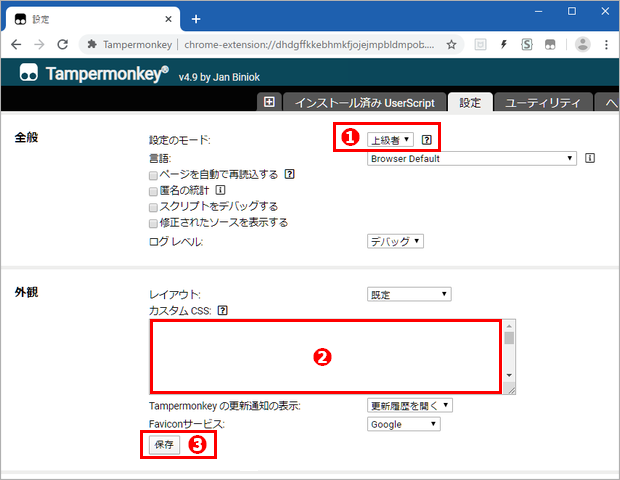
❷「Tampermonkey」にスクリプトを登録します
●「Tampermonkey」の「+」マークの「新規スクリプト」タブを開きます。

●「新規スクリプト」には、最初からテンプレートが記入されています。 これは全て削除して、完全に空白になった編集枠に 下のコードをコピー&ペーストします。
〔コピー方法〕 軽量シンプルなツール「PreBox Button 」を使うと
コード枠内を「Ctrl+左Click」➔「Copy code 」を「左Click」
の操作で、掲載コードのコピーが可能になります。
● 最後に「ファイル」メニューの「保存」を押すと、ツールが使用可能になります。
〔 Awake 〕 ver. 1.5
// ==UserScript==
// @name Awake
// @namespace http://tampermonkey.net/
// @version 1.5
// @description アクセスレポートの更新を背景色で表示・解析ページを「今日」で開く
// @author Ameba Blog User
// @match https://blog.ameba.jp/ucs/analysis*
// @match https://blog.ameba.jp/ucs/top*
// @grant none
// ==/UserScript==
let path=document.location.pathname;
if(path=='/ucs/top.do'){ // 管理トップ で実行
let realtime=document.querySelector('.accessAnalysis__dailyAccess');
if(realtime){
realtime.style.cursor='pointer';
realtime.onclick=function(event){
if(!event.shiftKey){
window.location.href=
'https://blog.ameba.jp/ucs/analysis/analysis.do?unit=today'; }
else{
window.location.href=
'https://blog.ameba.jp/ucs/analysis/analysis_page.do?unit=today'; }}
document.onkeydown=function(event){
if(event.shiftKey){
realtime.classList.add('shift'); }}
document.onkeyup=function(event){
if(!event.shiftKey){
realtime.classList.remove('shift'); }}
let style_icon=
'<style>.accessAnalysis__dailyAccess { position: relative; outline-offset: -1px; } '+
'.accessAnalysis__dailyAccess:before { position: absolute; top: 2px; left: 12px; '+
'font-family: ameba-symbols; font-size: 32px; '+
'content: "\\EA57"; color: #2196f3; } '+
'.accessAnalysis__dailyAccess.shift:after { content: "記事別"; '+
'position: absolute; top: 43px; left: 16px; font: bold 16px Meiryo; } '+
'.accessAnalysis__dailyAccess:hover { outline: 1px solid #2196f3; } '+
'.realtimeAccess__header .spui-LinkButton--neutral { display: none; } '+
'#contents .accessAnalysis__summary { background: #e2eef4; } '+
'#contents .accessAnalysis__graph { background: #e2eef4; } '+
'</style>';
realtime.insertAdjacentHTML('afterbegin', style_icon); }
setTimeout(()=>{
new_report1();
new_report_rank1();
}, 500); // ページを開いてからのタイミング
} // 管理トップ で実行
if(path.includes('analysis')){ // アクセス解析ページ全体
let target0=document.querySelector('#root > div');
let monitor0=new MutationObserver(page_change);
monitor0.observe(target0, { childList: true });
page_change();
function page_change(){
let path=document.location.pathname;
if(path.includes('analysis.do')){ // アクセス解析トップ
clear_disp();
setTimeout(()=>{
new_report2();
new_report_rank2();
}, 500); // ページを開いてからのタイミング
let realtime=document.querySelector('.p-realtimeAccess');
if(realtime){
realtime.style.cursor='pointer';
realtime.onclick=function(event){
if(!event.shiftKey){
window.location.href='https://blog.ameba.jp/ucs/top.do'; }
else{
window.location.href=
'https://blog.ameba.jp/ucs/analysis/analysis_page.do?unit=today'; }}
document.onkeydown=function(event){
if(event.shiftKey){
realtime.classList.add('shift'); }}
document.onkeyup=function(event){
if(!event.shiftKey){
realtime.classList.remove('shift'); }}
let style_icon=
'<style>.p-realtimeAccess { position: relative; } '+
'.p-realtimeAccess:before { position: absolute; left: 10px; '+
'font-family: ameba-symbols; font-size: 32px; '+
'content: "\\EA31"; color: #009688; } '+
'.p-realtimeAccess.shift:before { content: "\\EA57"; color: #2196f3; } '+
'.p-realtimeAccess.shift:after { content: "記事別"; '+
'position: absolute; top: 40px; left: 14px; font: bold 16px Meiryo; } '+
'.p-realtimeAccess:hover { border-color: #2196f3; } '+
'.p-analysisSummary { background: #e2eef4; }'+
'.p-genreRanking { background: #e2eef4; }'+
'.p-genreRanking__graph { background: #ffffff75 }'+
'</style>'+
'<style>.p-analysisSummary__ranking__rank { '+
'margin-left: 20px; padding: 0 30px; width: fit-content; height: 32px; }'+
'</style>';
realtime.insertAdjacentHTML('afterbegin', style_icon); }
} // アクセス解析トップ
if(path.includes('analysis_page.do')){ // 記事別アクセス数ページ
let target=document.querySelector('#root section');
let monitor=new MutationObserver(count_do);
monitor.observe(target, { childList: true });
count_do();
} // 記事別アクセス数ページ
} // page_change()
} // アクセス解析ページ全体
function new_report1(){
let graph_term=document.querySelector('.accessAnalysis__graphHeadingTerm');
if(graph_term){
let accsess_text=graph_term.textContent.split('〜')[1];
let day=accsess_text.slice(0, -3).split('/')[1];
let date=new Date();
date.setDate(date.getDate() -1); // 昨日の日付を取得
let yesterday=date.getDate();
if(day==yesterday){
let access_panel=document.querySelector('.accessAnalysis__summary');
let access_graph=document.querySelector('.accessAnalysis__graph');
if(access_panel && access_graph){
access_panel.style.background='#fff';
access_graph.style.background='#fff'; }}}}
function new_report_rank1(){
if(get_cookie('Awake_updated')==1){ // Cookie 「updated」をチェック Age 2h 🟢
disp_updated(); } // 更新後の2hはハイライト表示
let compare='';
let GRnum=
document.querySelector('.accessAnalysis__summaryRankingGenreRelatedRankNumber');
if(GRnum){
compare+=GRnum.textContent; }
let GAnum=
document.querySelector('.accessAnalysis__summaryRankingGenreAllRankNumber');
if(GAnum){
compare+=GAnum.textContent; }
let ORnum=
document.querySelector('.accessAnalysis__summaryRankingOfficialRelatedRankNumber');
if(ORnum){
compare+=ORnum.textContent; }
let OAnum=
document.querySelector('.accessAnalysis__summaryRankingOfficialAllRankNumber');
if(OAnum){
compare+=OAnum.textContent; }
// 以下のチェックを起動ごとに行う
let last=get_cookie('Awake_last');
if(last!=0 && compare!=''){
if(last!=compare){ // 更新後の判定 Cookie 「updated」を登録 Age 2h 🟢
document.cookie='Awake_updated=1; Max-Age=7200';
disp_updated(); }}
else{ ; } // 22h以内に管理トップを開いていない or compare取得に失敗した 判定不能
if(compare!=''){ // 起動ごとに Cookie「Awake_last」を更新 Age 22h 🟢
document.cookie='Awake_last='+compare+'; Max-Age=79200'; }
function disp_updated(){
let panel_G=document.querySelector('.accessAnalysis__summaryRankingGenre');
if(panel_G){
panel_G.style.filter='hue-rotate(45deg)';
panel_G.style.background='#fff'; }
let panel_O=document.querySelector('.accessAnalysis__summaryRankingOfficial');
if(panel_O){
panel_O.style.filter='hue-rotate(45deg)';
panel_O.style.background='#fff'; }}
function get_cookie(name){
let cookie_req=document.cookie.split('; ').find(row=>row.startsWith(name));
if(cookie_req){
if(cookie_req.split('=')[1]==null){
return 0; }
else{
return cookie_req.split('=')[1]; }}
if(!cookie_req){
return 0; }}
} // new_report_rank1()
function new_report2(){
let access_title=document.querySelector('.p-analysisSummary__access__title');
if(access_title){
let accsess_text=access_title.textContent.match(/\(.*\)/).toString();
let day=accsess_text.match(/\/.*/).toString().replace(/[^0-9]/g, '');
let date=new Date();
date.setDate(date.getDate() -1); // 昨日の日付を取得
let yesterday=date.getDate();
if(day==yesterday){
let access_panel=document.querySelector('.p-analysisSummary');
access_panel.style.background='#fff';
}}}
function new_report_rank2(){
let genre_xscale=document.querySelectorAll('.p-genreRanking__xScale');
if(genre_xscale.length==7){
let xscale_text=genre_xscale[6].textContent.match(/\/.*\(/).toString();
let day=xscale_text.replace(/[^0-9]/g, '');
let date=new Date();
date.setDate(date.getDate() -1); // 昨日の日付を取得
let yesterday=date.getDate();
let access_graph=document.querySelector('.p-genreRanking');
let ranking_rank=document.querySelectorAll('.p-analysisSummary__ranking__rank');
if(day==yesterday){
if(access_graph){
access_graph.style.background='#fff'; }
if(ranking_rank[0]){
ranking_rank[0].style.background='#fff'; }
if(ranking_rank[1]){
ranking_rank[1].style.background='#fff'; }}}}
function count_do(){
clear_disp();
let retry=0;
let interval=setInterval(more_open, 1000);
function more_open(){
retry++;
if(retry>20){ // リトライ制限 20回 4sec
clearInterval(interval);
alert("全てのリスト情報を開かずに合計しました"); }
let more=document.querySelector('.p-accessGraph__moreLinkBtn--center');
if(more){
more.click(); }
if(!more){
clearInterval(interval);
page_count(); }}
function page_count(){
let line_count=0;
let num_count=0;
let p_count=document.querySelectorAll('.p-accessGraphItem__count');
for(let k=0; k<p_count.length; k++){
line_count+=1;
let line_item_disp=p_count[k].textContent.replace(/[^0-9]/g, '');
num_count+=parseInt(line_item_disp, 10); }
let disp=
'<div id="add_access">'+
'参照された記事数:'+ line_count +' アクセス数合計:'+ num_count +
'<style>'+
'#add_access { position: absolute; top: 100px; right: calc(50% - 405px); '+
'padding: 4px 15px 2px; font: normal 16px Meiryo; z-index: 10; '+
'border: 1px solid #009688; background: #fff; '+
'box-shadow: 2px 3px 6px rgb(170, 170, 170, 0.4); }';
if(line_count==100){
disp+=
'#add_access { border: 1px solid red; }'; }
disp+='</style></div>';
if(document.querySelector('#add_access')){
document.querySelector('#add_access').remove(); }
document.body.insertAdjacentHTML('beforeend', disp);
let add_access=document.querySelector('#add_access');
window.addEventListener("scroll", scroll);
function scroll(){
    let scroll_position=window.pageYOffset;
    if(add_access){
        if(scroll_position>100){
            add_access.style.position='fixed';
            add_access.style.top='0'; }
        else{
            add_access.style.position='absolute';
            add_access.style.top='100px'; }}}
} // page_count()
} // count_do()
function clear_disp(){
if(document.querySelector('#add_access')){
document.querySelector('#add_access').remove(); }}