ツールの組み合わせ
かなりの数のツールを制作して、編集画面でも10数個のスクリプトツールを常駐待機させています。 これは、アメブロがデフォルトで動作させいてるスクリプトに比べては僅かでしょうが、ブラウザへの負担は少ないに越した事はありません。
無駄を避ける方法のひとつは、ツールを纏める事だと思います。 ツールの起動を司る「addEventListener("load", function(){...}」はお決まりのメソッドですが、2つのツールを1つのツールに纏めると、メソッドが消費するリソースが半分になります。
実用的なツールを制作するなら、そういう事も考慮した方が良いと思います。 前回に編集画面の終了時に動作させるコードでは、それを裏付ける傾向が垣間見えました。
実際に前ページの「BR Checker + To Space (nbsp) ⭐」は、
➀「brタグ」➔「pタグ改行」に置換え
➁「pre枠」のコード中の「 」➔「半角スペース」に置換え
③ 正確な半角文字数カウンター
④ 記事末尾の「空白行」の自動整理
といった機能を1つのツールに纏めています。
スクリプトを纏める事は、インストールするユーザー側にとっても、その作業の負担を減らします。 もっとも、ユーザーが要らない機能が沢山付いて来て、操作を覚えにくくなったりしては逆効果です。 ここから、機能の似たものどうしを纏めて、ユーザーが必要な機能を見つけて選択し易くする事が、纏めるポイントとなります。
「pre枠」に関するツールを纏める
前ページで「BR Checker + To Space (nbsp) ⭐」を編纂していて考えた事ですが、コードを掲載する「pre枠」を扱うユーザーは、とても限られます。 しかも対象の「pre枠」は、私自身が「Elements Palette ⭐」で書き込んだ「pre枠」のパターンを前提としていて、「pre枠」関連の機能はきわめて一般性に乏しいものです。
従って「pre枠」に関連する機能を纏めて、ひとつのツールにするのは理にかなっていて、ツール編成の整理がよりすっきりするはずです。
この先駆けとして、「BR Checker + To Space (nbsp) ⭐」から
➁「pre枠」のコード中の「 」➔「半角スペース」に置換え
のコードを切り出し、「Scrollbox Fixer ⭐」と統合する事にしました。
「Scrollbox Fixer ⭐」は以下の機能を纏めたツールです。
➄「pre枠」内のコードコピーのための全選択
⑥ 縦スクロール型の「pre枠」を編集用の非スクロール型に仮変換
この ➁➄⑥を「PreBox Tools ⭐」の名のツールに纏めました。
「PreBox Tools ⭐」の仕様
起動は「Scrollbox Fixer ⭐」のショートカットを受け継いで「Ctrl + F7」です。
●「pre枠」の「Ctrl + 右クリック」で「pre枠」内のコードを全選択します。
この機能は「PreBox Tools ⭐」の常駐で、編集画面を開くと常に有効になります。
▪編集画面の「pre枠」内のコードを全コピーしたり全削除する場合に利用します。

●「Ctrl + F7」のショートカットで「PreBox Tools ⭐」が起動します。
編集枠の上端に「PreBox Tools ⭐」で有効になるショートカットを表示します。

●「pre枠」の「Ctrl + 左クリック」で、スクロール型の「pre枠」を非スクロール型に一時的に変更します。 非スクロール型の「pre枠」はグリーン枠線を表示します。
▪特にコードの検索/置換の操作で非スクロール型への変更が必要になります。
● 変更した「pre枠」は「Ctrl + 左クリック」で元に戻ります。 また、このツールを「Ctrl + F7」で終了した場合も自動的に元に戻ります。

●「pre枠」を「右クリック」すると、コード内の「 」を「半角スペース」に変更する機能が起動されます。
▪「 」は大量に書き込まれて文字数を増やし、HTMLを見難くします。
▪ コード上のリンク文字列は「a要素」と誤解釈され、コピーされたコードを無効にする場合があるので、これを単なる文字列に戻します。

●「OK」を押すと「pre枠」内のコードの整形処理が実行されます。
▪ 処理後の「pre枠」にはブルー枠が表示されます。
▪ 処理済の「pre枠」を「右クリック」すると処理をアンドゥできます。
▪ ブルー枠は、このツールを「Ctrl + F7」で終了すると自動的に消えます。
コードのブラッシュアップ
ツールの再編成はコードの移植作業ですが、同時にエラーフィックス、無駄な記述の修正、関数名・クラス名等の整理などのブラッシュアップ作業になりました。
また、編集枠上部にツール専用のメニュー表示のデザイン統一を行いました。 それらを同時に起動する事は余りないですが、不可能ではありません。

今回の統合で「BR Checker + To Space (nbsp) ⭐」は「To Space (nbsp) 」の機能を外す事になります。 これは次の作業になります。
「PreBox Tools ⭐」の導入手順
「PreBox Tools ⭐」は「Scrollbox Fixer ⭐」の機能を全て移植して備えています。従って、このツールを「Tampermonkey」に登録する場合は「Scrollbox Fixer ⭐」をOFFにするか削除してください。
また、バージョンは「Scrollbox Fixer ⭐」の更新版として「ver. 1.0」にします。
このツールは、Chrome・Edge / Firefox の各ブラウザ版「Tampermonkey」で動作を確認しています。「Tampermonkey」にページ末尾の掲載コードを登録する事で、このツールを利用することが出来ます。
❶「Tampermonkey」を導入します
使用しているブラウザに拡張機能「Tampermonkey」を導入する事が必要です。 以下のページに簡単な導入の説明があるので参照ください。
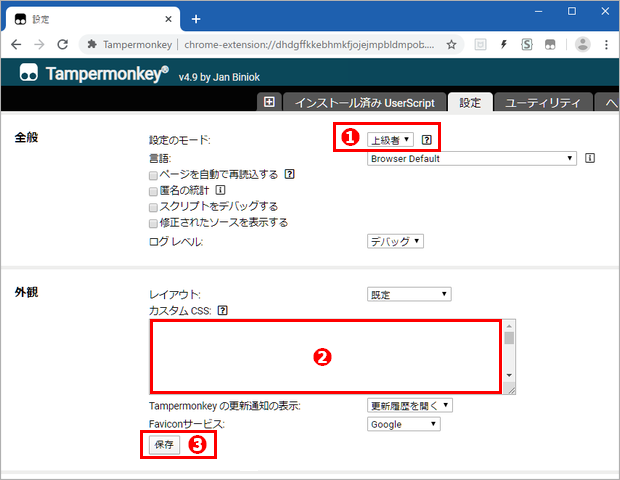
❷「Tampermonkey」にスクリプトを登録します
「Tampermonkey」の「+」マークの「新規スクリプト」タブを開きます。

●「新規スクリプト」には、最初からテンプレートが記入されています。 これは全て削除して、完全に空白の編集枠に 下のコードをコピー&ペーストします。
〔コピー方法〕 軽量シンプルなツール「PreBox Button 」を使うと
コード枠内を「Ctrl+左Click」➔「Copy code 」を「左Click」
の操作で、掲載コードのコピーが可能になります。
● 最後に「ファイル」メニューの「保存」を押すと、ツールが使用可能になります。
〔 PreBox Tools ⭐ 〕ver. 1.1
// ==UserScript==
// @name PreBox Tools ⭐
// @namespace http://tampermonkey.net/
// @version 1.1
// @description 「pre枠」関連の総合編集ツール 「Ctrl+F7」
// @author Ameba Blog User
// @match https://blog.ameba.jp/ucs/entry/srventry*
// @exclude https://blog.ameba.jp/ucs/entry/srventrylist.do*
// @grant none
// ==/UserScript==
let retry=0;
let interval=setInterval(wait_target, 100);
function wait_target(){
retry++;
if(retry>10){ // リトライ制限 10回 1sec
clearInterval(interval); }
let target=document.getElementById('cke_1_contents'); // 監視 target
if(target){
clearInterval(interval);
main(); }}
function main(){
let mode=0;
let box_mode=0; // boxの状態
let box_i; // boxの選択
let editor_iframe;
let iframe_doc;
let iframe_body;
let wysiwyg; // 通常表示の iframe内 html
let target=document.getElementById('cke_1_contents'); // 監視 target
let monitor=new MutationObserver(catch_key);
monitor.observe(target, {childList: true}); // ショートカット待受け開始
catch_key();
function catch_key(){
editor_iframe=document.querySelector('.cke_wysiwyg_frame');
if(editor_iframe){ // WYSIWYG表示が実行条件
iframe_doc=editor_iframe.contentWindow.document;
when_back();
right_select();
document.addEventListener('keydown', check_key); // iframe外
iframe_doc.addEventListener('keydown', check_key); // iframe内
function check_key(event){
if(event.ctrlKey && event.keyCode==118){ // ショートカット「Crtl+F7」
event.preventDefault();
event.stopImmediatePropagation();
if(mode==0){
mode=1;
sign();
tospace();
box_open(); }
else if(mode==1){
mode=0;
sign_clear();
tospace_clear();
box_close(); }}}}
before_end(); } // catch_key()
function when_back(){ // HTML表示から戻った時に処理状態を再現表示
editor_iframe=document.querySelector('.cke_wysiwyg_frame');
if(editor_iframe){
iframe_doc=editor_iframe.contentWindow.document;
if(iframe_doc){
if(mode==1){
sign();
tospace();
box_open(); }}}}
// ********** Menu Display Functions **************
function sign(){
monitor.disconnect(); // 起動時セットアップを MutationObserverに反応させない
editor_iframe=document.querySelector('.cke_wysiwyg_frame');
if(editor_iframe){
iframe_doc=editor_iframe.contentWindow.document;
let style_sbf=iframe_doc.createElement('style'); // box のデザインを指定
let css_inn=
'.open_box { outline: 2px solid #009688 !important; height: auto !important; } '+
'.clean_box { outline: 2px solid #03a9f4 !important; }';
style_sbf.setAttribute("id", "style_sbf");
style_sbf.innerHTML=css_inn;
let iframe_html=iframe_doc.getElementsByTagName('html')[0];
if(!iframe_html.querySelector('#style_sbf')){
iframe_html.appendChild(style_sbf); }}
let css_ext=
'#cke_1_contents { display: flex; flex-direction: column; } '+
'#disp_sf { display: none; margin: 0 0 5px; padding: 4px 0 2px; '+
'font: 16px/24px Meiryo; color: #fff; background: #009688; white-space: nowrap; }';
let disp=document.createElement("div");
disp.setAttribute("id", "disp_sf");
disp.innerHTML=" "+
"■ Code Copy: Ctrl+R-Click ■ Scroll Fix: Ctrl+L-Click ■ To Space (nbsp): R-Click";
let style=document.createElement('style'); // disp_sf のデザインを指定
style.setAttribute("id", "sf_style");
style.innerHTML=css_ext;
if(!target.querySelector('#sf_style')){
target.appendChild(style); }
editor_iframe=document.querySelector('.cke_wysiwyg_frame');
if(editor_iframe){
if(!target.querySelector('#disp_sf')){
target.insertBefore(disp, editor_iframe); }}
target.querySelector('#disp_sf').style.display='block';
monitor.observe(target, {childList: true}); } // sign()
function sign_clear(){
if(target.querySelector('#disp_sf')){
target.querySelector('#disp_sf').style.display='none'; }} // 起動表示を非表示
// ********** Pre Box Right Select Functions **************
function right_select(){
editor_iframe=document.querySelector('.cke_wysiwyg_frame');
if(editor_iframe){ // WYSIWYG表示が実行条件
iframe_doc=editor_iframe.contentWindow.document;
if(iframe_doc){
let iframe_body=iframe_doc.querySelector('body');
if(iframe_body){
let target_pre=iframe_body.querySelectorAll('pre');
for(let i=0; i<target_pre.length; i++){
target_pre[i].oncontextmenu=function(event){
if(event.ctrlKey){
event.preventDefault();
event.stopImmediatePropagation();
select_code(target_pre[i]); }}}
function select_code(box){
let selection=iframe_doc.getSelection();
let range=iframe_doc.createRange();
range.selectNodeContents(box);
selection.removeAllRanges();
selection.addRange(range); }
}}}} // right_select()
// ********** Pre Box Scroll Fixer Functions **************
function box_open(){
editor_iframe=document.querySelector('.cke_wysiwyg_frame');
if(editor_iframe){ // WYSIWYG表示が実行条件
iframe_doc=editor_iframe.contentWindow.document;
if(iframe_doc){
let target_body=iframe_doc.querySelector('body'); // 監視 target_body
let monitor_body=new MutationObserver(change);
monitor_body.observe(target_body, {childList: true, attributes: true});
function change(){
iframe_body=iframe_doc.querySelector('body');
let target_box=iframe_body.querySelectorAll('div');
for(let i=0; i<target_box.length; i++){
target_box[i].onclick=function(event){
if(event.ctrlKey){
event.preventDefault();
change_action(target_box[i], i); }}}
function change_action(box, index){
if(box_mode==0 && mode==1){
box_mode=1; // boxのScroll設定を外す
let style_set=window.getComputedStyle(box, null);
if(style_set.getPropertyValue('overflow')){
if(style_set.getPropertyValue('overflow')=='scroll' ||
style_set.getPropertyValue('overflow')=='auto' ||
style_set.getPropertyValue('overflow')=='overlay'){
box_i=index;
box.classList.add('open_box'); }}
else if(style_set.getPropertyValue('overflow-y')){
if(style_set.getPropertyValue('overflow-y')=='scroll' ||
style_set.getPropertyValue('overflow-y')=='auto' ||
style_set.getPropertyValue('overflow-y')=='overlay'){
box_i=index;
box.classList.add('open_box'); }}}
else{
if(index==box_i){
box_mode=0; // boxのScroll設定を元に戻す
box.classList.remove('open_box'); }}
}}}}} // box_open()
function box_close(){
editor_iframe=document.querySelector('.cke_wysiwyg_frame');
if(editor_iframe){
iframe_doc=editor_iframe.contentWindow.document;
if(iframe_doc){
box_mode=0;
let open_box=iframe_body.querySelectorAll('.open_box');
for(let i=0; i<open_box.length; i++){
open_box[i].classList.remove('open_box'); }}}} // 処理枠の outline を削除
// ********** To Space (nbsp) Functions **************
function tospace(){
let pre_box; // PRE枠のコンテナブロック
let buffer;
let nbsp;
let a_count;
iframe_doc=editor_iframe.contentWindow.document;
if(iframe_doc){ //「通常表示」が動作条件
iframe_body=iframe_doc.querySelector('body.cke_editable');
if(iframe_body){
pre_box=iframe_body.querySelectorAll('div');
buffer=Array(pre_box.length);
for(let i=0; i<pre_box.length; i++){
select_pre_box(i); }
function select_pre_box(i){
pre_box[i].oncontextmenu=function(event){
if(pre_box[i].firstChild.tagName=='PRE' && mode==1){
event.preventDefault();
event.stopImmediatePropagation();
pre_box[i].classList.add('clean_box');
setTimeout(()=>{
let box_ii=i;
start_select(box_ii);
}, 20); }}}
function start_select(k){
let regex=new RegExp('\u00A0', 'g');
let nbsp=pre_box[k].innerText.match(regex);
let pa_count=pre_box[k].getElementsByTagName("a");
if(buffer[k] !=null){
let ok=confirm(" ❎ 変換前に戻しますか?");
if(ok){
pre_box[k].firstChild.innerHTML=buffer[k];
buffer[k]=null;
pre_box[k].classList.remove('clean_box'); }}
else{
if(nbsp !=null || pa_count.length !=0){
let ok;
if(nbsp==null && pa_count.length !=0){
ok=confirm(" ⏬ 「 」 0 個\n"+
" 「a要素」 " + pa_count.length + " 個をテキストに置換えます"); }
else if(nbsp !=null && pa_count.length==0){
ok=confirm(" ⏬ 「 」 " + nbsp.length + " 個を半角空白に変換します\n"+
" 「a要素」 0 個"); }
else{
ok=confirm(" ⏬ 「 」 " + nbsp.length + " 個を半角空白に変換します\n"+
" 「a要素」 " + pa_count.length + " 個をテキストに置換えます"); }
if(ok){ to_space(k); }
else{ pre_box[k].classList.remove('clean_box'); }}
else{ ; }}}
function to_space(k){
a_count=0;
buffer[k]=pre_box[k].firstChild.innerHTML; // 選択pre枠のデータバックアップ
let child_node=pre_box[k].firstChild.childNodes;
for(let t=0; t<child_node.length; t++){
if(child_node[t].nodeType==3){
child_node[t].nodeValue=child_node[t].nodeValue.replace(/\u00A0/g , '\u0020'); }
else if(child_node[t].nodeType==1 && child_node[t].tagName=="A"){
let inner_node=child_node[t].childNodes;
if(inner_node.length==1 && inner_node[0].nodeType==3){
pre_box[k].firstChild.replaceChild(inner_node[0], child_node[t]); } // text を a要素と入替え
else{
a_count +=1; }} // 子ノードが1個の textの条件に当てはまらない a要素
else{
let child_node2=child_node[t].childNodes;
if(child_node2){
for(let t2=0; t2<child_node2.length; t2++){
if(child_node2[t2].nodeType==3){
child_node2[t2].nodeValue=child_node2[t2].nodeValue.replace(/\u00A0/g , '\u0020'); }
else{
let child_node3=child_node2[t2].childNodes;
if(child_node3){
for(let t3=0; t3<child_node3.length; t3++){
if(child_node3[t3].nodeType==3){
child_node3[t3].nodeValue=child_node3[t3].nodeValue.replace(/\u00A0/g , '\u0020'); }}}}}}}}
let regex=new RegExp('\u00A0', 'g');
nbsp=pre_box[k].innerText.match(regex);
if(nbsp !=null){
alert("❌ 変換できなかった「 」の数 : " + nbsp.length );}
if(a_count !=0){
alert("❌ 置換えが出来ない「a要素」 : " + a_count); }}}}}
function tospace_clear(){
editor_iframe=document.querySelector('.cke_wysiwyg_frame');
if(editor_iframe){
iframe_doc=editor_iframe.contentWindow.document;
if(iframe_doc){
let clear_box=iframe_doc.querySelectorAll('.clean_box');
for(let i=0; i<clear_box.length; i++){
clear_box[i].classList.remove('clean_box'); }}}} // 処理枠の outline を削除
// ********** Before End Functions **************
function before_end(){
editor_iframe=document.querySelector('.cke_wysiwyg_frame');
let submitButton=document.querySelectorAll('.js-submitButton');
submitButton[0].addEventListener("click", all_clear, false);
submitButton[1].addEventListener("click", all_clear, false);
function all_clear(){
if(!editor_iframe){ //「HTML表示」編集画面の場合
alert("⛔ Scroollbox Fixer が処理を終了していません\n\n"+
" 通常表示画面に戻り 編集を終了してください");
event.stopImmediatePropagation();
event.preventDefault(); }
if(editor_iframe){ //「通常表示」編集画面の場合
if(mode!=0){
mode=0;
box_mode=0;
tospace_clear();
box_close(); }}
}} // before_end()
} // main()
〔追記〕2020.12.31
71行目「function when_back()」を修正し起動不良対策。 ver. 1.1 に改めました。
このツールは「 Ctrl+F7」をショートカットに使っていますが、「キャレットが編集枠内にある」場合に「漢字変換がON」になっていると、このショートカットが無効になる事が判りました。 これはブラウザの「カーソルブラウジング」が「F7」キーに設定されている事に原因します。
現在は根本的な回避方法がありませんが、以下の方法で回避できます。
◎「 Ctrl+Shift+F7」を押す。
◎ 漢字変換をOFFにする
◎ 編集枠外をクリックしてフォーカスを外す(キャレットを消す)
以上で、ショートカットを有効にでき、実用上でそう困らないでしょう。
「PreBox Tools ⭐」最新版について
旧いバージョンの JavaScriptツールは、アメーバのページ構成の変更で動作しない場合があり、導入する場合は最新バージョンをお勧めします。
●「PreBox Tools ⭐」の最新バージョンへのリンクは、以下のページのリンクリストから探せます。