
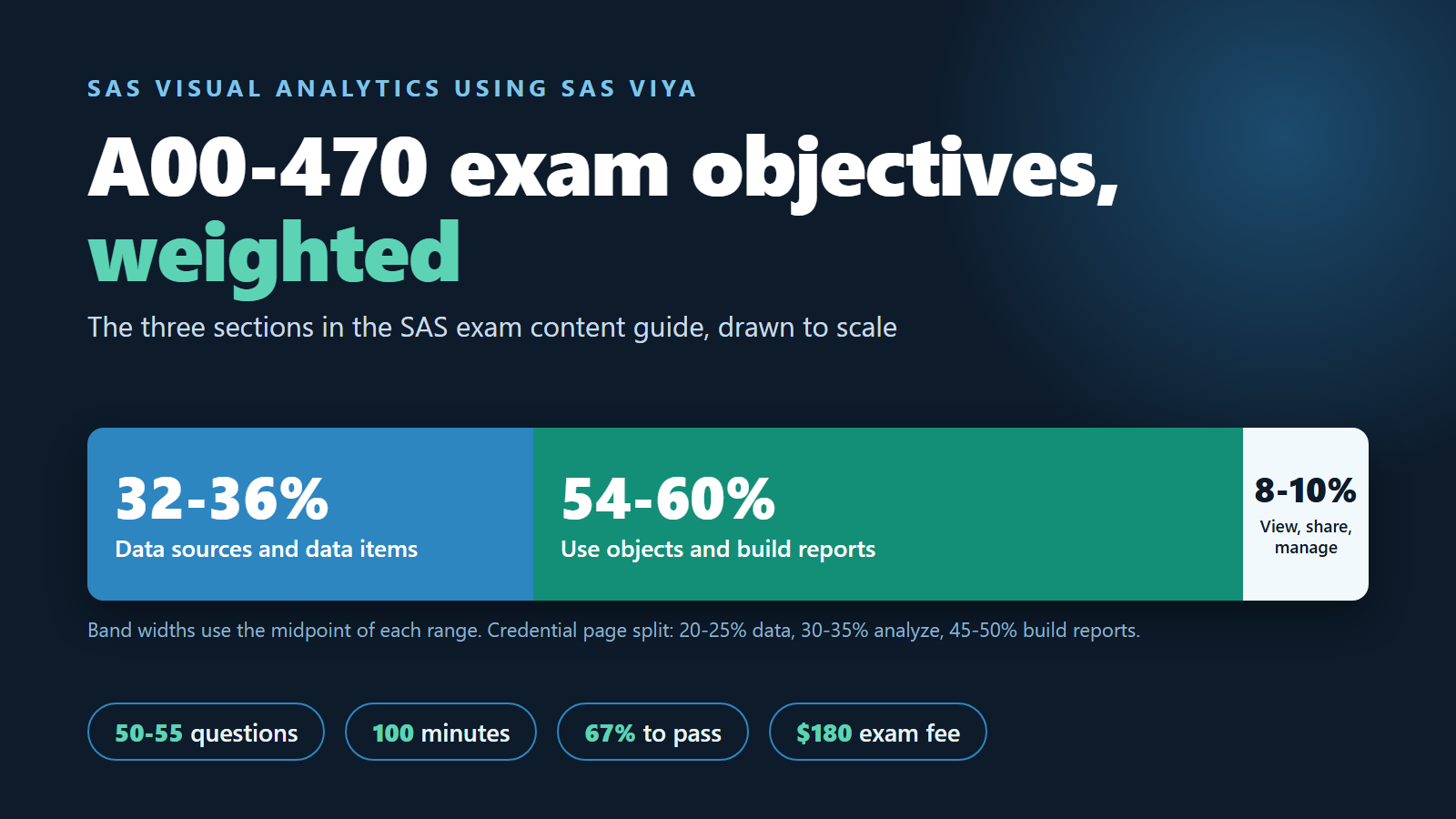
The A00-470 exam objectives cover three areas of SAS Visual Analytics: preparing data sources and data items, using objects to build reports, and viewing, sharing and managing those reports. Report building is the largest part by far. SAS gives it more than half of the exam in its content guide, and nearly half on the credential page.
That last sentence hides the one thing most candidates miss. SAS publishes two different weightings for the same exam, with different section names. This entry puts them side by side, explains how they fit together, and turns every objective group into something you can actually do in SAS Visual Analytics. It ends with a five-week plan, the mistakes that cost the most marks, and five short answers. Every exam figure below was read on SAS's own pages on 30 October 2026.
What is the A00-470 exam, in one paragraph?
A00-470 is the exam ID for the SAS Certified Specialist: Visual Business Analytics Using SAS Viya credential. It has 50 to 55 multiple-choice and short-answer questions, you get 100 minutes, and the passing score is 67%. SAS and Pearson VUE run it, and the fee is $180, charged in US dollars in every country.
All of this is on the SAS Visual Business Analytics credential page, together with two details worth knowing before you plan. First, the certification expires after five years. Second, SAS says experience with SAS Visual Analytics on either SAS Viya or SAS 9.4 is acceptable preparation, so you do not need a Viya-only background to start.
Why does SAS show two different weightings?
The credential page and the exam content guide split the exam in different ways, so their percentages do not line up. Neither one is wrong. They simply draw the section lines in different places.
Here is what each one says:
- Credential page: Data sources and data items 20-25%, Analyze data 30-35%, Build reports 45-50%.
- Exam content guide: Data Sources and Data Items 32-36%, Use Objects and Build Reports 54-60%, View, Share and Manage Reports 8-10%.
The easiest way to read them together is this. The content guide folds "analyze data" into its big objects-and-reports section, because in SAS Visual Analytics you analyze data by putting it into objects: a box plot, a heat map, a forecast. It also moves some data work, such as parameters, calculated items and filters, into the data section, which is why that section is bigger there. And it gives viewing, sharing and managing reports a small section of its own.
For study planning, we use the A00-470 exam content guide as the master list. It is the more detailed document, it names every object type, and it ends with a clear warning: the expanded objectives "define the entire domain that could be tested". If a topic is in that PDF, assume it can appear.
What does the data sources and data items section ask you to do?
This section tests whether you can get data into SAS Visual Analytics and shape it before any chart is drawn. Plan on roughly a third of your marks coming from here.
The objectives fall into three groups:
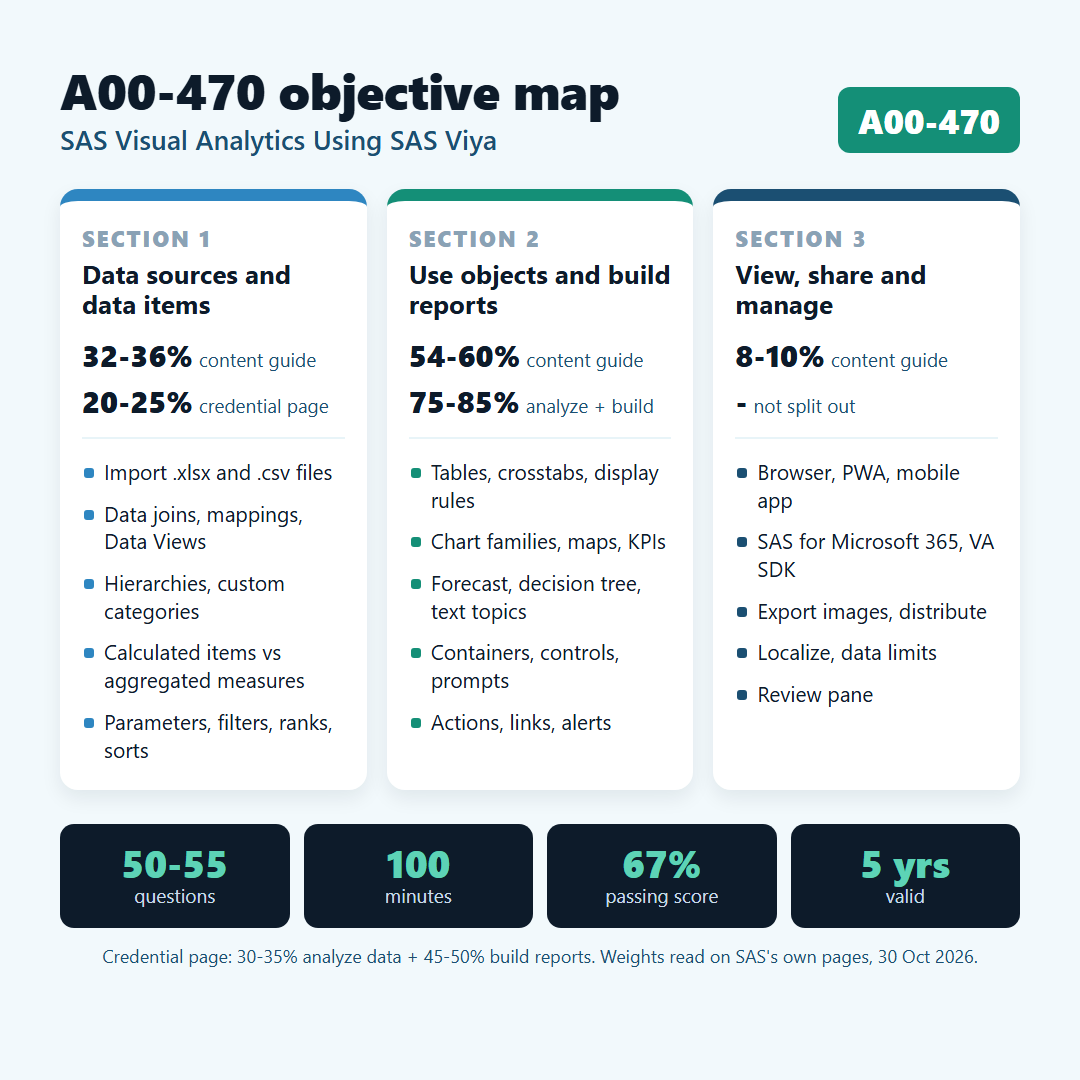
- Getting data in: import a local .xlsx or .csv file, work with more than one data source in a report, change a data source, create data mappings, create Data Views, build Visual Analytics data joins, and use an aggregated data source.
- Working with data items: read data item properties and measure details, look at related measures, outliers and insights, create hierarchies and custom categories, create quick calculations, calculated items and aggregated measures, and use numeric, character and date parameters.
- Subsetting data: create custom sorts, put filters on a data source and on objects, add a rank to an object, and create common filters.
One line in this section deserves extra time: "examine the difference between a calculated data item and aggregated measure". A calculated item is worked out row by row before the data is summarized. An aggregated measure is worked out after the data is grouped. A profit margin built as a calculated item and then summed gives a different answer from a margin built as an aggregated measure from summed profit and summed revenue. Build both versions on the same data and compare the totals. Once you have seen the numbers differ, you will not forget which is which.
What does the objects and reports section cover?
This is the core of A00-470: 54 to 60% in the content guide. It asks you to pick the right object for a question, set it up with the right data roles, and arrange objects into a report that people can use.
It is a long list, so it helps to sort it into families:
- Automatic features: the options in an automatic chart, the Suggest pane, page templates, and reading Automated Explanation and Automated Prediction.
- Data roles and styles: Required, Lattice, Hidden, Data Tips and Animation roles, plus object styles and options.
- Tables: list tables, crosstabs, table display rules, sparklines, and hierarchies built from a crosstab.
- Charts by purpose: box plots and histograms for distribution; bubble plots, correlation matrices, heat maps, parallel coordinates and scatter plots with fit lines for relationships; line charts and time series plots for time; bar, targeted bar, dot, needle and butterfly charts; dual axis charts; pie, donut, tree map and word cloud for part-to-whole; key value, gauge and text for KPIs; step, vector, bubble change, waterfall and schedule charts for change over time.
- Maps: geographic data items, plus geo maps, point maps, polyline maps and polygon maps.
- Analytic objects: forecasting, network analysis, path analysis, decision trees and text topics.
- Custom graphs: the Custom Graph Builder with cells, data-driven lattice and user-defined lattice layouts, and importing custom graphs.
- Report design: containers (prompt, standard, stacking, scrolling, precision), text with dynamic text, images, web content, job content, data-driven content, controls, pages and layouts.
- Interactivity: actions within a page, links to other reports, external links, filters and ranks on objects, page prompts and report prompts, display rules at report, table, graph and gauge level, alerts and parameters.
Notice the wording "given a scenario, apply the proper controls". That tells you the style of many questions. You will not only be asked what a control is. You will be given a reporting need and asked which control, container or action meets it.
What is in the view, share and manage section?
This is the smallest section, at 8 to 10%, but it is also the quickest to learn, so do not skip it. It is mostly about what happens after a report is built.
It covers viewing a report in a web browser, as a Progressive Web Application, in the mobile app, in SAS for Microsoft 365, and in a custom web application built with the SAS VA SDK. It also covers exporting and saving object images, distributing reports and generating alerts, sharing, saving and localizing reports, changing threshold and data limit options, and using the Review pane. Two or three evenings of hands-on work usually cover it.
How should you pace 50 to 55 questions in 100 minutes?
You have about 1.8 to 2 minutes per question. That is our own arithmetic from SAS's figures: 100 minutes divided by 55 questions, or by 50.
The same arithmetic gives a planning target for the pass mark. If every question counted the same, 67% would mean about 34 correct answers out of 50, or 37 out of 55. SAS does not say that every question carries the same weight, so treat those numbers as a guide, not a promise.
A simple rhythm works well. Go through every question once at a steady pace and flag anything that needs a second look. Short-answer items and long scenario questions are the usual time sinks, so do not let one of them eat five minutes on the first pass.
The short above, from the AnalyticsExam channel, sums up the format in under a minute. Its title uses the credential page split, where building reports is nearly half of the exam.
What does a scenario look like in practice?
Here is a worked example in our own words. It is not an exam question. It shows the kind of thinking the objectives ask for.
A regional sales manager wants one report page where she picks a region and every chart on the page updates. She also wants a small table that only appears when she clicks a bar in a bar chart, showing the orders behind that bar.
The answer uses two separate features. For the region choice, a control placed at page level (a page prompt) filters every object on the page. For the table that responds to a click, you add an action from the bar chart to the table, so the bar chart filters the table. A common mistake is to reach for a report prompt, which filters every page of the report, when the request was for one page only. Another is to rebuild the filter by hand on each object, which works but is slow and easy to get wrong.
Practice with requests like this one. Write a one-sentence business need, then build it two ways and decide which one fits the request exactly.
How can you prepare over five weeks?
Five weeks of steady work is enough for most people who already use a BI tool. Here is a plan built around the content guide weights.
- Week 1: data sources and data items. Import an .xlsx and a .csv file, join two tables, build a Data View, and make every type of calculated item, aggregated measure and parameter once. Finish by writing down the difference between a calculated item and an aggregated measure in your own words.
- Week 2: tables, distribution and relationship charts. Build list tables and crosstabs with display rules and sparklines, then box plots, histograms, heat maps and scatter plots with fit lines. For each one, write the question it answers.
- Week 3: the rest of the objects. Work through the bar, dual axis, part-to-whole, KPI and time variant families, the four map types, and the five analytic objects. Read the Automated Explanation and Automated Prediction output carefully, because the objective says "interpret", not just "create".
- Week 4: report design and interactivity. Use all five container types, add controls, page prompts and report prompts, and link objects with actions, links to other reports and external links. Build one complete three-page report from scratch.
- Week 5: view, share, manage and review. View your report in each way the guide lists, export images, set an alert, localize a report and run the Review pane. Then take the free SAS practice exam under timed conditions and go back to every section where you lost points.
SAS collects its own preparation material on the A00-470 certification pathway on learn.sas.com. It lists two courses, SAS Visual Analytics 1 for SAS Viya: Basics and SAS Visual Analytics 2 for SAS Viya: Advanced, along with free sample questions, a webinar and a tips article.
Which mistakes cost the most marks?
Most lost marks come from studying the wrong weighting or from knowing objects by name but never building them.
- Planning from the credential page alone. Its 20-25% for data looks small. The content guide puts the data section at 32-36%, and parameters, calculated items and filters live there.
- Skipping the "interpret" objectives. Automated Explanation, Automated Prediction and the analytic objects are tested on what their output means, not only on how to add them.
- Mixing up prompts and filters. Page prompts, report prompts, common filters and object filters each work at a different level. Know which one reaches which objects.
- Ignoring the small section. At 8 to 10%, view, share and manage could be four to five questions. They are some of the easiest marks on the exam.
- Learning only from screenshots. The scenario questions reward people who have clicked through the menus. Build everything at least once.
For a related report-building exam on another platform, our QSBA hands-on task breakdown maps the Qlik Sense Business Analyst topics to tasks in the same way.
How do you know you are ready to book?
You are ready when you can build any object in the content guide without looking it up, and your timed practice scores sit comfortably above 67%.
SAS offers a free practice exam for this credential on its SAS practice exams page. You get 180 days of access from activation and can retake it as many times as you want, with a SAS profile.
Use it twice: once at the end of week 3 to find gaps, and once in week 5 as a timed run. Between the two runs, keep a short list of every objective where you hesitated, and rebuild each one in SAS Visual Analytics before the second attempt.
If you want more timed runs after that, a timed A00-470 practice exam from AnalyticsExam draws its questions at random from a larger bank, which helps you check that your score holds up on questions you have not seen before.
Frequently asked questions
1. How many questions are on the A00-470 exam?
The A00-470 exam has 50 to 55 multiple-choice and short-answer questions. You get 100 minutes, and the passing score is 67%.
2. Which A00-470 section carries the most weight?
Building reports. The content guide gives Use Objects and Build Reports 54 to 60% of the exam, and the credential page gives Build reports 45 to 50%, with another 30 to 35% for analyzing data.
3. Why do the credential page and the content guide show different percentages?
They divide the exam into differently named sections. The content guide folds data analysis into the objects and reports section, puts more data work in the data section, and gives viewing, sharing and managing reports its own 8 to 10%.
4. Can I prepare on SAS 9.4 instead of SAS Viya?
Yes. SAS says experience with SAS Visual Analytics on either SAS Viya or SAS 9.4 is acceptable for exam preparation.
5. How much does the A00-470 exam cost, and how long is it valid?
The exam fee is $180, charged in US dollars in every country. The certification expires after five years.