
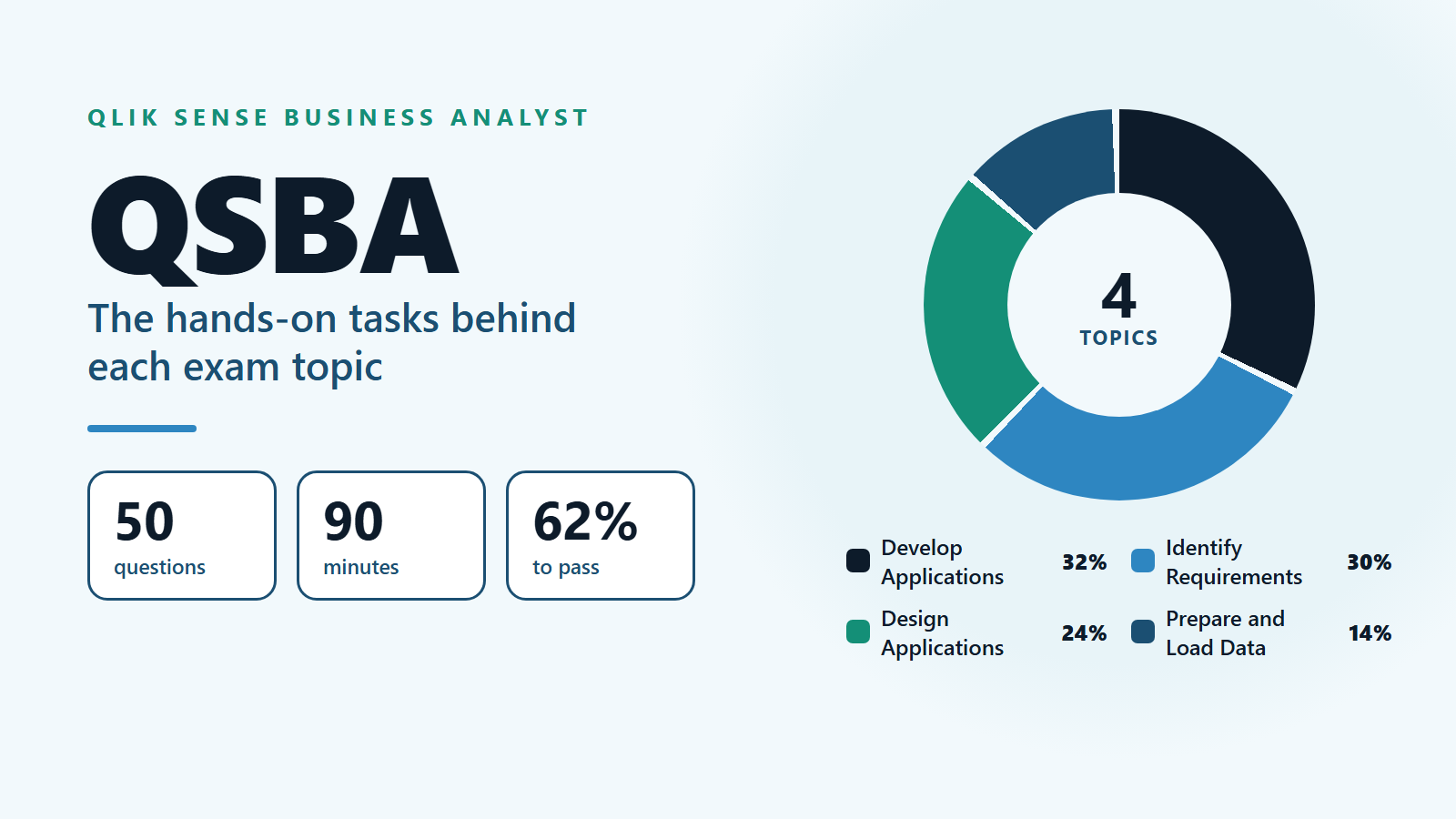
To earn the QSBA certification (Qlik Sense Business Analyst), you need a score of 62% or more on a 50-question exam that runs for 90 minutes. Qlik splits the exam into four topics. Develop Applications is the largest at 32%, then Identify Requirements at 30%, Design Applications at 24% and Prepare and Load Data at 14%.
Those four labels sound like reading topics, but each one is a set of things you do in a Qlik Sense app. This entry goes through the topics one at a time and names the hands-on tasks behind each. Then it turns the weights into a practice schedule, so the hours you spend in Qlik Sense roughly match the marks on offer. Every exam figure here was read on Qlik's own pages on 21 October 2026.
What is the QSBA certification exam, in short?
QSBA is Qlik's exam for people who build Qlik Sense apps for business users. On its QSBA exam details page, Qlik says the exam measures your ability to identify requirements, design applications, prepare and load data, and develop applications.
The key facts from that page:
- Questions: 50.
- Time: 90 minutes.
- Passing score: 62%.
- Platform: neutral. The content applies to client-managed Qlik Sense and to Qlik Cloud.
- Changes: Qlik updates the content from time to time. The number and difficulty of questions may change, and the passing score is adjusted to keep the standard the same.
- Price: not listed on the exam page. Check it on Qlik's purchase link before you plan your budget.
Qlik recommends practical experience developing production-quality apps in Qlik Sense, experience creating dimensions, measures and objects for the master library, and an understanding of user experience and design best practice.
How many QSBA questions come from each topic?
Qlik publishes percentages, not question counts. Applied to 50 questions, they work out to roughly this (our arithmetic, not an official split):
- Develop Applications, 32%: about 16 questions
- Identify Requirements, 30%: about 15 questions
- Design Applications, 24%: about 12 questions
- Prepare and Load Data, 14%: about 7 questions
Two things stand out. First, Identify Requirements and Design Applications together make up 54% of the exam, and neither is about clicking through menus. They test judgment: which chart, which KPI, which layout suits a given user. Second, data loading is the smallest topic, so a business analyst does not need to be a script expert to pass.
On timing, 90 minutes for 50 questions gives you about 1.8 minutes per question. Scenario questions take longer to read, so aim to finish a first pass with 15 minutes to spare for the ones you flagged.
What hands-on tasks sit behind Identify Requirements?
Identify Requirements (30%) asks you to listen to a business need and pick the Qlik Sense answer. Qlik lists five skills for it: deciding which product capabilities deliver a solution, recommending KPIs, dimensions and measures, discussing how business users will consume the information, interpreting results from Qlik associations, and deciding the best process for loading data and building the app.
In practice, that means these tasks:
- Take a request such as "sales leaders want to see which regions miss target" and write down the KPI, the dimension and the measure it implies before you open any chart.
- Decide whether a need is best met by a sheet, a story, a filter pane or a simple KPI object.
- Make a few selections in an app and explain what the remaining values mean, including values that are now excluded.
- Say whether a request should be handled in the data model or in a chart expression.
A good way to practise is to take any public dashboard you use at work, rebuild its requirements as a short list of KPIs and dimensions, then check whether each chart on it actually answers one of them.
What does Design Applications ask you to do in Qlik Sense?
Design Applications (24%) is about the layout and look of an app, and how it grows over time. Qlik names three skills: deciding the visualization layout and its characteristics, evolving and enhancing the design, and once again meeting the needs of the people who will use it.
The tasks behind it:
- Place the most important KPI where the eye lands first, and move detail tables lower or onto a second sheet.
- Choose a chart that matches the question. A trend over time suits a line chart. A ranking suits a sorted bar chart. A share of a whole with only a few parts can suit a pie or donut chart.
- Improve an existing app without breaking it for current users. Typical changes are adding a drill-down, splitting a crowded sheet in two, or replacing a table with a chart.
Questions in this topic often describe a user and a goal, then offer four designs. The right answer is usually the simplest design that answers the stated question, not the one with the most features.
How much data modeling is in Prepare and Load Data?
Only 14%, and it stays at a practical level. Qlik lists three scenario skills: use Data Manager to create a basic data model, enhance and augment that model from a set of requirements, and verify the model in the data model viewer.
The verification step is where a business analyst most often needs to read the model rather than build it. Qlik's guide to the data model viewer in Qlik Sense explains that each table appears as a box with its fields listed, and associations appear as lines. A dotted line marks a circular reference. The same guide notes that Qlik Sense creates synthetic keys when two or more tables have two or more fields in common, which may point to an error in the model.
Practice tasks for this topic:
- Load two or three small tables, for example orders, customers and products, through Data Manager and let it propose the associations.
- Open the data model viewer and confirm that each table links on the field you expect.
- Deliberately add a second shared field to two tables, look at the synthetic key it creates, then fix it by renaming one field.
What does Develop Applications cover?
Develop Applications (32%) is the biggest topic, and Qlik describes it in two lines: build an application, then refine and finalize it. That covers most of the daily work of a Qlik Sense developer.
Master items are central to it, and they also link back to the recommended experience Qlik lists. Qlik's help on creating a master dimension from the data model viewer sets out the rules that scenario questions like to test:
- You create master items in an unpublished app. Users of a published app can use them but cannot change them.
- Master items can only be viewed, created, edited and deleted while you edit a private sheet, not from a public or community sheet.
- To change master items in a published app, you change the source app and publish it again.
Tasks to practise here: create a master dimension and a master measure, build three charts from them, change the measure once and watch every chart update, then publish the app and confirm what a user can and cannot change.
How should you split your practice time for QSBA?
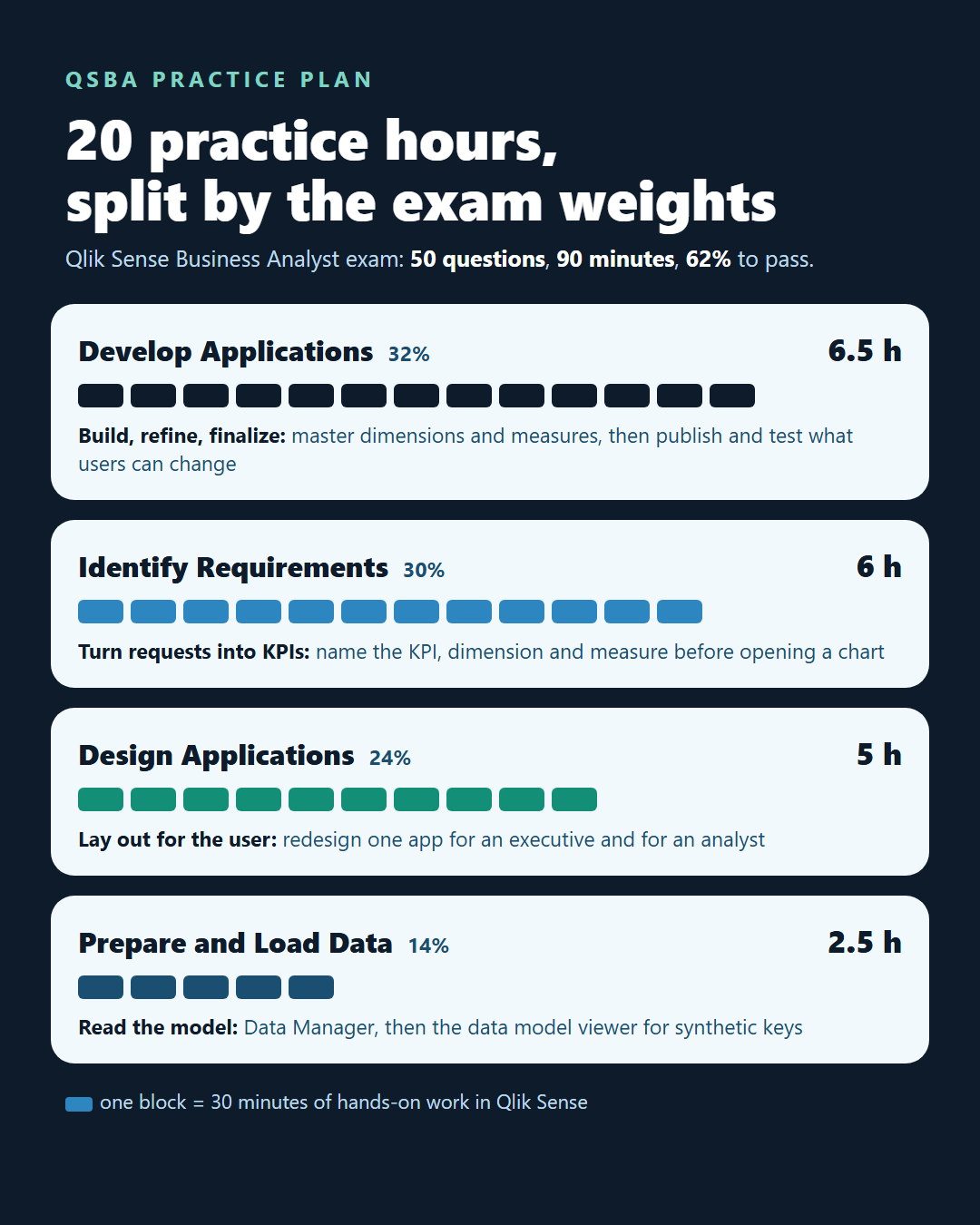
Follow the weights. If you can set aside about 20 hours of hands-on practice, a split close to the exam's own percentages looks like this:
- Develop Applications: about 6.5 hours
- Identify Requirements: about 6 hours
- Design Applications: about 5 hours
- Prepare and Load Data: about 2.5 hours
Over four weeks, that becomes a simple plan:
- Week 1, build: create one small app from start to finish with Data Manager, master items and three sheets. Do not polish it yet.
- Week 2, requirements: write ten short business requests and, for each, list the KPI, dimension and measure before you build a chart for it.
- Week 3, design: redesign the week 1 app for two different users, an executive and an analyst, and compare the two layouts.
- Week 4, review: check your data model in the viewer, reread the four topic lists on the exam page, and time yourself on practice questions at 1.8 minutes each.
If you already build Qlik Sense apps at work, shrink week 1 and give the time to weeks 2 and 3. Those are the judgment topics, and together they carry more than half of the marks.
What mistakes cost candidates marks on QSBA?
Most lost marks on QSBA trace back to a handful of habits. Watch for these:
- Studying menus instead of decisions. Knowing where a button is helps less than knowing when a chart type is the wrong choice.
- Over-preparing load script. Prepare and Load Data is 14%, and its three skills name Data Manager and the data model viewer, not hand-written script.
- Ignoring the published-app rules. Questions about who can edit master items in a published app are easy marks that people miss.
- Running out of time on long scenarios. Read the last line of a scenario first, so you know what is being asked before you read the details.
- Picking the richest design. When two answers both work, the clearer one for the stated user is usually right.
Can you answer this practice question?
Here is a question written in the exam's style. It is our own example, not a real exam item.
A sales manager uses a published Qlik Sense app. She says the "Gross Margin" measure in five charts uses an old formula and asks you to fix it everywhere at once. The measure is a master item. What should you do?
- A. Edit the measure in each of the five charts on the public sheet.
- B. Edit the master measure in the source app, then publish the app again.
- C. Create a new master measure in the published app and swap it into the charts.
- D. Ask the manager to duplicate the sheet and edit the copy.
The answer is B. Master items in a published app cannot be changed there, so the fix goes into the source app and reaches users when you publish it again. Because all five charts use the same master measure, one change updates them all. A edits charts one by one on a public sheet, which is not allowed. C fails because you cannot create master items in a published app. D creates a private copy and leaves the shared app wrong.
Is there a short video on the QSBA exam?
Yes. This short from the AnalyticsExam channel sums up the exam's weighting in half a minute: more than half of the questions come before you build anything.
What happens after you pass the QSBA exam?
You receive the Qlik Sense Business Analyst certification badge through Credly. The QSBA badge page on Credly lists the criteria behind it, including choosing visualizations that meet business requirements, creating an associative data model and troubleshooting basic issues, configuring dashboards to show business insights, and passing the exam.
Booking comes before all of that, and it has a few rules of its own.
For booking, the Qlik certification program page explains that you need a Qlik Learning account and must accept Qlik's Certification Terms and Conditions. The exams are proctored and multiple choice, and you can take them from home or the office. During the exam your machine is locked down and a proctor watches through your webcam.
Frequently asked questions
1. How long is the QSBA certification exam?
The QSBA certification exam lasts 90 minutes and has 50 questions, which is about 1.8 minutes per question. You need a score of 62% to pass.
2. Is the QSBA exam only about Qlik Cloud?
No. Qlik describes the exam as platform-neutral, so the content applies to both client-managed Qlik Sense and Qlik Cloud.
3. Which QSBA topic carries the most weight?
Develop Applications carries the most at 32%, followed by Identify Requirements at 30%, Design Applications at 24% and Prepare and Load Data at 14%.
4. Can I take the QSBA exam from home?
Yes. Qlik certification exams are proctored online, so you can take them from home or the office. Your machine is locked down during the exam and a proctor watches through your webcam.
5. What experience does Qlik recommend before the QSBA exam?
Qlik recommends practical experience building production-quality Qlik Sense apps, creating dimensions, measures and objects for the master library, and an understanding of user experience and design best practice.
Spend your hours where the marks are, and keep the 62% target in view as you build.