
You are ready for the QSSA exam (Qlik Sense System Administrator) when you can do seven kinds of admin work without notes, starting with at least six months of running a Windows Server environment. That is Qlik's own list of recommended experience. The exam itself has 50 questions in 90 minutes, and you need 62% to pass.
Most people who ask "am I ready?" look at the topic list. The better guide is that experience list, because it tells you what Qlik assumes you have already done with your own hands. This entry goes through the seven skills one by one, shows how they feed the four exam topics, and gives you a short self-check and a four-week plan for two common starting points. Every exam figure here was read on Qlik's own pages on 26 October 2026.

What is the QSSA exam, and what does it cover?
The QSSA exam tests whether you can run Qlik Sense Enterprise on Windows as its system administrator. On the Qlik Sense System Administrator exam details page, Qlik says it measures your ability to identify requirements for environments, install and set up Qlik Sense Enterprise, manage environments, and monitor and troubleshoot.
The key facts from that page:
- Questions: 50.
- Time: 90 minutes, which is 1.8 minutes per question on average.
- Passing score: 62%. If every question counts the same, that is 31 correct answers out of 50.
- Edition: the client-managed edition of Qlik Sense only. The page says plainly that the exam does not cover the skills needed to administer Qlik Cloud.
- Changes: Qlik updates the content from time to time. The number and difficulty of questions may change, and the passing score is adjusted to keep the standard the same.
- Price: not listed on the exam page. It shows when you follow Qlik's purchase link, so check it there before you plan your budget.
The four official topics and their weights are Installation (30%), Configuration (32%), Security and Licensing (16%), and Monitor, Troubleshoot, and Maintenance (22%). On 50 questions, those weights work out to about 15, 16, 8 and 11 questions. Qlik publishes the weights, not the counts, so treat those numbers as a guide.
What are the seven skills Qlik expects before the QSSA exam?
Qlik lists seven kinds of recommended experience. Read each one as a question: have I done this, on a real or lab server, more than once?
Skill 1: Six months as a Windows Server administrator
Qlik asks for at least six months of experience as the administrator of a Windows Server-based environment. Qlik Sense Enterprise on Windows lives on top of Windows services, accounts, file shares and certificates. If you have never created a service account or shared a folder with the right permissions, the installation questions will feel like guesswork.
Skill 2: Sites and the Qlik Management Console
You should have worked in Qlik Sense sites and in the Qlik Management Console (QMC) for data and application governance, library maintenance, and user and application security. The QMC is where almost every configuration task in the exam happens.
Skill 3: Policies and options for servers and apps
Qlik expects experience managing the policies and options that run the Qlik Sense servers and apps. In practice that means changing service settings, node settings and app settings in the QMC, and knowing what each change affects.
Skill 4: Rules and streams
You should have created rules and managed the streams that carry apps to users. Security rules, load balancing rules and stream access all sit in this skill. It is the one that app developers most often lack.
Skill 5: Networking, Active Directory and proxies
Qlik lists knowledge of networking and Active Directory configuration, proxies, intermediate web servers, load balancers, and more. You do not need to be a network engineer, but you should know how a request travels from a browser through the proxy to the engine.
Skill 6: Windows tools and logs
Qlik names Event Viewer, the Services Console, the DCOM Console and the Windows Registry as examples. When a Qlik service will not start, these are the places an administrator looks first.
Skill 7: Network troubleshooting tools
The last item is experience with NSLookup, Telnet, Ping, NetStat, Fiddler and other browser tools, used to troubleshoot connectivity, interoperability, configuration and performance. If you can test whether a port is open between two servers, you have the core of this skill.
How do the seven skills map to the four QSSA exam topics?
Each skill feeds one or two topics. This view shows where a gap in your experience will cost you the most questions.
- Installation (30%, about 15 questions): skills 1 and 5. The topic covers planning the infrastructure, installing Qlik Sense Enterprise on Windows with shared persistence, and choosing between single-node and multi-node set-ups.
- Configuration (32%, about 16 questions): skills 2, 3 and 4, plus Active Directory from skill 5. The topic covers streams and apps, automated tasks with different triggers, load balancing rules, AD connections with user and group sync, and node configuration.
- Security and Licensing (16%, about 8 questions): skills 2 and 4. The topic covers the Qlik Sense licensing model, user license access, and security rules.
- Monitor, Troubleshoot, and Maintenance (22%, about 11 questions): skills 6 and 7. The topic covers app issues, typical system issues and server maintenance.
Qlik's badge page on Credly describes the same ground from the other side. To earn the Qlik Sense System Administrator badge, you must show you can recommend the right authentication and authorization method, configure multi-node deployments with proxies and virtual proxies, configure tasks, manage streams, apps and privileges, and monitor and troubleshoot, as well as pass the exam. Credly lists the level as Advanced.
Which parts of a multi-node site should you be able to draw?
You should be able to sketch a multi-node site from memory: one central node, one or more rim nodes, a shared file share and the repository database. Qlik's guide to installing Qlik Sense in a multi-node site sets out the order: prepare the server, install the central node, configure the PostgreSQL connections, license, allocate user access, then install and connect the rim nodes.
A few details from that guide are worth knowing cold:
- Every site starts by creating a central node in a cluster. A single-node site is just the central node; a multi-node site adds rim nodes.
- The file share stores Qlik app data and must be reachable by the central node and every rim node.
- All Qlik Sense servers must be in the same geographic location or data center as the repository database and the file share.
- You can only make a node a failover candidate when you create it.
- Do not use postgres as the database user name.
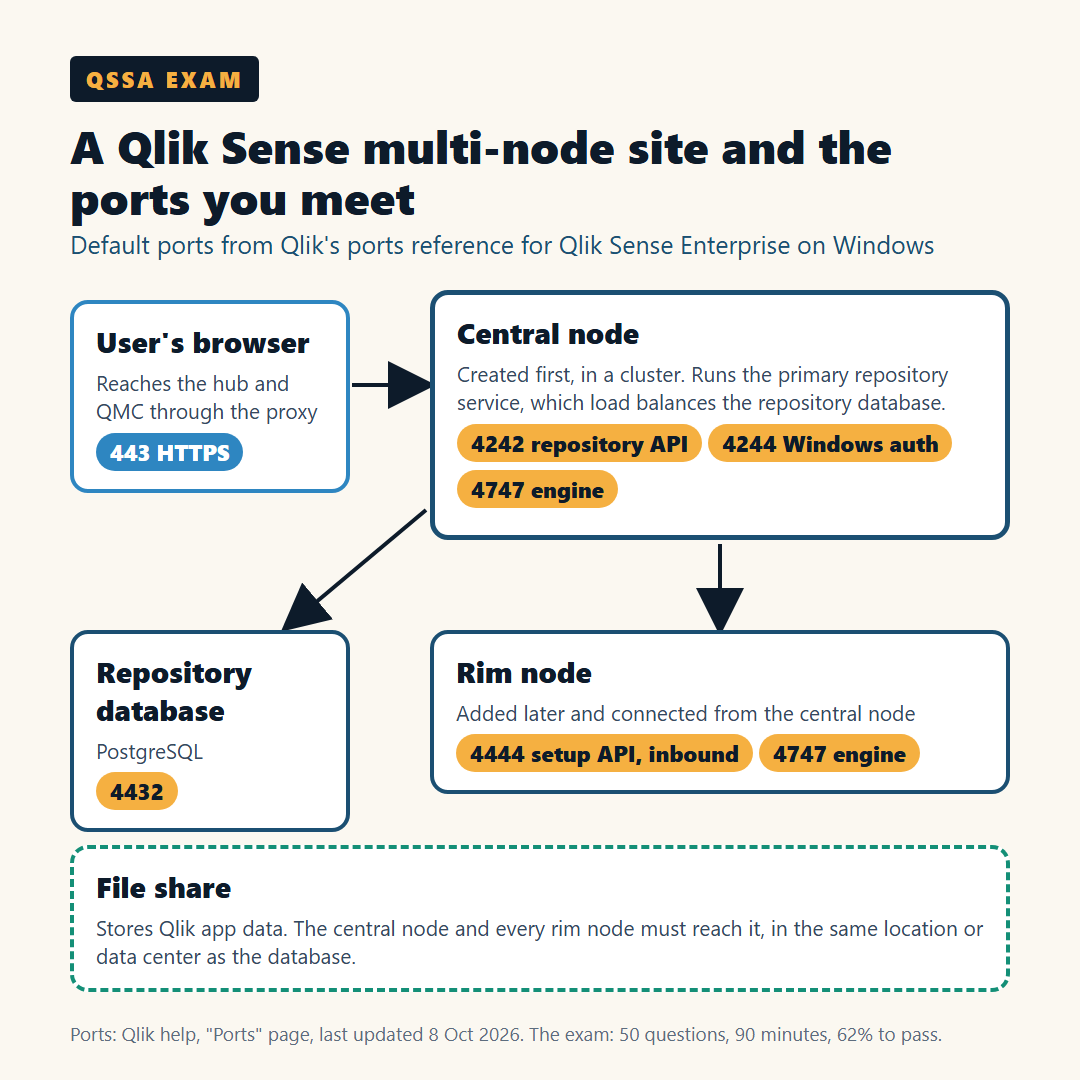
Ports come up in planning and in troubleshooting. You do not need the whole table, but Qlik's ports reference for Qlik Sense Enterprise has a handful that every administrator meets: 443 (HTTPS through the proxy), 4242 (repository REST API), 4244 (Windows authentication), 4432 (repository database), 4444 (setup API, inbound on rim nodes) and 4747 (engine).
How can you check your own QSSA readiness in 30 minutes?
Give yourself 30 minutes on a lab server and try the eight tasks below without opening any documentation. Each one you finish counts as a point.
- Create a stream and publish an app to it, so only one AD group can see it.
- Add a user directory connector for Active Directory and run a sync.
- Build a reload task that runs after another task finishes.
- Write a security rule that limits an action to one group, then sign in as a second user to test it.
- Give a user license access, then take it away again.
- Explain which ports must be open between a central node and a new rim node.
- Find the log for a service that failed to start.
- Use Ping, NSLookup or Telnet to show whether one server can reach another.
Seven or eight points: you are close, so spend your time on timed practice. Four to six: follow the plan below for your starting point. Three or fewer: build a lab first, because reading alone will not close this gap.
What does a four-week QSSA plan look like for each starting point?
Most candidates come from one of two backgrounds, and each needs a different first two weeks. Qlik lists three ways to prepare: the instructor-led Deploy and Administer Qlik Sense course, the self-paced Qlik Sense System Administrator course, and the self-paced Deploy and Administer Qlik Sense course.
If you are a Windows or infrastructure administrator:
- Week 1: install a single-node site, then work through the QMC: streams, apps, tasks and the license.
- Week 2: security rules and AD sync. Write rules, break them and fix them until the rule syntax feels normal.
- Week 3: add a rim node, set up load balancing rules and a failover candidate.
- Week 4: monitoring apps, logs and maintenance, then timed review at 1.8 minutes a question.
If you are a Qlik Sense app developer:
- Week 1: Windows Server basics: service accounts, file shares, certificates, Event Viewer and the Services Console.
- Week 2: install a single-node site from scratch, then a second server as a rim node.
- Week 3: networking: ports, proxies, virtual proxies and the tools from skill 7.
- Week 4: QMC configuration and security rules, then timed review.
If you came to administration from app building, my earlier entry on the QSBA certification tasks per topic covers the developer side of Qlik Sense, which helps when exam questions mention streams, apps and master items from the user's point of view.
Which mistakes cost QSSA candidates marks?
The most common mistake is studying the wrong product. Qlik Cloud has its own administration console and concepts, and the QSSA exam covers only the client-managed edition.
Other mistakes that show up again and again:
- Learning ports as a list. Learn them as paths between services, so you can reason about a blocked connection.
- Skipping the Windows layer. About a fifth of the exam is monitoring and troubleshooting, and much of that starts in Windows tools.
- Treating security rules as theory. Rules are easier to understand once you have written one that locked you out.
- Running out of time. At 1.8 minutes a question, a long scenario can eat your buffer. Mark it and come back.
- Assuming the old version. Qlik changes the content over time, so check the exam details page in the week you book.
What does a QSSA-style question look like?
Here is a practice question written for this entry. It is not taken from the exam.
Question: An administrator installs Qlik Sense on a new server and tries to add it as a rim node from the QMC on the central node. The step fails, but both servers can ping each other. Which check should come first?
- A. Confirm that port 4444 is open inbound on the new server.
- B. Re-allocate the professional licenses.
- C. Republish the apps to their streams.
- D. Restart the engine service on the central node.
Answer: A. Ping proves the servers can reach each other, but not that the setup API port is open. Qlik's ports table lists 4444 as the setup API, inbound on rim nodes, and the central node uses it to connect a new rim node. Licenses and streams play no part in adding a node.
How do you register for the QSSA exam, and what happens on exam day?
You book through a Qlik Learning account. On its certification overview, Qlik says its proctored, multiple-choice exams can be taken from anywhere in the world, from home or the office. You must agree to Qlik's Certification Terms and Conditions. During the exam your machine is locked down from other functions, and a proctor watches through your webcam.
Plan a quiet room, a working webcam and a computer you are allowed to lock down. A work laptop with strict security software can block the proctoring tool, so test it before the day.
Frequently asked questions
1. How many questions are on the QSSA exam?
The QSSA exam has 50 questions and lasts 90 minutes. You need a score of 62% to pass, which is about 31 correct answers if every question counts the same.
2. Does the QSSA exam cover Qlik Cloud?
No. Qlik says the exam is based only on the client-managed edition of Qlik Sense and does not cover the skills needed to administer Qlik Cloud.
3. How much experience do I need before the QSSA exam?
Qlik recommends at least six months as an administrator of a Windows Server-based environment, plus hands-on work in the Qlik Management Console, rules and streams, networking and Active Directory, Windows tools and network troubleshooting tools.
4. Which QSSA exam topic carries the most weight?
Configuration carries the most at 32%, followed by Installation at 30%, Monitor, Troubleshoot, and Maintenance at 22%, and Security and Licensing at 16%.
5. How do I prepare for the QSSA exam?
Qlik lists the instructor-led Deploy and Administer Qlik Sense course and two self-paced courses. Pair one of them with a lab server where you install a site, add a rim node and write security rules yourself.