Building a robust customer management interface from scratch takes time. We’ve reviewed the top templates based on tech stack, component count, dashboard variants, TypeScript support, dark mode, and production-ready code. These CRM dashboard templates focus on real-world features like lead tracking, analytics, and API integration, so you get a working, scalable dashboard without the fluff.
Every template includes a live preview, an official download link, and a clear last-updated date. All are ready to use with minimal framework adjustments.
Here’s why developers trust this list: we counted dashboard variants, UI components, and pages for each template to provide concrete details. The result is a data-driven roundup of CRM-specific admin UIs that teams are actually using to monitor customer data and KPIs in real time.
What is a CRM Admin Template
A CRM admin template is a prebuilt system that provides a framework for managing leads, deals, users, and analytics. It reduces the need to build tables, charts, filters, and forms from scratch. Instead of spending weeks on UI scaffolding, you start with a structured layout and connect APIs to real data.
At a minimum, a production-ready CRM dashboard should support lead tracking, pipeline stages, revenue analytics, and user-level access. If these are missing, the template becomes a UI kit rather than a CRM system. The templates below cover all of these patterns.
How to Evaluate a CRM Dashboard
Choosing a CRM dashboard template is less about the framework and more about how the codebase is structured for real-world use.
In practice, most issues come from how data flows through the system. A good template should clearly separate UI components, data-fetching logic, and state management. If everything is tightly coupled, even small changes (like adding filters or new metrics) become difficult to maintain.
Instead of focusing only on visuals, check how dashboards are implemented:
- Are charts driven by reusable configurations or hardcoded data?
- Are forms modular and reusable across pages?
- Is state management predictable and easy to extend?
Another key signal is how easy it is to plug in your API. If you need to rewrite large parts of the template just to connect real data, it will slow down development.
A strong CRM template should let you:
- Add new metrics without rewriting existing components
- Extend dashboards without duplicating logic
- Integrate APIs with minimal friction
Quick Comparison Checklist
Before choosing an admin template, check the following:
- Does it match your framework (React, Next.js, Angular, Vue, Nuxt, Laravel)?
- Is it updated within the last 6 months?
- Does it include TypeScript support?
- Does it ship with multiple dashboard layout variants?
- Do chart configs allow dynamic updates from API data?
- Does it include ready-to-use pages aligned with CRM workflows?
- Does it have RTL + dark mode support?
- Are design assets included for faster development?
- Is the folder structure modular (not one giant component)?
- Does it include auth pages (login, register, forgot password)?
- Is documentation and developer support provided?
Quick Reference: Template Comparison


Top CRM Dashboard Templates For Developers
As mentioned earlier, CRM software is valuable for any business, making it essential to have a suitable admin template for CRM projects. Using a ready-made CRM admin panel can significantly reduce development time and effort. To help you get started quickly, we’ve compiled a selection of some of the best CRM dashboard templates available.
Let’s explore these dashboards one by one.
Tailwindadmin React
Tailwindadmin is a React admin template built with Tailwind CSS, focused on analytics-heavy dashboards. It includes multiple CRM-style dashboards with prebuilt KPI cards, charts, and activity sections. The component structure follows a utility-first approach, reducing CSS overhead and improving reuse. The code organization is clean enough to scale feature modules without refactoring.
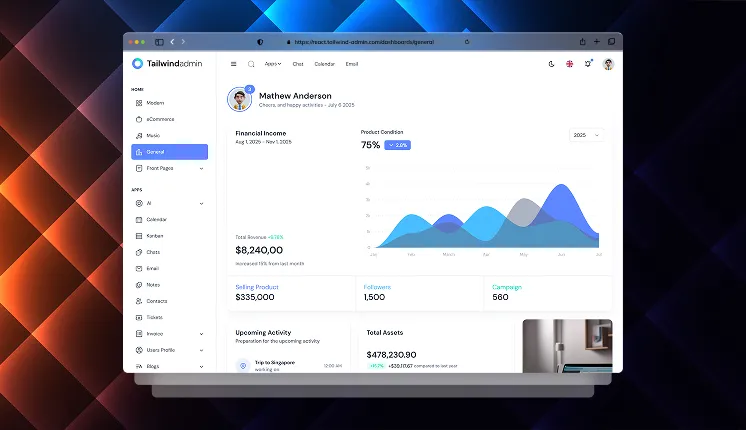
Tech stack: React v19, Tailwind CSS v4, Shadcn v3, TypeScript
Last Updated: Feb 2026
Key features:
- 4+ Dashboard variants like (Modern, Ecommerce, General, Music, etc.)
- Supports light and dark mode
- Includes a full theme customizer
- Includes React i18n (Internationalization) support
- 8+ Ready-to-use Auth Pages included
- Supports multiple frameworks: React, Next.js, HTML, Vue, Angular, and TanStack Start
Best for: SaaS CRM dashboards where analytics and reporting are core features
CRM Dashboard Shell (Shadcn Space)
ShadcnSpace ships a set of copy-paste dashboard shells built on Shadcn UI and Tailwind CSS. This Dashboard Shell is specifically the CRM layout, with sales metrics, campaign tracking, project management modules, activity feeds, and a best-selling products section.
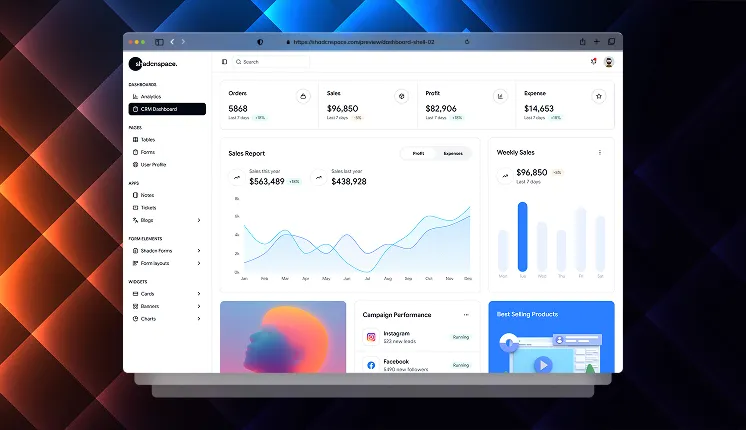
Tech stack: React v19, Tailwind CSS v4, Shadcn v3, TypeScript
Last Updated: January 2026
Key features:
- Supports Radix and Base UI Primitives
- Supports light and dark mode
- Figma Design Included
- Clean folder structure
- Highly Responsive
Best for: Developers building custom CRM systems from scratch
-------------------------------------------------
👉 See the original post here: