
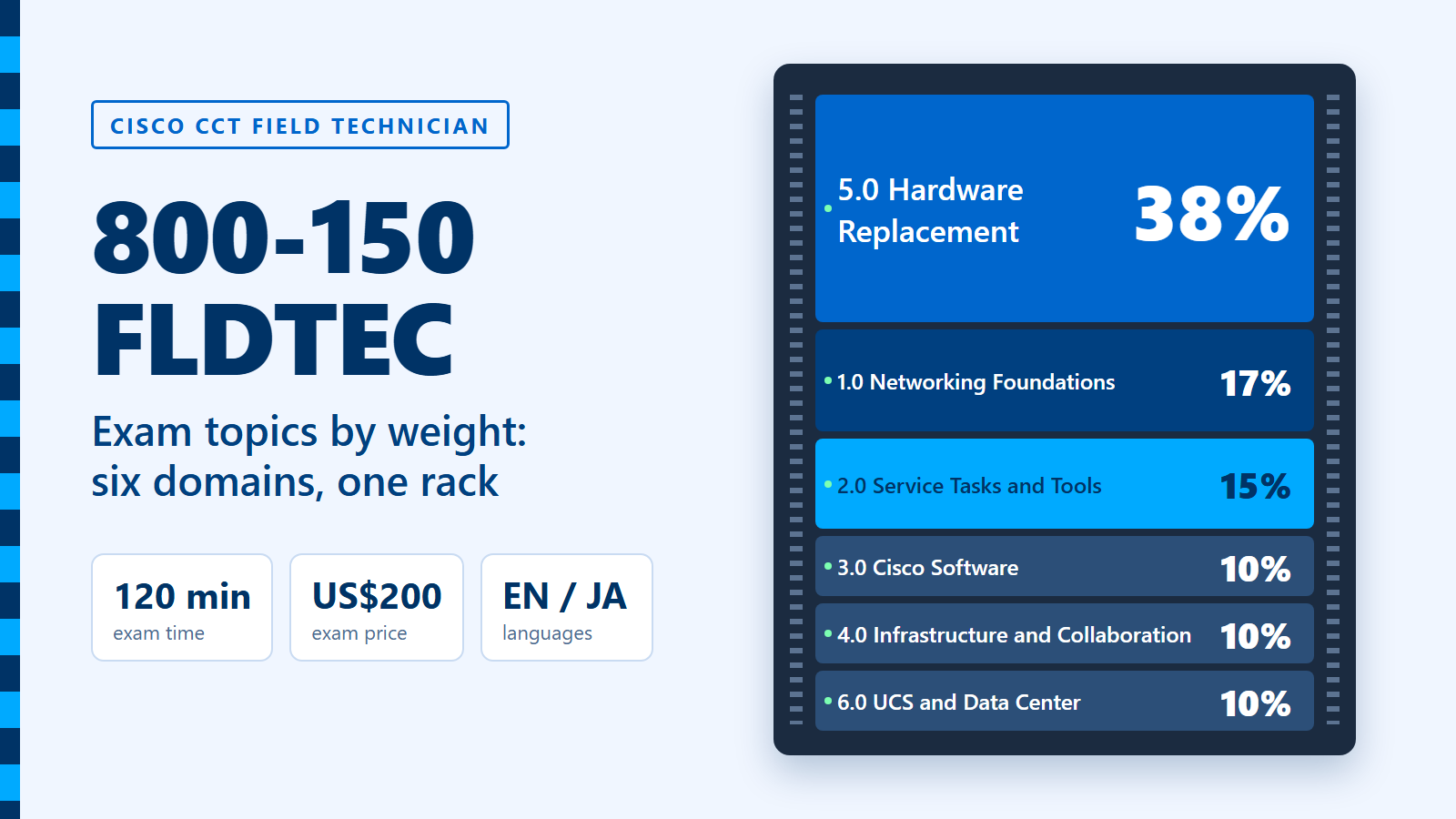
Hardware replacement is the heart of the 800-150 FLDTEC exam topics: at 38%, it outweighs the next two domains put together. The other five domains cover networking foundations (17%), service tasks and tools (15%), Cisco software (10%), infrastructure and collaboration (10%), and UCS and data center (10%).
FLDTEC is the one exam behind the Cisco Certified Technician (CCT) Field Technician certification. It is a 120-minute exam, offered in English and Japanese, and it costs US$200 (Cisco Learning Credits are also accepted). This entry reads the blueprint as a list of jobs you would do on a customer site. For each domain it names the bench skills that go with it, and then it turns the weights into a five-week plan. Every exam figure here was checked on Cisco's own pages on 22 October 2026.
What is the 800-150 FLDTEC exam?
The 800-150 FLDTEC exam (Supporting Cisco Devices for Field Technicians) tests whether you can replace Cisco equipment on site and bring it back into service. On the Cisco 800-150 FLDTEC exam page, Cisco describes it as on-site replacement across routing, switching, data center, UCS and collaboration platforms. That includes hardware identification, cabling, configuration backup and restore, and software upgrades and downgrades.
The key facts:
- Exam: 800-150 FLDTEC v1.0, Supporting Cisco Devices for Field Technicians.
- Certification: Cisco Certified Technician (CCT) Field Technician. One exam is all it takes.
- Duration: 120 minutes.
- Languages: English and Japanese.
- Price: US$200, or Cisco Learning Credits.
- Prerequisites: none. Cisco says there are no formal prerequisites.
- Question count and passing score: Cisco does not publish either one. The exam uses performance-based items, and Cisco notes that the number of questions may vary.
Because the question count is not fixed, plan your pacing by time, not by item numbers. A simple rule is to check your progress at the 40 and 80 minute marks: by then you want to be about a third and two thirds of the way through. Performance-based items can take longer than a single-answer question, so leave room for them.
How are the six FLDTEC domains weighted?
Cisco lists six domains on the 800-150 FLDTEC v1.0 exam topics page. The weights tell you where most of the marks sit.
- 5.0 Cisco Hardware Replacement: 38%
- 1.0 Networking Foundations: 17%
- 2.0 Common Service Tasks and Tools: 15%
- 3.0 Cisco Software: 10%
- 4.0 Cisco Infrastructure and Collaboration Architecture: 10%
- 6.0 Cisco UCS and Data Center Architecture: 10%
Two things stand out. First, Domain 5 alone is more than a third of the exam. Second, Domains 2, 3 and 5 together make up 63%, and all three are about hands-on work: booting, file handling, images, configs and swapping parts. The remaining 37% is the knowledge a field tech needs to recognise what is in front of them. Cisco also says the topics may change to follow its products, so check the page again in the week you book.
What does Domain 5, hardware replacement, ask you to do?
Domain 5 asks you to replace a device safely and in the right order, across a long list of Cisco product families. It has four parts.
- 5.1 Safety and environmental protocols: a safe work zone and ESD discharge.
- 5.2 Replacement process for 14 product families: Catalyst switches, Catalyst edge platforms, Meraki switches, ISR routers, ASR routers, the 8000 series, the NCS series, Secure Firewall, Nexus switches, MDS switches, UCS infrastructure components, UCS B-series, C-series and X-series, UCS E-series, and collaboration devices.
- 5.3 Configuring Cisco NX-OS: supported platforms, operating modes, CLI commands, ACI and NX-OS boot modes, and NX-OS password recovery.
- 5.4 Collaboration endpoints: IP phones and video endpoints.
The trap is to study 5.2 as 14 separate products. On a real visit the steps repeat: confirm the failed unit and its serial number, protect yourself and the hardware, record cabling and port positions, move or match the software, restore the configuration, and prove the service works before you leave. Learn that sequence once. Then, for each family, note only what is different, such as the NX-OS boot modes on Nexus or the cloud dashboard on Meraki.
Bench skills for Domain 5: label and photograph cabling before you unplug anything; practise an ESD routine until it is automatic; walk through an NX-OS password recovery on paper, step by step; and list which families are fixed-configuration and which are modular.
What do Domains 1 and 2 cover?
Domains 1 and 2 are the groundwork, and together they are worth 32%. Domain 1 checks that you know what the devices are. Domain 2 checks that you can work on them.
Domain 1, Networking Foundations (17%), runs from LAN and wireless basics through the OSI model and TCP/IP stack, UTP and fiber cabling, switching, IPv4 addressing and subnetting, and routing at Layer 3. It ends with device roles: campus core, distribution and access layers, edge and branch routers, firewalls, Nexus and MDS switches, UCS servers and collaboration devices.
Domain 2, Common Service Tasks and Tools (15%), is the field tech's daily kit: the Cisco boot-up process, common IOS commands, tools for file management, confirming physical connectivity, remote access with common Windows tools, connecting to the console port, capturing device status, password recovery, replacement tools and finding serial numbers.
Bench skills for Domains 1 and 2: subnet by hand until a /26 or /27 takes you less than a minute; connect to a console port with a terminal program and read a full boot sequence; and save the output of a few status commands to a file, as you would for a support case.
What do Domains 3, 4 and 6 add?
Each of these three domains is 10%, so together they are 30% of the exam. They are smaller, but they are full of terms that are easy to mix up.
- Domain 3, Cisco Software: IOS bundle mode versus install mode, software licensing models, image backup and transfer over FTP, TFTP and USB, installing IOS in both modes, and managing configuration files.
- Domain 4, Infrastructure and Collaboration: infrastructure devices and endpoints, on-premises collaboration (call controllers, call signaling and media flow, Cisco Unified Communications Manager), Telepresence Management Suite, Cisco Meeting Server and meeting management, and cloud services such as Webex Meetings, Webex Teams, Calling and Control Hub.
- Domain 6, UCS and Data Center: LAN, SAN and Unified Fabric, Nexus, UCS and MDS together, server deployment models (top of rack, end of row and FEX), virtual machines, hypervisors, cloud deployment and delivery models, and where UCS fits in campus, edge and data center designs.
Bench skills for Domains 3, 4 and 6: write out, in two sentences each, how a switch boots in bundle mode and in install mode; draw a call from a phone to Unified Communications Manager, marking signaling and media; and sketch a row of racks three times, once each for top of rack, end of row and FEX.
How should you split your study hours across the domains?
Split your hours roughly in line with the weights, with a little extra on the hands-on domains. For a 40-hour budget, that gives the split below.
- Hardware replacement (38%): 15 hours
- Networking foundations (17%): 7 hours
- Service tasks and tools (15%): 6 hours
- Cisco software (10%): 4 hours
- Infrastructure and collaboration (10%): 4 hours
- UCS and data center (10%): 4 hours
If you already work in the field, you may need fewer hours on Domains 1 and 2 and more on the product families you rarely touch. If you are new to networking, add time to Domain 1 first, because every other domain assumes it.

What does a 5-week FLDTEC study plan look like?
Five weeks at about eight hours a week covers the 40-hour budget exactly. Domain 5 is split across three weeks, so each part of it sits next to the smaller domain that describes the same platforms. Here is one way to lay it out.
- Week 1, foundations (8 hours): Domain 1 (7 hours): cabling types, the OSI and TCP/IP models, subnetting drills and the campus layers. Use the last hour for your first console session, the start of Domain 2.
- Week 2, service tasks and software (9 hours): the rest of Domain 2 (5 hours) and Domain 3 (4 hours): the boot-up process, status capture, password recovery, image transfer and the two IOS modes.
- Week 3, replacement, part one (8 hours): Domain 5.1 safety and the routing, switching and firewall families of 5.2: Catalyst, Meraki, ISR, ASR, 8000, NCS and Secure Firewall.
- Week 4, data center (8 hours): Nexus, MDS and UCS replacement plus NX-OS from Domain 5 (4 hours), and Domain 6 (4 hours).
- Week 5, collaboration (7 hours): collaboration devices, IP phones and video endpoints from Domain 5 (3 hours), and Domain 4 (4 hours).
Before exam day, add one review session: go over the blueprint line by line, mark anything you cannot explain aloud, and do a timed run of the replacement sequence from memory.
Cisco also has an official training route. The Cisco U. FLDTEC learning path is a beginner-level path with 12 courses and 8 assessments, about 10 hours in total, and 180 days of access. Its pre- and post-assessments let you skip what you already know. The path was last updated on 3 February 2026.
What mistakes do FLDTEC candidates often make?
Most lost marks come from studying the exam as a networking theory test, when it is really about field procedure. These are the patterns to watch for.
- Treating every product family the same. The general replacement sequence repeats, but the details do not. Nexus brings NX-OS and ACI boot modes, UCS brings its own components, and collaboration devices have their own endpoints.
- Skipping the 10% domains. Domains 3, 4 and 6 add up to 30%. Collaboration terms in particular are new to many hardware techs.
- Learning commands without context. Knowing a command is not enough; know when on a visit you would run it, and what you would do with the output.
- Forgetting safety. Safe work zones and ESD sit in Domain 5.1, inside the largest domain. They are easy marks if you have learnt them.
- Relying on old notes. v1.0 is the current version, and Cisco says topics can change. Read the live blueprint, not a copy from last year.
What does an FLDTEC-style question look like?
Here is one practice question, written for this entry in the style of the blueprint. It is not taken from the exam.
Scenario: You arrive on site to replace a failed Catalyst access switch. The customer has a copy of the old configuration on a TFTP server. The replacement unit boots, but it is running a different software release and boot mode from the failed unit. What should you do before you restore the configuration?
- A. Copy the old configuration to the new switch straight away and reload it.
- B. Bring the replacement's software release and boot mode in line with the failed unit, then restore the configuration.
- C. Erase the replacement's flash memory and leave the switch for the customer to set up.
- D. Return the replacement unit and order another one.
Answer: B. A configuration is written for a particular software release. If you restore it onto a different release or boot mode, some commands may be rejected or behave differently. Matching the software first is the safer order, and it ties together Domain 3 (images and modes) and Domain 5 (the replacement process).
Watch: a short video on the 800-150 exam
This video from the NWExam channel gives a quick overview of getting ready for the Cisco 800-150 exam.
Who should take the CCT Field Technician certification?
The CCT Field Technician certification suits people who visit customer sites to diagnose, repair and replace Cisco devices. On its Cisco Certified Field Technician page, Cisco says CCTs work closely with the Cisco Technical Assistance Center (TAC) to resolve support incidents.
Cisco gives three example learner profiles: people moving into IT, IT professionals who want to stand out in the job market, and IT professionals who want to add networking skills to their current role. Since there are no prerequisites and only one exam, it is also a practical first Cisco credential for someone in hardware support.
Frequently asked questions
1. How many questions are on the 800-150 FLDTEC exam?
Cisco does not publish a fixed number. The exam includes performance-based items, and Cisco says the number of questions may vary, so plan your pace by the 120-minute clock instead.
2. What is the passing score for 800-150 FLDTEC?
Cisco does not publish a passing score for 800-150 FLDTEC. Prepare to cover every domain well, with the most time on hardware replacement at 38%.
3. How much does the 800-150 FLDTEC exam cost?
The exam costs US$200, and Cisco also accepts Cisco Learning Credits. It lasts 120 minutes and is offered in English and Japanese.
4. Which FLDTEC domain carries the most weight?
Domain 5, Cisco Hardware Replacement, carries 38%. It covers safety, the replacement process for 14 product families, NX-OS configuration and collaboration endpoints.
5. Do I need another certification before 800-150 FLDTEC?
No. Cisco lists no formal prerequisites for the CCT Field Technician certification, and you earn it by passing this one exam.