
Discover Every Website Hosted on One IP Address
Reverse IP Lookup: Free Check of Sites on the Same IP
Every domain you type into a browser ends at an IP address, and that address is often shared by far more sites than most owners realize. A forward DNS lookup answers the question "where does this domain point?", while a reverse lookup flips the question and asks "which domains point to this IP?" When you need that answer quickly, a reverse ip lookup gives you a free list of co-hosted sites, along with the PTR record, ISP and ASN of the address, and a warning when the IP belongs to a CDN such as Cloudflare. For PromoPilot™ users and anyone auditing hosting or link sources, this is one of the fastest ways to see who else lives on the same server.

The practical value of this check comes from the fact that an IP address is a shared resource. On shared hosting, dozens or hundreds of unrelated projects can sit behind one address, and the server's reputation, mail deliverability and even security posture are affected by all of them at once. If a neighbour sends spam or hosts malware, the address may end up on a blacklist, and your legitimate mail begins to disappear into spam folders. Seeing the neighbours is therefore not a curiosity; it is a way to understand the environment your own site operates in.
Co-hosting changes constantly, so a list that was accurate last quarter may describe a different set of sites today
- The PTR names the address, not the tenants, and treating it as a directory of customers will mislead you about what lives on the server
- Shared hosting of unrelated clients, migrations, expired domains that were parked and CDN usage all produce neighbour lists that look suspicious but have ordinary explanations
- The list of co-hosted sites tells you who shares an address at a particular moment, drawn from datasets that are never complete
- Verify the domains you care about with a direct DNS query, compare registration and content signals, watch for the footprints that suggest a single owner, and always record when the data was collected
Reverse IP data also matters when you are evaluating a network of sites. A group of supposedly independent domains that all resolve to one address, or to a tight range within a single ASN, is a pattern worth investigating. That does not prove anything by itself, because legitimate hosts pack thousands of customers onto shared infrastructure, but it does tell you where to look more closely before trusting a link or a partner.
What Reverse IP Lookup Reveals and Why It Matters
A reverse IP lookup maps an address back to the domain names that resolve to it. The forward direction is simple, because DNS is designed to answer it: you ask for a name and receive an A record. The reverse direction is not something DNS was built to answer. No standard record lists every site on a server, so reverse IP services assemble their own datasets by resolving very large numbers of domains and storing which ones point where.
The reason one IP can host many sites is ordinary and entirely legitimate. Shared hosting places many customers on one web server and distinguishes them by the host header in each request. Virtual hosts work the same way on dedicated machines. Reverse proxies and CDNs go further: they accept traffic for a huge number of domains on a shared set of edge addresses and forward requests to the real origin behind the scenes. In each case, the IP tells you about the infrastructure, not necessarily about the owner of every domain attached to it.
This is why the result must be read as a snapshot rather than a verdict. The list reflects the DNS and host records seen at the time of scanning, and it may include domains that moved away long ago or omit sites that are too new, too obscure or hidden behind private configurations. Treat each co-hosted domain as a candidate for further checking, not as a confirmed relationship.
How IP-to-Domain Mapping Works Under the Hood
Most reverse IP datasets are built from several sources at once. Passive DNS databases record answers that resolvers return to real users over time, which gives a historical view of which names pointed to which addresses. Crawls of the public web contribute by resolving domains that have pages and noting their addresses. Some providers also collect host header information from scans, so they can tell which virtual host answered on a given IP. Each source has blind spots, and combining them improves coverage without making it complete.
The incompleteness has concrete causes. Private hosting for internal sites, staging environments and sites without public DNS names never appear in any dataset. Virtual hosts that are configured but not linked from anywhere may never be resolved by a crawler. Domains that were recently moved, or that changed their records after the last collection cycle, will show stale or missing entries. A lookup that returns a short list is therefore not proof that the IP hosts only those sites; it only proves that the dataset contains those sites.
It is also important to separate the PTR record from the list of hosted domains. A PTR record is reverse DNS: it maps the IP back to a single hostname, usually one that the network operator assigned for administrative purposes, such as a name that identifies a server in the provider's network. There is typically one PTR per address, and it rarely tells you about the customer sites running there. The PTR is useful for confirming the hosting context, but it is not a directory of tenants.
Key Data Points in a Lookup Report
The PTR record is the first field to read. When it exists and resolves consistently back to the IP, it suggests that the operator maintains reverse DNS deliberately, which is common for mail servers and professional hosting. When it is absent, generic or does not match the forward record, that is a weaker signal, and it should be interpreted together with the other fields rather than alone. A PTR that names a hosting provider's infrastructure tells you more about the environment than a PTR that looks like a personal domain.
The ISP and ASN fields describe who operates the network that carries the address. The ASN is the autonomous system number that identifies a block of routing under one organisation's control. Knowing the ASN lets you tell whether an address sits inside a large cloud provider, a regional hosting company or a small network of a single operator. When many co-hosted domains share an ASN, that is often a sign of a common hosting relationship, although it can equally reflect a large provider serving unrelated customers.
Geolocation requires particular caution. An IP's location in a database reflects where the address is registered or routed, and for addresses behind anycast or CDN networks it can be misleading or meaningless. A site serving visitors from many countries through a global edge network does not have a single physical location in any useful sense. Geolocation can suggest where infrastructure is located, but it should never be taken as proof of where the operator or the audience is.
Reverse IP Lookup Use Cases by Role
Marketers and link builders use reverse IP data to audit the sources they are considering. When several donor sites share an address or a tight network range, that cluster may indicate a single owner operating a group of sites that look independent. Checking the co-hosted list before buying or exchanging links helps you avoid building on a footprint that search engines and partners may regard as manipulative. The same check helps verify that a partner or affiliate site is hosted where its claimed business would suggest.
Security analysts approach the same data from the opposite direction. Phishing kits and malware distribution often cluster on shared infrastructure, and a reverse lookup on a suspicious address can reveal other domains serving the same campaign. Mapping these relationships helps correlate malicious domains, identify the infrastructure an attacker is reusing and decide which addresses to block or report. In incident response, the list is a starting point for a broader investigation, not the end of it.
Site owners and agencies benefit in a more everyday way. If you are moving to a new host, the reverse list shows the company you would be keeping, and a neighbouring domain with a bad reputation can drag down your mail deliverability. Before buying an expired domain, checking the address it currently resolves to, and the sites around it, is part of basic due diligence. Researchers and journalists use the same method to trace who is behind a set of domains, combining the list with registration data and historical records.
How to Run a Free Lookup Step by Step
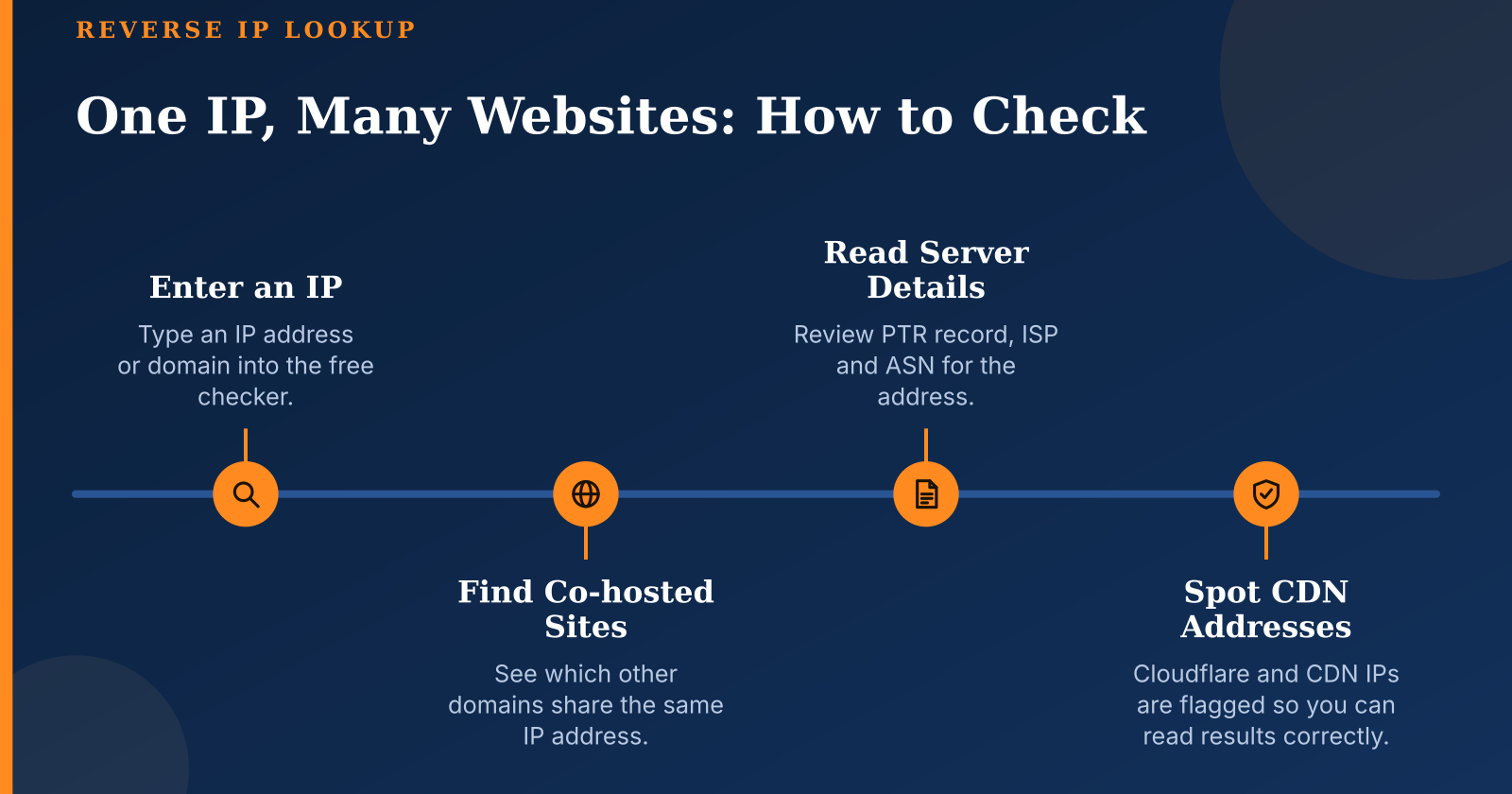
Start by deciding what you have. If you already know the IP address, enter it directly. If you have a domain, the tool first resolves it to its current IP, so the result describes where that domain points right now, which may differ from where it pointed last month. Keep in mind that a domain with several addresses will be checked through its first IPv4 address, and the others need separate queries.
Run the query and read the list of co-hosted domains, noting the total count before you look at individual names. The count is the fastest signal of what kind of infrastructure you are looking at. A handful of names usually points to a dedicated server or a small VPS, while a very large number points to shared hosting or a platform. Save the count alongside the names so you can compare later.
Next, cross-check the PTR, ISP and ASN fields to confirm the hosting context. Ask whether the PTR matches the provider you expect, whether the ASN belongs to a known hosting company or a cloud platform, and whether the ISP name agrees with what the domain's own website or registration suggests. If the fields conflict with each other, that is a reason to investigate further rather than to accept the first answer.
Finally, record the scan date and export or save the results. Co-hosting changes over time as sites move, expire or are sold, so an undated list quickly becomes misleading. A typical lookup returns in seconds, but the result depends on the size of the dataset, the rate limits of the service and how popular the address is, since busy shared IPs have longer lists to assemble.
Interpreting Results: CDN, Cloudflare and Shared Infrastructure
Recognising a CDN address is the first interpretive skill. Cloudflare, Akamai and other content delivery networks publish their address ranges and are usually identifiable from the ISP and ASN fields. Many tools flag these ranges automatically, and this flag matters because a CDN address serves a vast and unrelated set of customers, so a co-hosted list drawn from it describes the platform's client base rather than any real neighbourhood. When you want to see which other domains share the same server, a reverse ip lookup tool lets you list them in seconds without manual searching.
On a CDN IP, thousands of unrelated domains can appear, and the list tells you almost nothing about the relationship between them. These sites share an edge network, not a server or an owner, and the actual origin servers are hidden behind the proxy by design. You cannot usually find the origin through DNS for a proxied site. Non-proxied subdomains such as mail or ftp hostnames sometimes resolve to the real server and offer a hint, but there is no guarantee that they do, and they should be verified rather than assumed.
Shared hosting and dedicated servers differ in ways that show up in the data. Shared hosts tend to produce long lists of small, similar-looking domains with generic PTR records and a single hosting ASN. Dedicated servers usually produce short lists, often with one owner's projects and a PTR that names the server or the provider. These patterns are not absolute, but they help you decide how much weight to give the neighbours.
Distinguishing a genuine relationship from coincidental co-hosting is the central judgment in interpretation. Two domains on the same ordinary shared host have no meaningful connection, while two domains on a small dedicated server with matching registration details and similar content may indeed belong to one owner. Look for shared registrant information, consistent design, interlinking and matching analytics or contact details before drawing a conclusion. The IP is evidence to weigh, not proof on its own.
How to Choose a Reverse IP Lookup Tool: Criteria to Check
Database coverage and freshness should be the first criteria. Ask how often the records are updated and how far back the historical data goes, because a dataset that refreshes rarely will show outdated neighbours, while a very shallow history will miss sites that were hosted on an address in the past. Coverage also varies by region and by domain type, so a tool that works well for common commercial domains may be weak for newer or less popular ones.
Accuracy indicators tell you how carefully the tool handles edge cases. A trustworthy service flags CDN and proxy addresses, explains where its data comes from and states its limitations plainly. If a tool presents a long list for a Cloudflare address without any warning, its output should be treated with suspicion. Transparency about methodology is a good sign, because it lets you judge the results instead of accepting them on faith.
Output quality determines how useful the result is in practice. Look for PTR, ASN and ISP fields alongside the domain list, the ability to export the data, and an API if you need to run checks in bulk or inside your own workflow. A list without context forces you to research each address separately, which costs time that the context fields would have saved.
Limits and privacy complete the picture. Free tiers usually cap the number of queries or the length of results, and it is worth knowing those caps before you depend on the tool for a project. Check the logging policy to understand whether your lookups are retained, especially if you are investigating sensitive infrastructure. Finally, prefer tools whose results you can verify independently, using DNS queries and public registration data, rather than ones that offer no way to check their claims.

Common Mistakes and How to Avoid Them
The most frequent mistake is treating co-hosting as proof of ownership or of a link network. Sharing an address is a weak signal on its own, because ordinary hosting puts unrelated businesses side by side every day. Use the list to form a hypothesis, then test it with registration details, content comparison and linking patterns before you act on it.
Ignoring CDN addresses is the second common error. Drawing conclusions from thousands of unrelated domains behind a Cloudflare or Akamai address leads nowhere, and it can lead to false accusations about sites that merely use the same platform. When the CDN warning appears, the correct response is to stop interpreting the neighbour list and look for the origin through other means, or accept that the infrastructure is hidden.
Relying on a single snapshot without checking the scan date causes errors that are easy to avoid. Always note when the data was collected and re-run the check before making a decision that depends on it.
Confusing PTR records with the full list of hosted domains is a conceptual error with practical consequences. Similarly, assuming that an IP's geolocation reflects where a site's audience or operator is located can send your analysis in the wrong direction, particularly for sites served through global networks.
Acting on results without checking for legitimate reasons is the final mistake to avoid. Before you report a site, drop a partner or decide that a host is unsafe, confirm the pattern with independent evidence and consider the innocent explanations first.
Conclusion: Using Reverse IP Data With Judgment
A reverse IP lookup is a fast and useful way to see the environment behind a domain, but its value depends entirely on how carefully you read it. The PTR, ISP and ASN fields place that address within a network and help you judge the hosting context, while the CDN warning tells you when the list has stopped meaning much at all.
The best results come from combining the lookup with other checks. Used this way, the tool becomes a reliable first step for audits, security work and due diligence, rather than a source of confident but unfounded conclusions.