Today we are going to develop a Rest API using Laravel and Passport.
Setup is simpler than it sounds.
Just keep in mind that to follow this guide you need Laravel 5.8 or higher.

Step 1. Create a new Laravel project
You can create the Laravel project using Composer:
composer create-project --prefer-dist laravel/laravel auth
Or if you're someone who prefers Laravel Installer, you can do the same with laravel new auth.
As you can see:
- In this case,
authis the name of the project. - But if you already have one created, you can follow the steps there.
If you're working on a new project, remember that you must also set up your database access credentials.
For example, you can create a database called "auth", and then define in your .env:
DB_CONNECTION=mysql
DB_HOST=127.0.0.1
DB_PORT=3306
DB_DATABASE=auth
DB_USERNAME=root
DB_PASSWORD=
Step 2. Install the Laravel Passport package
Laravel Passport allows us to set up an OAuth2 server on top of our Laravel in a very short time.
composer require laravel/passport
Step 3. Run the migrations
The Passport package, when downloaded, includes migrations.
It is important to execute these migrations, so that you have the necessary tables to save information from the clients y access tokens:
php artisan migrate
If you don't understand very well what I'm talking about, it's because you're not familiar with the OAuth protocol2.
In that case:
- I recommend you start with this one article on OAuth2.
- And if you want to go deeper, you can follow this one OAuth course 2 ?.
Step 4. Generate keys
So that our project can generate access tokens insurance is necessary to have encryption keys (keys used in the encryption process).
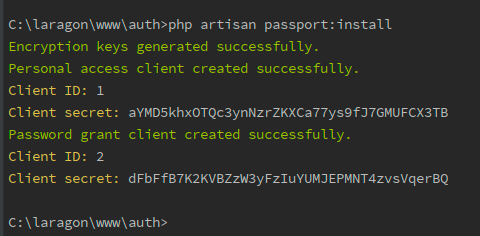
To do this, we must execute:
php artisan passport:install
This command will also create clients, which we can then use to generate access tokens:
Step 5. Passport Settings
Now you need to add the trait Laravel\Passport\HasApiTokens to your model App\User.
This trait enables methods for the model, which will allow you to inspect the authenticated user's token and their scopes corresponding.
<?php namespace App;

use Illuminate\Foundation\Auth\User as Authenticatable;
use Illuminate\Notifications\Notifiable;
use Laravel\Passport\HasApiTokens;

class User extends Authenticatable
{
    use Notifiable, HasApiTokens;
    // ...
}
For Passport to work properly, you must also enable its routes.
To do this, it is enough to call the method Passport::routes within the AuthServiceProvider of your project.
Specifically within the boot.
These routes allow Passport to make issue y revoke of access tokens y clients.
<?php namespace App\Providers;

use Laravel\Passport\Passport;
use Illuminate\Support\Facades\Gate;
use Illuminate\Foundation\Support\Providers\AuthServiceProvider as ServiceProvider;

class AuthServiceProvider extends ServiceProvider
{
    // ...
    public function boot()
    {
        $this->registerPolicies();

        Passport::routes(); // <---
    }
}
With this ready you can go to your configuration file config/auth.php and assign the "passport" driver for the authentication guard called "API":
'guards' => [
    'web' => [
        'driver' => 'session',
        'provider' => 'users',
    ],
    'api' => [
        'driver' => 'passport', // <---
        'provider' => 'users',
    ],
],
In this way, Passport will be in charge of validating incoming requests to the API.
So far we already have Laravel Passport configured correctly.
However, the question is:
¿how we can use Passport and define the first paths of our API?
Let's see this below.
Step 6. Define the main paths for the API
You just have to go to the file routes/api.php, and add there:
Route::group([
    'prefix' => 'auth'
], function () {
    Route::post('login', 'AuthController@login');
    Route::post('signup', 'AuthController@signUp');

    Route::group([
      'middleware' => 'auth:api'
    ], function() {
        Route::get('logout', 'AuthController@logout');
        Route::get('user', 'AuthController@user');
    });
});
¿What this code does?
- Define 4 routes, assigning them all a prefix "auth".
- The first 2 routes are public, and the next 2 require authentication.
Step 7: Create a Controller to resolve the routes
In the previous step we have declared 4 paths, each associated with a controller method AuthController.
Then you just need to create such a controller:
class AuthController extends Controller
{
    /**
     * Registro de usuario
     */
    public function signUp(Request $request)
    {
        $request->validate([
            'name' => 'required|string',
            'email' => 'required|string|email|unique:users',
            'password' => 'required|string'
        ]);

        User::create([
            'name' => $request->name,
            'email' => $request->email,
            'password' => bcrypt($request->password)
        ]);

        return response()->json([
            'message' => 'Successfully created user!'
        ], 201);
    }

    /**
     * Inicio de sesión y creación de token
     */
    public function login(Request $request)
    {
        $request->validate([
            'email' => 'required|string|email',
            'password' => 'required|string',
            'remember_me' => 'boolean'
        ]);

        $credentials = request(['email', 'password']);

        if (!Auth::attempt($credentials))
            return response()->json([
                'message' => 'Unauthorized'
            ], 401);

        $user = $request->user();
        $tokenResult = $user->createToken('Personal Access Token');

        $token = $tokenResult->token;
        if ($request->remember_me)
            $token->expires_at = Carbon::now()->addWeeks(1);
        $token->save();

        return response()->json([
            'access_token' => $tokenResult->accessToken,
            'token_type' => 'Bearer',
            'expires_at' => Carbon::parse($token->expires_at)->toDateTimeString()
        ]);
    }

    /**
     * Cierre de sesión (anular el token)
     */
    public function logout(Request $request)
    {
        $request->user()->token()->revoke();

        return response()->json([
            'message' => 'Successfully logged out'
        ]);
    }

    /**
     * Obtener el objeto User como json
     */
    public function user(Request $request)
    {
        return response()->json($request->user());
    }
}
Step 8: Verify API operation
Here you can start a server with PHP using php artisan serve.
However, if you have a Web Server as an Apache, it's best to define VirtualHosts for your projects.
To test our API we must make requests to the paths we have defined.
A very convenient way to do this is through Postman.
¡So let's get started!
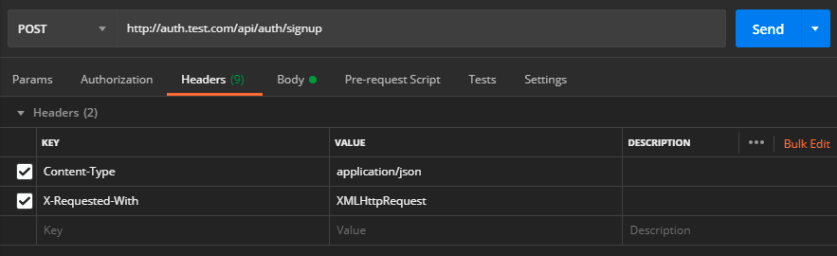
Headers
Since we are querying a Rest API that returns data in JSON format, it is important to add the following 2 headers in each of our requests:
Content-Type: application/json
X-Requested-With: XMLHttpRequest
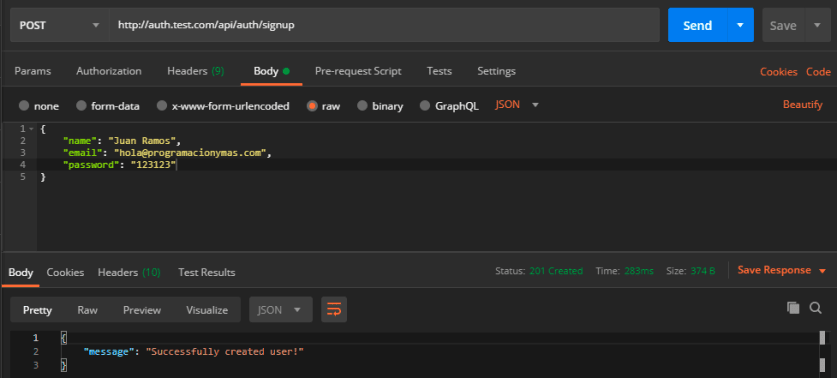
Registration
We make a POST request and register a user with our data.
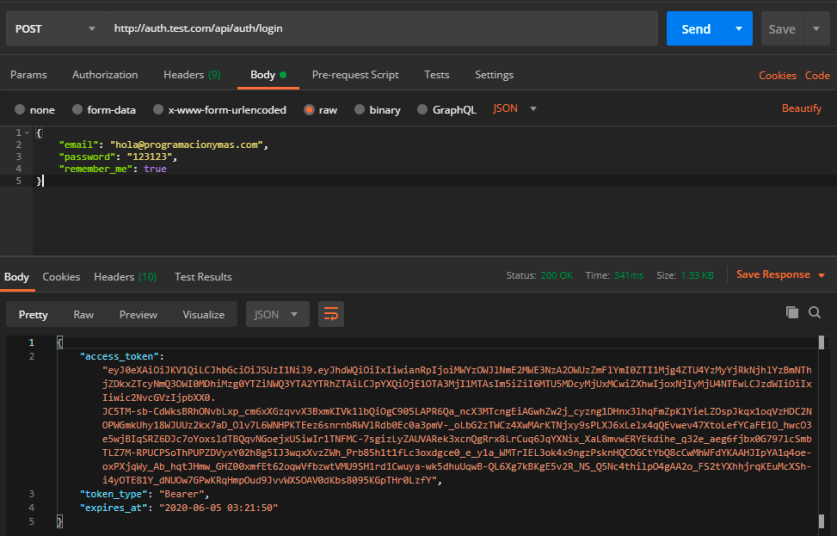
Login
Using our user data we can log in, and get a access_token, that will allow us to identify ourselves to the API.
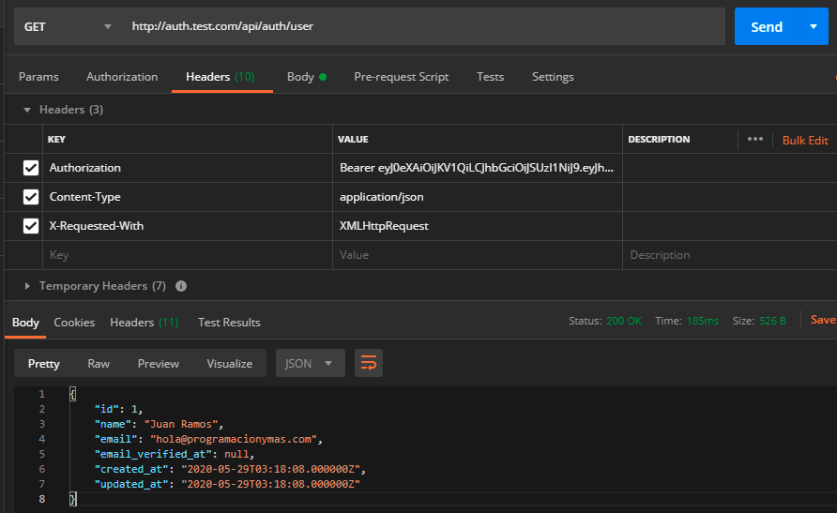
User Data
We can consult protected routes by sending a Authorization header and the token we got earlier.
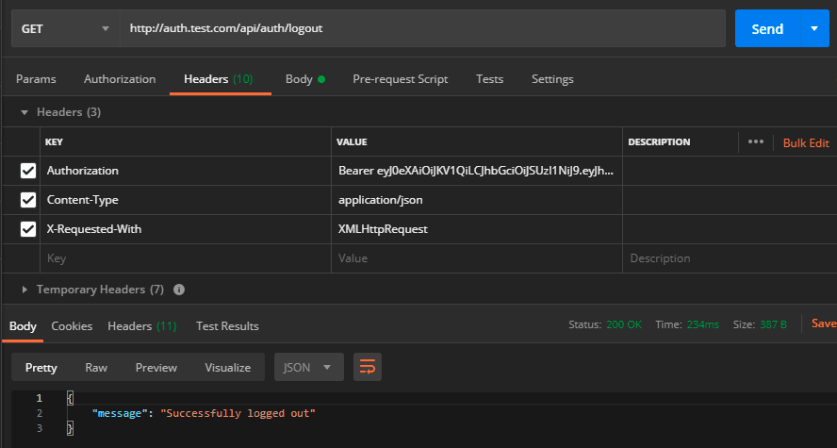
Log Out
If we make a GET request to the logout path with our token, it will be invalidated.
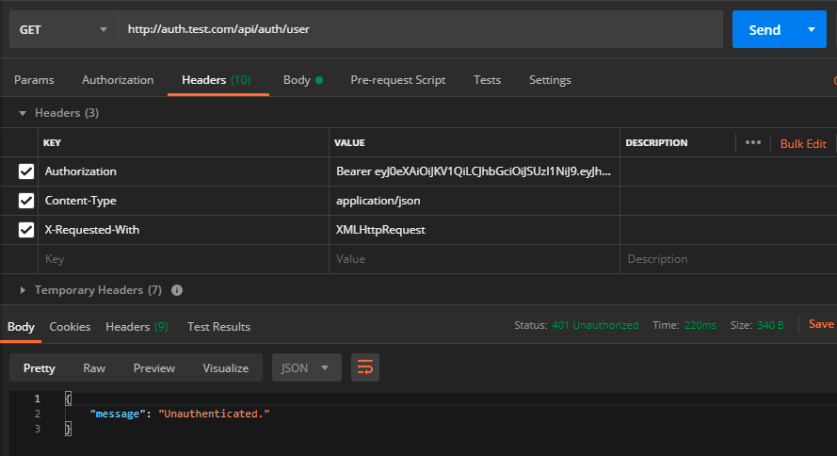
Unauthenticated
So if we try to get our user data with the same token, the API protected by the middleware will tell us that we are not authenticated.