
How does an operator know that a key press has worked? A fingertip sensation, a mechanical click, a confirmation tone, and a changed display should not automatically mean the same thing. Separate the physical press from input recognition and completion of the requested action when defining an interface. That distinction is the starting point for a tactile vs. non-tactile membrane switch comparison. Instead of asking which design feels stronger, ask what the operator needs to confirm, which feedback channels are available during the task, and how the proposed keypad performs after installation in the equipment.
Define What the Operator Needs to Confirm
Begin by writing a feedback requirement for each important operation. For example, distinguish “the key moved,” “the controller recognized the command,” and “the requested process finished.” A tactile dome supplies a mechanical event, not a report from the controlled process. Snaptron's force-displacement guidance describes dome movement and electrical contact closure. Consequently, do not let a satisfying click stand in for confirmation that a measurement was saved or a commanded movement was completed. Define the necessary equipment status indication independently of the chosen key construction.
Next, describe where the operator will be looking. During sample evaluation, ask whether users can see the relevant indicator from their normal working position, rather than assuming that a nearby display is always visible. Where looking away from the task is impractical, include a tactile candidate in the comparison. Where visual confirmation is continuously available, investigate whether a non-tactile candidate gives adequate confidence without additional sound. These are screening questions, not automatic rules assigning a switch type to an industry.
Specify noise conditions, permitted gloves, hand position, and the expected sequence of presses. Assess a confirmation tone against representative background noise, and test the intended gloves rather than recording “glove compatible” without qualification. Include sustained data entry or repeated adjustments, not just a single deliberate press. Ask participants what they believed each cue confirmed, whether they hesitated, and whether they pressed again unnecessarily. Turn those observations into acceptance criteria before selecting a preferred sample. The objective is understandable feedback throughout the task, not the strongest sensation during an isolated demonstration.
Compare Tactile and Non-Tactile Feedback
A tactile membrane keypad provides a noticeable snap during actuation. A metal dome beneath the overlay is one implementation; formed polyester domes are another. Epec's Membrane Switch Design Guide identifies both dome approaches, so “tactile” should not be used as a synonym for one particular metal component. In a typical momentary metal-dome construction, pressing produces a snap transition toward contact closure; releasing the pressure lets the dome return. When reviewing tactile membrane switch options, ask which mechanism is proposed and how it will be integrated into the finished keypad. The component description is a starting point, not the complete feedback specification.
A conventional non-tactile membrane switch is still pressure actuated. Pressing deflects a flexible circuit layer across a spacer opening to bring the contacts together, but without a deliberately engineered snap. The absence of snap does not mean zero movement or zero operating force. Epec describes membrane switching as momentary electrical contact produced by fingertip force. By contrast, Microchip's Peripheral Touch Controller documentation describes capacitive sensing through capacitance measurement. These are different input mechanisms; a flat appearance does not make a membrane contact switch a capacitive touch interface.

For a non-tactile design, plan how the operator will recognize an accepted input, such as through an appropriate display change or indicator. Epec identifies visual feedback as an option where direct tactile confirmation is absent. Evaluate the meaning and timing of that indication rather than assuming that any illuminated symbol is sufficient. For either construction, review mechanical sound and electronic tones separately. Do not specify absolute silence, longer life, or lower total cost merely from the tactile or non-tactile label. Use the questions below to compare candidates against the same operating requirements.
|
Decision factor |
Tactile design questions |
Non-tactile design questions |
|---|---|---|
|
Visual attention |
Is the snap recognizable when the display is outside the operator's view? |
Is input confirmation available without an impractical change of gaze? |
|
Sound |
Is the mechanical click acceptable, and is a separate tone needed? |
Is the physical press quiet enough, and are programmed tones acceptable? |
|
Gloves and grip |
Can intended users distinguish the snap in the required gloves and grip? |
Can intended users complete the press and recognize confirmation in the same conditions? |
|
Repeated entry |
Are repeated presses comfortable and individually recognizable? |
Does the confirmation scheme avoid hesitation and unnecessary repeat presses? |
|
Functional recognition |
Does each intended press produce the specified controller event? |
Does each intended press produce the same specified controller event? |
|
Installed feel |
Does mounting preserve the approved force, travel, and snap? |
Does mounting preserve the approved force, deflection, and return? |
Review Force, Sound, and the Installed Key Feel
Review the force throughout the press rather than relying on one nominal force value. Snaptron distinguishes actuation force from tactile ratio: the latter describes the relative force drop associated with snap, rather than simply how hard the user pushes. Request force-displacement information for tactile candidates and identify travel to electrical closure, the sensation through the press, and return behavior. For a non-tactile candidate, review force, movement, closure, and release without imposing a snap requirement that contradicts its intended behavior.
The overlay and supporting construction belong in this review. Snaptron notes that overlay stiffness, thickness, and adhesive construction can alter the response experienced in an assembled keypad. Ask the supplier to identify the tested layer stack, including the surface material, embossing, spacer, and mounting arrangement. Epec also notes that pillow embossing alone does not create snap feedback. A raised key outline should therefore be treated as a surface feature unless the underlying actuation mechanism has been established.
Compare samples on appropriate support. Snaptron's handling guidance warns against actuating unsupported metal domes and against exceeding their designed travel. For enclosure reviews, check backing flatness, support beneath active keys, and clearance around the key area. Record whether closure and return remain consistent after bonding and final assembly. Compare a correctly supported keypad before enclosure installation with the installed version; do not evaluate a loose dome by squeezing it between fingers.
Finally, separate audible preference from tactile preference. Listen at the intended operator position during representative operation. Record whether a mechanical click is acceptable and whether an electronic tone is necessary. Replace vague approval language such as “nice click” with agreed descriptions, measured requirements where appropriate, and an identified reference sample.
Choose a Construction and Validate It with Samples
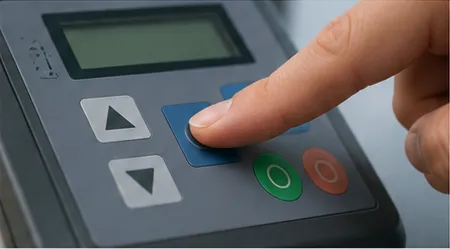
Shortlist a tactile construction when the requirement calls for distinct mechanical confirmation; shortlist a non-tactile construction when the proposed indication scheme can provide sufficient input confirmation without snap. Keep both in the evaluation when the requirements leave the choice open. Before requesting samples, compare membrane switch constructions and identify the proposed overlay, contact mechanism, spacer, backing, and enclosure interface. Request representative assembled samples rather than choosing solely from an isolated component's description.
Consider an illustrative example involving two hypothetical products. A quiet benchtop instrument with a continuously visible display could be evaluated with non-tactile keys and explicit on-screen input acknowledgment. A handheld controller operated while the user watches another object could instead prioritize recognizable tactile feedback. Neither scenario establishes a universal winner. Test whether the first arrangement causes uncertainty or unnecessary repeat presses, and whether the second remains comfortable and distinguishable in its intended grip.
Run a documented sample review with representative operators, relevant gloves, expected viewing positions, and realistic background sound. Include individual presses, ordinary repeated sequences, and any intended hold or repeat functions. Monitor actual controller events alongside subjective feedback. Check for missed commands, unintended duplicate events, and correct release recognition. Record the sample identity, assembly state, firmware settings, and test conditions so that observations can be compared meaningfully.
Keep this usability review separate from endurance qualification. Snaptron's published dome cycle procedure defines its mechanical failure criterion around cracking and explicitly excludes electrical resistance testing from that procedure. A component cycling result is therefore not, by itself, proof of complete keypad functionality. Agree project-specific endurance conditions, electrical checks, and acceptable changes in feel. Retain the approved construction revision and reference samples for subsequent reviews.
Conclusion
Choose feedback by defining what an operator must understand, then test whether the complete interface communicates it. A tactile design is a candidate where mechanical confirmation matters; a non-tactile design remains a candidate where another clearly understood cue is sufficient. Neither label should replace evaluation of force, sound, return, and installed behavior. The next step is a shared requirement brief and a controlled sample comparison that connects operator experience to actual input recognition. Approve the construction, assembly conditions, and acceptance criteria together, rather than approving a click in isolation.