
When a small business talks about its network, the conversation usually starts with internet speed, Wi-Fi coverage, or the cost of new equipment. The part that gets less attention is the physical layer underneath it all, the cabling hidden above ceiling tiles, tucked into walls, or bundled behind desks. That is often where reliability is won or lost.
I have seen offices spend heavily on new firewalls, faster switches, and better access points, only to keep suffering random dropouts because the underlying network cabling was an afterthought. I have also seen modest businesses with sensible gear run beautifully for years because someone planned the cable plant correctly the first time. For a small business, that difference matters. Downtime hits harder when you have a lean team, no large IT department, and staff who need every hour of the day to stay productive.
Office network cabling is not glamorous, but it shapes day-to-day operations in quiet, practical ways. Phone calls over VoIP sound cleaner. File transfers finish faster. Printers stop disappearing. Security cameras keep recording. Wi-Fi access points get the power and backhaul they need. Expansion becomes easier instead of painful. If you are considering a move, buildout, renovation, or upgrade, it helps to understand what makes a solid cabling system and where small businesses most often get tripped up.
Cabling is infrastructure, not an accessory
A lot of business owners understandably think of cabling as a one-time installation cost, something to keep the computers connected and move on from. In practice, structured cabling behaves more like plumbing or electrical work. Once it is in place, every future technology decision depends on it.
That includes obvious devices such as desktop PCs and printers, but also the things that creep into office environments over time. Wireless access points, IP phones, conferencing systems, door access controls, cameras, digital signage, point-of-sale stations, badge readers, and even some HVAC controls all rely on low voltage cabling. A business network installation that seems simple on day one often grows into something much more interconnected by year three.
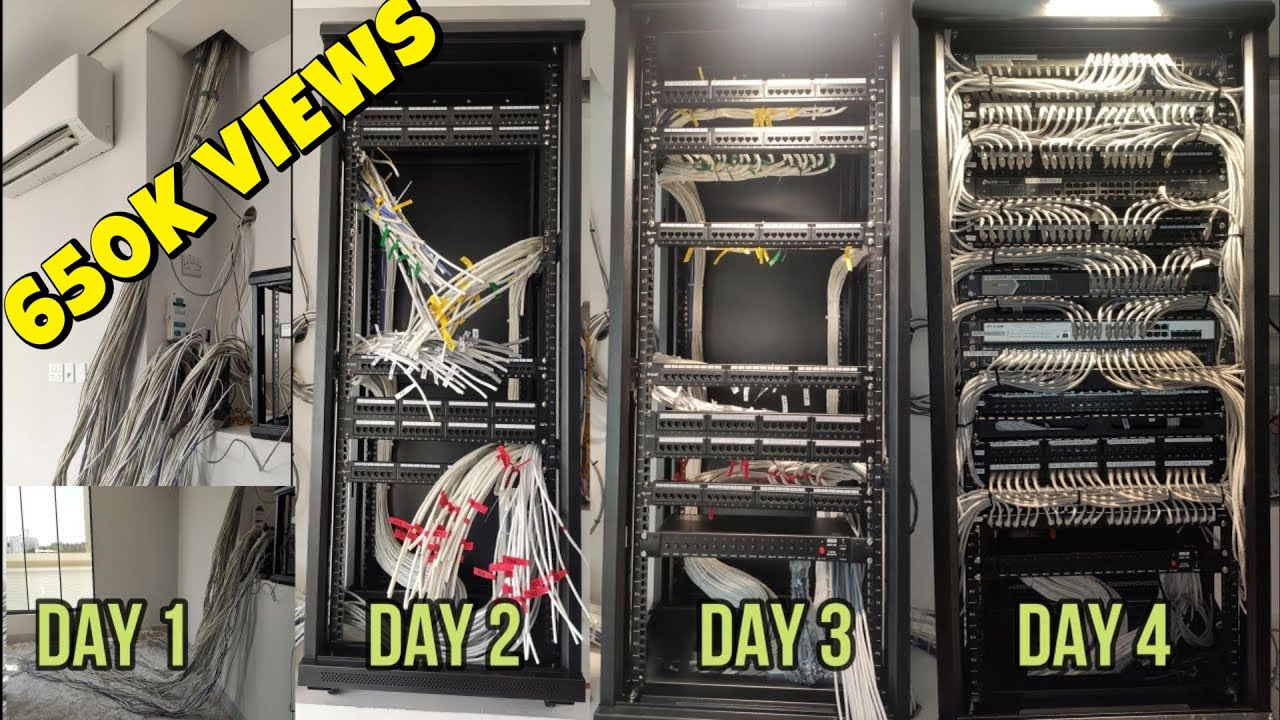
This is why structured cabling matters. Instead of running cables in an ad hoc way from one closet to the nearest desk, a structured approach creates a predictable layout. Cables are home-run back to a central location, patch panels are labeled, pathways are considered ahead of time, and growth is planned. That kind of discipline pays off later when someone needs to troubleshoot a bad connection in five minutes rather than trace an unlabeled cable for half a day.
Small businesses do not need enterprise-scale complexity, but they do benefit from enterprise habits at the cabling layer.
What “structured cabling” really means in a small office
The phrase sounds bigger than it needs to be. In a small office, structured cabling usually means every permanent cable run goes from a wall jack or device location back to a central termination point, often a network rack or wall-mounted cabinet. Switches, patch panels, internet equipment, and sometimes phone or security equipment live there.
A good structured cabling system has a few predictable traits. Cable runs are terminated cleanly. Jacks are tested. Labels on both ends match. Patch panels are organized. The rack has room to breathe. Cable paths avoid power interference and physical abuse. Service loops are reasonable, not giant tangles. The result is a network that can be understood and maintained by someone other than the original installer.
That last point is more important than many people realize. Offices change hands. IT vendors change. Employees move. If the system only makes sense to the person who installed it, you do not really own a maintainable system.
Choosing between CAT6 cabling and CAT6A cabling
For most small businesses today, the practical discussion is usually CAT6 cabling versus CAT6A cabling. Older categories still exist in plenty of offices, but if you are wiring a fresh space or doing a substantial upgrade, CAT6 is generally the floor.
CAT6 cabling handles 1 gigabit very comfortably and can support 10 gigabit over shorter distances, depending on conditions and the quality of the installation. For many offices, that is more than adequate. Most desk devices still connect at 1 gigabit. Many internet connections are far below 10 gigabit. If cable runs are moderate in length and the budget is tight, CAT6 is often a sensible choice.
CAT6A cabling costs more in both materials and labor. The cable is thicker, less flexible, and can make crowded pathways and terminations a little more demanding. But it gives you more headroom, especially for 10 gigabit ethernet cabling across full channel distances. It can also be a better fit in environments where higher performance and cleaner margins matter, such as offices with heavy server traffic, media workstations, large local file transfers, or long planning horizons.
The right choice depends on context more than marketing. A 2,500 square foot office with a dozen employees, cloud-based apps, and standard desk work may be perfectly served by CAT6. A design studio moving large files all day, or a business building out a new office expected to last ten years, may feel better about CAT6A cabling despite the added cost.
Here is a practical way to frame it:
| Scenario | Usually makes sense | |---|---| | Typical small office, standard cloud apps, moderate budget | CAT6 cabling | | New fit-out with long expected lifespan | CAT6A cabling if budget allows | | Heavy local data movement or planned 10Gb backbone to endpoints | CAT6A cabling | | Tight conduits, crowded pathways, simpler retrofit | CAT6 may be easier to install |
I have seen owners regret underbuilding when their office matured faster than expected. I have also seen businesses overspend on CAT6A everywhere when only a few locations actually needed it. A mixed strategy can work well. Use CAT6A for key areas such as conference rooms, server-adjacent spaces, uplinks, or high-performance workstations, then deploy CAT6 to standard desks.
The hidden cost of poor installation
People often compare cable types down to the dollar but overlook the quality of the network cabling installation itself. A sloppy CAT6A job is still a sloppy job. Bad bends, poor terminations, crushed cable, inconsistent labeling, and messy routing can create ongoing problems that have nothing to do with category rating on paper.
One office I visited had solid internet service and new switching, but users complained that calls dropped and large uploads stalled. The cause was not the ISP or the firewall. Several cable runs above the drop ceiling had been cinched too tightly with zip ties and bent around sharp metal edges during a previous remodel. The cables tested poorly under load. Replacing a handful of damaged runs solved weeks of frustration.
That kind of issue is common. Data cabling is less forgiving than it looks. Installers need to respect bend radius, pulling tension, separation from electrical lines, and proper termination practices. They also need to certify the runs with appropriate testers, not just plug in a laptop and confirm there is a link light.
For a small business owner, this means the installer matters as much as the cable specification. Ask how runs will be tested, how they label outlets, whether they provide results, and how they handle changes after occupancy. Good low voltage cabling contractors usually have clear answers and documentation habits. Weak ones tend to talk only about price.
Planning for devices you do not have yet
A common mistake in office network cabling is planning only for current headcount. If you have twelve employees today, it is tempting to install twelve drops plus a few extras and call it done. Offices rarely stay that static.
Furniture changes. Departments shift. Conference rooms gain more technology. Printers move. A quiet corner becomes a video meeting room. A lobby gains a display. A back door needs access control. Security cameras appear after a break-in. Each of these changes is easier when cable was planned generously from the start.
That does not mean overbuilding blindly. It means thinking in zones and use cases. A conference room may need more than a single data jack, especially if it will support a display, a conferencing appliance, and a wireless access point. A reception desk often needs more connectivity than people expect. Ceiling locations for access points should be identified early, because those runs are easy to forget until the last minute.
The cheapest time to pull extra cable is when the ceiling is already open and the crew is already on site. Pulling one additional run to a strategic location during construction often costs very little compared with sending someone back months later to fish a cable through a finished space.
Wi-Fi still depends on wires
Businesses sometimes ask whether they can just rely on wireless and skip much of the ethernet cabling. In very small or temporary setups, maybe. In a permanent office, that approach usually creates more problems than it solves.
Every wireless access point still needs a cable back to the network unless you are relying on a mesh design, which has its own trade-offs. Access points also often use Power over Ethernet, so the same cable provides both data and power. If the cabling is poor, your Wi-Fi experience suffers no matter how advanced the access point is.
That is especially true in offices with multiple rooms, dense drywall construction, glass conference spaces, or neighboring tenant interference. Better Wi-Fi frequently begins with better cable placement. Put access points where coverage is needed, not just where it was easiest to reach with a cable after the office was finished.
This is one of those areas where business network installation decisions ripple outward. Strong wireless starts with thoughtful wired infrastructure.
Where the network rack should go
The network closet or rack location deserves more attention than it often gets. In small offices, the temptation is to put network equipment in whatever leftover space exists, a janitor closet, a corner cabinet, or a shelf in the break room. Sometimes that works. Often it creates long-term headaches.
The best location is secure, reasonably cool, accessible for service, and central enough to support efficient cable routing. It should have reliable power, ideally some battery backup, and enough wall or floor space to terminate and manage cables cleanly. It also needs room for growth. A tiny cabinet packed full on day one leaves no margin for additional switches, patch panels, or security hardware later.
I once saw a small office place its rack above a kitchenette cabinet because it was “out of the way.” Six months later, a switch failed during summer heat, and the replacement process required a ladder, unplugging coffee equipment, and half an hour of awkward cable tracing. They saved a little during buildout and paid for it repeatedly afterward.
A practical rack location makes every future move, add, and change easier.
Labeling and documentation are not optional
There is a point where every office becomes just large enough that memory stops working. Someone may think they know which port feeds the corner office or the conference room table, but after a few changes, those assumptions fail.
Clean labeling is one of the biggest separators between professional structured cabling and improvised data cabling. Every jack should map clearly to a patch panel port. Labels should be readable and consistent. A simple floor plan or port schedule should exist, even for a very small office. It does not need to be fancy. It needs to be accurate.
When businesses skip this, even small issues become expensive. A simple desk move turns into trial and error. A dead phone port requires tracing. A switch replacement becomes stressful because no one knows what can safely be unplugged. Documentation may feel like overhead during install, but it saves real money later.

What to ask before approving a cabling project
If you are hiring for network cabling installation and do not work in IT, the process can feel opaque. You do not need to become a cable expert, but you should ask enough to understand the design logic and the quality standard.
A useful conversation should cover these points:
What cable category is being proposed, and why does it fit this office? How many drops are planned per workspace, conference room, and shared area? Where will the rack or cabinet go, and does it have enough power, cooling, and growth space? Will all runs be tested and labeled, and will you receive the test results and port map? What allowance is there for future devices such as cameras, access points, phones, or access control?A good contractor should be comfortable discussing trade-offs. If someone recommends CAT6A cabling everywhere, they should explain the business case. If they propose only one drop per desk, they should explain how that fits your equipment needs. If they avoid test documentation, that is worth noticing.
Retrofit work is usually harder than new construction
New offices are the easy case. Open ceilings, exposed walls, and empty rooms make cable routing straightforward. Retrofitting an occupied office is different. You deal with finished surfaces, existing tenants, furniture, noise limitations, and the reality that no one wants to stop working while a technician fishes cable above their desk.
That does not mean retrofit projects are a bad idea. It just means expectations and pricing should reflect the added complexity. Labor can rise quickly when installers need to work after hours, protect finished spaces, patch openings, or route around inaccessible areas. Pathways that looked simple on a floor plan can become complicated once you find fire blocks, crowded conduits, or surprise utility obstacles.
In older buildings, the unknowns multiply. I have seen offices where a previous tenant left abandoned cable bundles everywhere, making it hard to distinguish active runs https://charliejyhi975.lowescouponn.com/cat6a-cabling-benefits-for-future-ready-business-infrastructure from dead ones. In some cases, it makes sense to start fresh with a clean structured cabling layout rather than trying to inherit and decode years of improvisation.
Security and compliance considerations
Not every small business has formal compliance requirements, but many do have practical security concerns that intersect with office network cabling. Public-facing areas, shared buildings, and mixed-use spaces all create physical risks. A cable run that can be unplugged or tampered with easily is not just messy, it can affect operations.
For businesses handling sensitive client data, payment systems, or surveillance retention, it is worth thinking about where network gear is mounted, who can access it, and how exposed patch cords and ports are in common areas. Clean low voltage cabling is part of physical security, not separate from it.
If your environment has specific code, insurance, or industry requirements, bring those up before installation begins. It is far easier to account for them in the design stage than to rework terminations, pathways, or closet layouts after the fact.
Budgeting without buying twice
Small businesses have to keep projects realistic. The goal is not to build a data center. It is to create dependable infrastructure that supports the business for years without forcing avoidable rework.
That usually means being deliberate in a few places. Spend for quality installation. Spend for sensible testing and documentation. Spend for enough drops in high-use areas. Consider CAT6A cabling where the lifespan or performance case justifies it. Do not overspend on blanket specifications that sound impressive but do not match your actual environment.
One useful way to think about cost is to separate what is expensive to change later from what is easy to change later. Cable hidden in walls and ceilings is expensive to revisit. Patch cords, switches, and endpoint devices are comparatively easier to upgrade. That is why the permanent layer deserves careful thought.

Here is the simple version I give to owners when they ask where not to cut corners:
Do not compromise on installation quality. Do not skip labels and test results. Do not underbuild conference rooms and wireless access point locations. Do not place the rack in a bad environment just because space is convenient. Do not plan only for the staff you have today.A good cabling job feels boring, and that is the point
The best office network cabling tends to disappear into the background. Staff do not think about it because their calls work, their laptops connect, their printers stay online, and new desks can be activated without drama. That kind of stability rarely happens by accident. It comes from making careful decisions early, even on a modest budget.
For a small business, network cabling is one of those investments that rewards practicality over shortcuts. Whether you are comparing CAT6 cabling to CAT6A cabling, planning a first office, or cleaning up a space that has grown messy over time, the goal is the same: build a physical network that is reliable, understandable, and ready for the next few years of change.
If you get that layer right, nearly everything above it gets easier.
Fontana Tech Pros provides professional network cabling installation, structured cabling, fiber optic installation, commercial WiFi, access control, security camera installation, alarm systems, and phone system solutions for businesses throughout Southern California. Learn more at https://fontanatechpros.com/.
Fontana Tech Pros specializes in reliable network cabling solutions for commercial offices, warehouses, schools, and industrial facilities. Our experienced team delivers high-quality structured cabling and low-voltage installations designed for long-term performance.