
If you landed here, you are probably choosing between two families of feel and sound for your controller face buttons and paddles: quiet, muted presses that barely register on a mic, or sharp, tactile clicks that announce every input. The short answer is this: quiet switches reduce noise, hand fatigue, and stream bleed, while tactile switches improve distinct feedback and timing confidence, especially in fast shooters and fighters. The best choice depends on your games, your environment, and how your hands respond over long sessions.
This guide breaks down how different button mods work, how they change feel and sound, and how to match them to the way you play. I will also cover practical build details, reliable parts, hidden trade-offs, and lessons learned from modding both stock pads and custom PC controllers, including custom PS5 controllers with back paddles and specialty shells like Helico Hexavent shells.
What “quiet” and “tactile” actually mean in a controller
Quiet and tactile describe two different design goals.
A quiet button prioritizes low acoustic output and smoother travel. It often uses a soft tactile dome or a silent micro switch with dampening. Think of a laptop keyboard done right: cushioned bottom out, minimal ping, no ping-pong click on return.
A tactile button prioritizes clear feedback at actuation. Most people describe it as “mouse click” or “tap.” The sound is part of the feedback, but the key is the distinct bump you feel the instant the input actuates. In controllers, that often means mouse-style micro switches for the face buttons or back paddles.
A useful definition you can keep in your pocket: quiet builds hide the switch, tactile builds showcase it.
Why this choice matters more than you think
Button feel affects timing, aim correction, and mental confidence. Audio matters too: your mic might hear every click, and your teammates might hear you more than the game. If you compete, you may need predictable actuation force and a dead-silent pad for a LAN with low noise tolerance. If you stream, a “quiet build” saves hours of post-processing.
Numbers help frame it. Typical stock controller face buttons measure around 38 to 48 dBA at 30 cm in a quiet room. With quiet mods and dampening, you can drop that into the 25 to 35 dBA range. Mouse-style tactile buttons often land in the 40 to 55 dBA range depending on the enclosure, shell ventilation, and switch type. The delta looks small on paper, but on a condenser mic with light compression it is night and day.
Where sound comes from in a controller
You are not just hearing the switch. The enclosure is an instrument, and your hands are the amplifier.
The three primary noise sources:
- The switch itself, which may click on actuation and release. The bottom-out and top-out impact against the shell and cap. The shell resonance, including any “porting” effect from vents, seams, and screw posts.
Silent switches solve only the first. If you still slam the cap into a hard post with no foam, you will hear it. Shell design matters too. Vented designs, like Helico Hexavent shells with their hex-pattern cutouts, can change how sound escapes the controller. Vents can shift the tone upward and project noise, but they also allow you to add internal damping without suffocating heat, and sometimes the mass reduction slightly lowers low-frequency resonance. The net result depends on your foam, tape, and how tightly the shell is screwed together.
Anatomy of a button mod
A face button mod is rarely just a switch swap. Most good builds combine several elements:
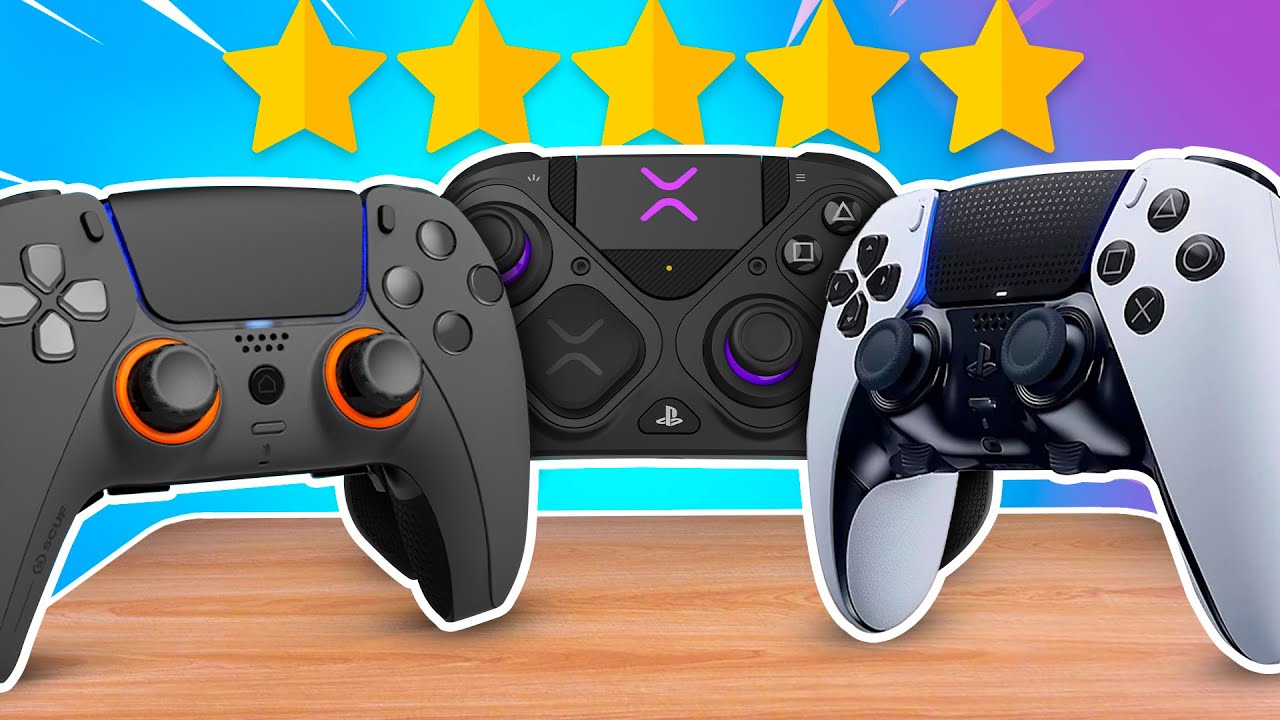
Switch type. Options include rubber domes, tactile domes, mouse-style micro switches, and silent micro switches. Each has different actuation forces, travel distances, and acoustic signatures.
Dampening. Foam dots, silicone mats, or fabric tape under the cap and on posts. The goal is to soften bottom-out and top-out, not to introduce sponginess.
Travel tuning. Shortening travel can speed repeated taps but risks accidental presses. Thin shims under the cap or spacer rings under the switch are common. Expect 0.2 to 0.6 mm reductions in a conservative build.
Debounce handling. If you switch to mouse-style micro switches, consider the controller’s firmware debounce and polling. Some boards are forgiving, some chatter with ultralight switches.
Ergonomics. Cap height and curvature affect perceived force. A taller cap amplifies leverage and makes actuation feel lighter even if the gram force is the same.
Quiet builds: how to get them truly quiet
Quiet builds are about controlling three things: the switch click, the cap impact, and shell resonance.
Start with silent switch options. There are mouse-style silent micro switches sold as “silent” or “low noise” that use internal dampers. These trade a small amount of crispness for a big drop in dB. If you prefer dome-style tactility, modern tactile domes with a rubber interface can feel snappy without the hard click of a metal leaf. Avoid super-stiff domes; they drive you to bottom out harder, which negates the quiet goal.
Target bottom-out and top-out. A 0.3 to 0.5 mm foam dot under each cap does more than any switch. It trims the harshness and tames the resonance path into the shell. I prefer high-density EVA for stability over time, or silicone pads cut from a soft controller gasket. Add a tiny felt square on the post where the cap returns to home to reduce top-out knock.
Dampen the cavity. Inside the shell, thin acoustic foam or even painter’s tape on the inner walls can reduce reflections. Avoid blocking critical flex cables or heat zones. Do not pack foam directly around analog sticks; give them room to breathe and move.
Watch your shell. Lightweight, vented shells like Helico Hexavent shells save weight and can keep sweaty palms cooler, which is a genuine comfort win, especially in long sessions. They also change the acoustic character. If your mic sits off to one side, a side vent can project more noise toward it. You can selectively line that quadrant internally with thin felt to rebalance projection.
Keep actuation force in a sensible band. Quiet builds feel better around 55 to 70 gf measured at the cap surface for face buttons. Lighter than that, you risk accidental presses while resting fingers. Heavier than 75 gf on a quiet build tends to bring the thud back.
Reality check for streamers and shared apartments: a well-done quiet build reads as a soft tap through a cardioid mic at 30 to 50 cm, even with light compression. If your compressor is aggressive, add one more layer of felt to top-out points.
Tactile builds: chasing that crisp click
Tactile builds center on feedback, consistency, and rebound speed. The mouse-style micro switch is the classic route because it offers a clear, early actuation and quick reset. Good switches advertise their operating force, travel to actuation, and total travel. In practice, the enclosure modifies both feel and sound.
Bias toward mid-force switches if you are heavy-handed. Around 60 to 80 gf at the finger feels punchy without tiring you out. Heavier micro switches can drift out of spec faster under constant mashing, especially if they run warm inside a tight shell.
Give the switch solid support. Mounting matters. If the switch floats or flexes, you lose crispness and generate squeaks. Ensure the posts or adapter plate seat flush. A tiny polyurethane bead can stop micro rattle without adding squish.
Control echo and ping. Even in a clicky build, you do not want shell ping. A light foam liner behind the switch area takes the metallic edge off without dulling the click.
Mind the double click. Fast repeated taps can ride the reset point on some micro switches. If your controller firmware uses conservative debounce, rapid-fire inputs can drop. Test in a button spamter in software before closing the shell.
When people talk about “mouse button face buttons,” they often forget how much the cap shape and plunger alignment matter. Spend time aligning plungers so each face button triggers at the same depth. Your muscle memory will thank you when you throw combos at 3 a.m.
What about back paddles?
Back paddles change where and how you interact with the controller. For many players, paddles are the number one performance mod because they let you jump, slide, or swap without lifting your thumbs.
Quiet vs tactile on paddles tracks the same logic as face buttons, but with extra wrinkles:
- Paddles have leverage. A small change in switch force feels bigger under a long paddle arm. A 60 gf switch at the contact can feel like 40 gf at your finger if the paddle geometry multiplies it. Accidental presses are more costly. A stray jump or reload can cost a round. Err on the side of slightly higher force or a more pronounced tactile bump for paddles that map to critical actions. Shell flex is real. Paddle cutouts and brackets remove material. If the shell flexes, your switch may chatter. Add a stiffener plate or foam shim to anchor the paddle at rest.
If you stream or play in a quiet house, go silent on paddles first. That is where microphones most often pick up repetitive clicks, especially in shooters where your left paddle might be spammed for movement tech. If you compete locally and want absolute clarity in timing, a tactile paddle on your primary action and a quieter switch on your secondary is a practical compromise.
The PS5 angle and cross-platform play
Custom PS5 controllers sit in a sweet spot for mods. The stock platform is responsive, and the internal layout offers room for either micro switches or well-tuned domes, depending on the donor board and shell. Face buttons on a PlayStation pad tend to be closer together and slightly tighter vertically than on some PC-first controllers, which magnifies any mismatch in height or actuation.
A couple of notes if you are building or buying:
- On PlayStation, stick to well-documented switch kits that are known to clear the touchpad ribbon and the haptic drivers. Space is tight. If you use back paddles, evaluate how the haptics rumble through the shell. Paddles act like little soundboards. A quiet build with strong haptics can still carry a hum to your mic if the paddle bracket resonates. A rubber “washer” between paddle and bracket helps. For crossplay on PC, ensure your mods do not confuse input recognition layers. Some aftermarket boards expose paddles as keyboard keys. That is fine for shooters, but certain fighters or racing sims expect native XInput. Plan your remaps around the target games.
If you are ordering custom PS5 controllers from a shop, ask for the exact switch models they use, not just “silent” or “tactile.” A good builder will share force numbers and travel specs and can demonstrate sound on a mic. Even better, ask them to keep the four face buttons within 0.1 mm of travel and within a 10 gf force window. Consistency beats absolute numbers.
Custom PC controllers and the platform difference
On PC, you are not bound to one ecosystem. That is both empowering and chaotic. With custom PC controllers, the options for polling, debounce, and remap layers vary a lot. Some boards let you tune debounce in software. Lower values can make tactile switches feel snappier, but also make chatter more likely with ultra-light switches or sloppy paddle tolerances. Test values in a button poll viewer before locking them in.
If you use hall effect triggers or sticks, remember that noise can travel through the frame to their sensors. Excess foam near hall sensors can drift position readings when compressed against magnets. Keep dampening material clear of the trigger magnet path and any flux lines. It is a small risk, but I have seen it on two builds where the foam warmed and deformed over months.
Genre-specific advice that actually helps
Shooters and tactical games. Tactile buttons for actions that must be timed to a frame or within a tight window feel great. Map reload and use to tactile, jump and slide to paddles, and consider making one of the paddles quiet to reduce stream noise. Triggers with short pulls and mechanical stops help more than changing button type. If your aim correction requires feathering a face button, a quiet, slightly higher-force switch prevents accidental presses in high tension.
Fighting games. A crisp, short travel on face buttons wins here. If your controller supports it, micro switches with early actuation help negative edge and piano inputs. Avoid spongy dampening under the caps. You want a clean top-out for consistent bounce, but not a loud knock. A single layer of thin felt on the roof of the cap takes the edge off without dulling the return.
Racing and sims. Quiet wins more often. You will press fewer face buttons per minute and hold them longer. Muted clicks reduce fatigue and mic bleed. The bigger upgrade for racers is trigger feel and paddle shifters on a wheel, but if you stick to a pad, quiet face buttons keep you immersed.
Platformers and metroidvanias. It is a toss-up. If you need to buffer inputs and feel the exact point where the button fires, tactile is reassuring. If you grind long sessions, quiet helps your hands and ears.
MMOs and macro-heavy games. Quiet works best if you map abilities to back buttons or paddles and spam them. Your squad will thank you for not sounding like a typewriter.
Practical build notes: what modders get wrong
People over-dampen. The easiest way to ruin a quiet build is to stack too many layers under a cap. You end up with mush and inconsistent actuation across the four buttons. Use one foam dot for bottom-out and a tiny https://johnnyrpib823.fotosdefrases.com/thermal-myths-do-vented-shells-cool-your-controller felt top-out damper, then stop. If you need more quiet, address the shell first.
People mismatch switch travel and cap height. If one button sits 0.3 mm higher, your brain will find it during combos. Measure with a feeler gauge across all four.
People ignore heat. Controllers build heat near the battery and rumble motors. Foam glue softens. Use materials rated for at least 70 C and check after a long session that nothing creeps.
People forget cable clearance. A sliver of foam against a flex cable can cause intermittent inputs that only show up under grip pressure. Before closing, press the shell sides to simulate your hold and watch for false presses.
People overtighten shells. Extra torque transmits and amplifies click noise and can warp cap travel. Bring screws to contact, then a quarter turn. If the seam is not flush, you are solving the wrong problem.
Two quick tools that make testing easier
- A decibel meter app and a consistent test distance. Even a phone app helps compare changes. Set your pad 30 cm from the mic, record a fixed tapping sequence, and keep the room noise low. You will hear differences more than the meter reads, but the relative numbers are useful. A button polling viewer on PC. You can see chatter, missed repeats, and slow releases. Testing early saves you from opening the shell three times.
How to choose in 60 seconds
Here is a fast decision matrix you can use without overthinking.
- If you stream, share a room, or play late at night, choose a quiet build for paddles first and face buttons second. Keep actuation around 60 to 70 gf with light dampening. If you play shooters or fighters at a competitive level, choose tactile for primary action buttons. Use minimal dampening and mid-force micro switches. Consider quiet paddles if your mic lives near your hands. If you feel hand fatigue or numbness after long sessions, bias toward quiet, slightly higher-force switches and softened bottom-out. Your fingers will relax against the cushion. If your mic compression is aggressive or you use a mechanical keyboard on stream, either go fully quiet on the controller or you will be mixing two click signatures that fight each other. If you are unsure, make your A and X (or cross and square) tactile and your B and Y quiet. Live with it for a week, then commit.
A careful word about warranties and safety
Opening a controller usually voids the warranty. Static discharge can kill small components. If you solder, practice on scrap first and keep heat under control to avoid lifting pads. Disconnect batteries before you work. If you buy prebuilt, vet the builder’s return policy and ask for a sound demo recording, not just a spec sheet.
Where Helico Hexavent shells fit
Shells with vented hex patterns target three things: airflow to cool hands, weight reduction, and grip. That airflow helps long sessions by reducing sweat, which matters because moisture changes how your fingers perceive tactile bumps. You get a more consistent feel over time and less slippage on glossy caps.
Acoustically, the vents shift how the controller projects sound. You can use that to your advantage. If you seat thin felt behind the vent zones nearest the microphone side and leave the opposite side clear, you can “aim” the remaining noise away from the mic. It is not a miracle fix, but it trims harshness. The lighter shell also slightly reduces low-frequency thump from bottom-out. Pair that with quiet switches and you have a stealth build that still feels lively.

Example configurations that work
For a stealthy, late-night build on a PS5-style pad: silent micro switches on the four face buttons, thin EVA dots for bottom-out, felt on top-out, quiet mid-force switches on back paddles, and a Helico Hexavent shell lined sparingly on the mic-facing side. Triggers get short stops and light grease to take away scrape sounds. Expect around 28 to 34 dBA at 30 cm and a smooth, cushioned press.
For a competitive shooter on PC: tactile micro switches on A and X, quiet domes on B and Y to reduce spam noise, a pronounced tactile paddle for jump, a quieter paddle for reload or interact, and minimal shell dampening to keep the snap. Debounce tuned modestly lower in software if your board supports it. Expect 42 to 50 dBA spikes on the tactile buttons, with paddles in the low 30s if you keep them quiet.
For a fighter: four tactile face buttons matched within a tight force window, no soft bottom-out under the caps, only a hair of felt to stop ping. Back paddles optional, and if you use them, make them stiffer to avoid accidental macro triggers during motion inputs.
A short pre-build checklist
- Decide your noise budget first. Where will your mic sit, and how loud can you be? Pick switch forces that match your grip. Heavy thumbs love mid-force, light thumbs love quiet with slightly higher force to avoid mistakes. Plan dampening locations before you open the shell. Bottom-out and top-out only, with thin materials. Test switch placement on an open shell. Verify cap height, actuation order, and return sound before final screws. Record a 10-second tap sequence after each change. Your ears forget fast, your recordings do not.
Answering a few common doubts
Does a tactile switch reduce input latency? Not meaningfully by itself. What you gain is earlier actuation in the travel and a clearer feel of that actuation. That can make you faster, but it is not a millisecond magic trick. Firmware debounce and polling intervals matter more.
Are silent switches mushy? The good ones are not. They damp the click leaf internally, not your entire travel. If your quiet build feels mushy, you likely over-dampened bottom-out or chose a low-quality foam that compresses unevenly.
Will quiet mods survive heat and sweat? Yes, if you choose materials with proper temperature ratings and avoid packing foam against motors and batteries. Vented shells help by reducing moisture, which extends the life of adhesives.
Can I run different profiles per game on PC? With certain custom PC controllers you can, especially those with remap boards that expose software profiles. If you like tactile for one game and quiet for another, you might configure inputs so that the loudest actions map to quieter switches in one profile.
Will Helico Hexavent shells make my controller louder? They can shift the tone upward and project certain frequencies, but with targeted dampening you can net out quieter. The real win is comfort and grip over long sessions.
The craft of feel
The best controllers do not just click or hush, they carry intention. A quiet build whispers back to your fingers and disappears from the soundtrack of your matches. A tactile build talks clearly, every press a tiny handshake confirming the input. Pick the voice you want, then engineer the rest of the body to support it.
Whether you are commissioning custom PS5 controllers or hand-tuning your own custom PC controllers, ask concrete questions, measure what you can, and listen to your recordings. Your thumbs will tell you the rest after a weekend of play.