For the past two weeks, my OBDSTAR ODO Master had been working flawlessly with my iPhone Hotspot, but now it refuses to establish a connection. Despite my attempts to reset the network settings on my iPhone and restarting it multiple times, the problem persists. Whenever I attempt to connect the OBDSTAR to my iPhone, it initially recognizes the hotspot ID and displays a “Saved” status, but after a brief moment, it consistently displays a “WiFi Connection Failure” message.
My iPhone is running the latest iOS version, 15.1. I recently purchased one-year updates for my OBDSTAR ODO Master at a cost of $199, hoping that the included software updates would address this problem. Unfortunately, the updates did not fix the connectivity issue.
To troubleshoot further, I successfully connected the OBDSTAR to another phone, as well as connected another phone and my laptop to my iPhone Hotspot without any problems. The difficulty lies specifically with the OBDSTAR device.
Regrettably, OBDSTAR ODO Master does not offer a network reset option; it only has a Factory Reset, which I am reluctant to perform since it would result in the loss of all installed data. The OBDSTAR device operates on Android 5.1.1.
The problem can be solved this way:
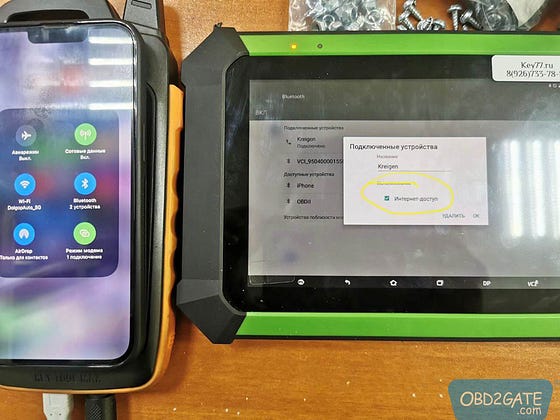
Same problem encountered with wi-fi on an OBDSTAR X300 DP tablet before. With wifi, the problem could not be solved. Please distribute the internet via bluetooth and create a pair of iphone + d300dp, and the Internet works through hotspot.
In the Bluetooth settings on the tablet, you need to tick “Internet access”.
Therefore, one potential solution is to enable “Internet access” in the OBDSTAR ODO Master tablet’s Bluetooth settings for connectivity.