
StrokesPlus(Rob Yapchanykさん作?) その11
DRA-CAD用のアクションを追加しました。設定は以下の通りです。
上段【アクション名】
----------------------------------------
中段【Luaスクリプト】
----------------------------------------
下段【使い方】
----------------------------------------
※すべて私が普段使うをソフトをより使い易くするための設定なので、ご自分の使い勝手に合わせて読み替えて下さい。
DRA_S1--S4
----------------------------------------
acSendAltDown()
acSendKeys("l")
acDelay(50)
acSendKeys("b")
acSendAltUp()
acSendAltDown()
acSendKeys("l")
acDelay(50)
acSendKeys("k")
acSendAltUp()
acDelay(50)
acSendKeys("201")
acSendKeys("{ENTER}")
acDelay(50)
acSendKeys("{ESCAPE}")
acSendAltDown()
acSendKeys("v")
acDelay(300)
acSendKeys("e")
acSendAltUp()
acDelay(50)
acSendKeys("s1")
acDelay(200)
acSendAltDown()
acSendKeys("l")
acDelay(50)
acSendKeys("b")
acSendAltUp()
acSendAltDown()
acSendKeys("l")
acDelay(50)
acSendKeys("k")
acSendAltUp()
acDelay(50)
acSendKeys("202")
acSendKeys("{ENTER}")
acDelay(50)
acSendKeys("{ESCAPE}")
acSendAltDown()
acSendKeys("v")
acDelay(300)
acSendKeys("e")
acSendAltUp()
acDelay(50)
acSendKeys("s2")
acDelay(200)
acSendAltDown()
acSendKeys("l")
acDelay(50)
acSendKeys("b")
acSendAltUp()
acSendAltDown()
acSendKeys("l")
acDelay(50)
acSendKeys("k")
acSendAltUp()
acDelay(50)
acSendKeys("203")
acSendKeys("{ENTER}")
acDelay(50)
acSendKeys("{ESCAPE}")
acSendAltDown()
acSendKeys("v")
acDelay(300)
acSendKeys("e")
acSendAltUp()
acDelay(50)
acSendKeys("s3")
acDelay(200)
acSendAltDown()
acSendKeys("l")
acDelay(50)
acSendKeys("b")
acSendAltUp()
acSendAltDown()
acSendKeys("l")
acDelay(50)
acSendKeys("k")
acSendAltUp()
acDelay(50)
acSendKeys("204")
acSendKeys("{ENTER}")
acDelay(50)
acSendKeys("{ESCAPE}")
acSendAltDown()
acSendKeys("v")
acDelay(300)
acSendKeys("e")
acSendAltUp()
acDelay(50)
acSendKeys("s4")
acSendAltDown()
acSendKeys("v")
acDelay(300)
acSendKeys("h")
acSendAltUp()
----------------------------------------
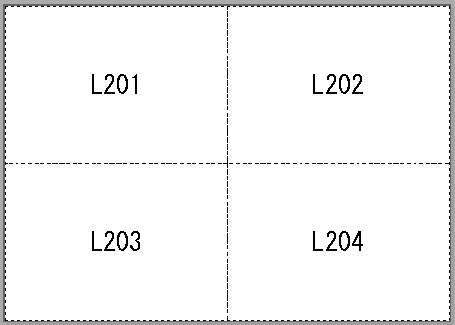
[表示範囲の記憶]コマンドを4つ連続で記憶すします。
予め記憶する表示範囲の矩形(レイヤ201から204)を作図しておきます。
(それぞれの矩形の外側にそれと同じレイヤの図形等がないこと)
これ実行することで、矩形ごとに表示範囲として記憶します。
最後の矩形を図面範囲表示して完了します。
【矩形配置の例】
----------------------------------------
DRA_S1--S9
----------------------------------------
acSendAltDown()
acSendKeys("l")
acDelay(50)
acSendKeys("b")
acSendAltUp()
acSendAltDown()
acSendKeys("l")
acDelay(50)
acSendKeys("k")
acSendAltUp()
acDelay(50)
acSendKeys("201")
acSendKeys("{ENTER}")
acDelay(50)
acSendKeys("{ESCAPE}")
acSendAltDown()
acSendKeys("v")
acDelay(300)
acSendKeys("e")
acSendAltUp()
acDelay(50)
acSendKeys("s1")
acDelay(200)
acSendAltDown()
acSendKeys("l")
acDelay(50)
acSendKeys("b")
acSendAltUp()
acSendAltDown()
acSendKeys("l")
acDelay(50)
acSendKeys("k")
acSendAltUp()
acDelay(50)
acSendKeys("202")
acSendKeys("{ENTER}")
acDelay(50)
acSendKeys("{ESCAPE}")
acSendAltDown()
acSendKeys("v")
acDelay(300)
acSendKeys("e")
acSendAltUp()
acDelay(50)
acSendKeys("s2")
acDelay(200)
acSendAltDown()
acSendKeys("l")
acDelay(50)
acSendKeys("b")
acSendAltUp()
acSendAltDown()
acSendKeys("l")
acDelay(50)
acSendKeys("k")
acSendAltUp()
acDelay(50)
acSendKeys("203")
acSendKeys("{ENTER}")
acDelay(50)
acSendKeys("{ESCAPE}")
acSendAltDown()
acSendKeys("v")
acDelay(300)
acSendKeys("e")
acSendAltUp()
acDelay(50)
acSendKeys("s3")
acDelay(200)
acSendAltDown()
acSendKeys("l")
acDelay(50)
acSendKeys("b")
acSendAltUp()
acSendAltDown()
acSendKeys("l")
acDelay(50)
acSendKeys("k")
acSendAltUp()
acDelay(50)
acSendKeys("204")
acSendKeys("{ENTER}")
acDelay(50)
acSendKeys("{ESCAPE}")
acSendAltDown()
acSendKeys("v")
acDelay(300)
acSendKeys("e")
acSendAltUp()
acDelay(50)
acSendKeys("s4")
acDelay(200)
acSendAltDown()
acSendKeys("l")
acDelay(50)
acSendKeys("b")
acSendAltUp()
acSendAltDown()
acSendKeys("l")
acDelay(50)
acSendKeys("k")
acSendAltUp()
acDelay(50)
acSendKeys("205")
acSendKeys("{ENTER}")
acDelay(50)
acSendKeys("{ESCAPE}")
acSendAltDown()
acSendKeys("v")
acDelay(300)
acSendKeys("e")
acSendAltUp()
acDelay(50)
acSendKeys("s5")
acDelay(200)
acSendAltDown()
acSendKeys("l")
acDelay(50)
acSendKeys("b")
acSendAltUp()
acSendAltDown()
acSendKeys("l")
acDelay(50)
acSendKeys("k")
acSendAltUp()
acDelay(50)
acSendKeys("206")
acSendKeys("{ENTER}")
acDelay(50)
acSendKeys("{ESCAPE}")
acSendAltDown()
acSendKeys("v")
acDelay(300)
acSendKeys("e")
acSendAltUp()
acDelay(50)
acSendKeys("s6")
acDelay(200)
acSendAltDown()
acSendKeys("l")
acDelay(50)
acSendKeys("b")
acSendAltUp()
acSendAltDown()
acSendKeys("l")
acDelay(50)
acSendKeys("k")
acSendAltUp()
acDelay(50)
acSendKeys("207")
acSendKeys("{ENTER}")
acDelay(50)
acSendKeys("{ESCAPE}")
acSendAltDown()
acSendKeys("v")
acDelay(300)
acSendKeys("e")
acSendAltUp()
acDelay(50)
acSendKeys("s7")
acDelay(200)
acSendAltDown()
acSendKeys("l")
acDelay(50)
acSendKeys("b")
acSendAltUp()
acSendAltDown()
acSendKeys("l")
acDelay(50)
acSendKeys("k")
acSendAltUp()
acDelay(50)
acSendKeys("208")
acSendKeys("{ENTER}")
acDelay(50)
acSendKeys("{ESCAPE}")
acSendAltDown()
acSendKeys("v")
acDelay(300)
acSendKeys("e")
acSendAltUp()
acDelay(50)
acSendKeys("s8")
acDelay(200)
acSendAltDown()
acSendKeys("l")
acDelay(50)
acSendKeys("b")
acSendAltUp()
acSendAltDown()
acSendKeys("l")
acDelay(50)
acSendKeys("k")
acSendAltUp()
acDelay(50)
acSendKeys("209")
acSendKeys("{ENTER}")
acDelay(50)
acSendKeys("{ESCAPE}")
acSendAltDown()
acSendKeys("v")
acDelay(300)
acSendKeys("e")
acSendAltUp()
acDelay(50)
acSendKeys("s9")
acDelay(200)
acSendAltDown()
acSendKeys("v")
acDelay(300)
acSendKeys("h")
acSendAltUp()
----------------------------------------
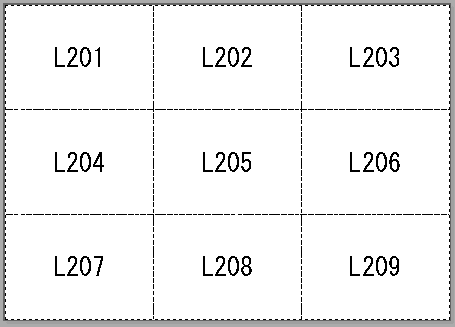
同様に[表示範囲の記憶]コマンドを9つ連続で記憶すします。
予め記憶する表示範囲の矩形(レイヤ201から209)を作図しておきます。
(それぞれの矩形の外側にそれと同じレイヤの図形等がないこと)
これ実行することで、矩形ごとに表示範囲として記憶します。
最後の矩形を図面範囲表示して完了します。
【矩形配置の例】
【補足です】
キーボードの[A]、[S]にコマンドを割付けしている場合は使えません。
[表示範囲の記憶]コマンドは2D、3D、それぞれ9つまで表示範囲を記憶できます。
StrokesPlus、是非お試しください。
くまたろ 2018.09.11
-----------------------------------------------------------
StrokesPlus については、下記で説明しています。
StrokesPlus 初回の記事 ↓↓↓
https://ameblo.jp/moon0219/entry-12192036058.html
StrokesPlus その2 ↓↓↓
https://ameblo.jp/moon0219/entry-12309373640.html
StrokesPlus その3 ↓↓↓
https://ameblo.jp/moon0219/entry-12311093385.html
StrokesPlus その4 ↓↓↓
https://ameblo.jp/moon0219/entry-12311954329.html
StrokesPlus その5 ↓↓↓
https://ameblo.jp/moon0219/entry-12319834455.html
StrokesPlus その6 ↓↓↓
https://ameblo.jp/moon0219/entry-12323126359.html
StrokesPlus その7 ↓↓↓
https://ameblo.jp/moon0219/entry-12325619984.html
StrokesPlus その8 ↓↓↓
https://ameblo.jp/moon0219/entry-12329454639.html
StrokesPlus その9 ↓↓↓
https://ameblo.jp/moon0219/entry-12330056944.html
StrokesPlus その10 ↓↓↓
https://ameblo.jp/moon0219/entry-12402592843.html
StrokesPlus その12 ↓↓↓
https://ameblo.jp/moon0219/entry-12405779908.html