

• DaVinci Resolve Studio Win v14.2.1 - 673,6 Mo
• Guide Utilisateur DaVinci Resolve 14 du 7 septembre 2017 - 38,8 Mo
• Guide de configuration DaVinci Resolve 14 Mac/PC/Linux - 3,2 Mo
Cette mise à jour logicielle intègre plus de 50 correctifs et améliorations de stabilité et performance et elle est recommandée pour tous les utilisateurs de DaVinci Resolve 14 Studio.
DaVinci Resolve 14.2.1 Studio offre de bien meilleures performances sur la page Edit lors de la génération des vignettes, une gestion correcte des sorties audio 5.1 et 7.1 pour les fichiers .WAV, un témoin de progression plus fiable lors de la création des média optimisés, plus d'une douzaine d'améliorations sur la page Audio Fairlight, une meilleure performance pour le visionnage en multicam, la possbilité de modifier les propriétés sur une sélection de clips en même temps, de nouveaux indicateurs de tracking pour le mode d'image dans les Power Windows, une amélioration de la stabilité lors des rendus CineForm et H.264, un encodage ProRes plus rapide, un décodage XAVC-I plus rapide.
Elle est recommandée pour tous les utilisateurs de DaVinci Resolve 14 Studio. Cette version nécessite un dongle DaVinci Resolve ou un code d’activation logiciel.
Nouveautés de DaVinci Studio 14.2.1
- Addressed an issue where playing frame-based clips in the Media page would not play the synced audio
- Addressed an issue where Resolve would sometimes not output audio on certain pages in macOS
- Addressed an issue where audio formats for stereo, 5.1 and 7.1 were not set correctly when rendering WAV files
- Addressed an issue where rendered adaptive tracks were incorrectly tagged as stereo, 5.1 or 7.1 formats
- Addressed an issue where changing clip audio properties in the Inspector would not work correctly when multiple clips were selected
- Addressed an issue where deleting a volume keyframe and performing an undo would not restore the smoothening applied
- Addressed an issue where the source meters would sometimes not reflect the correct number of channels for clips with audio
- Addressed an issue where the Fairlight viewers would show a still image during playback when monitoring with a Blackmagic Design capture and playback device
- Addressed an issue where render jobs could not be added for audio only timelines
- Addressed an issue where rendered media files would sometimes have blank audio on the first video frame
- Addressed an issue with marking render ranges when rendering an audio-only timeline on the Delivery page
- Addressed a crash when adding a marker to a clip with cross-fades
- Addressed an issue where moving an audio clip on the Fairlight page would sometimes result in a crash
- Addressed an issue where the metadata widget would remain blank when clips were selected on the Fairlight page
- Addressed an issue where audio FX applied on clips inside a nested timeline would sometimes not get saved
- Addressed an issue where deleting an audio clip in a layered track and performing an undo would restore it in an incorrect layer
- Addressed an issue where resetting audio properties in the Inspector would not fully reset the clip equalizer
- Clips dragged on to the timeline no longer update the position of the playhead
- Addressed an issue where viewers would become blank when Video Scopes were enabled in Edit page
- Addressed a crash when decomposing compound clips from certain timelines imported using XML or AAF
- Addressed an issue where reimporting EDLs exported from Resolve would cause a crash
- Addressed an issue where performing an undo on a take selector action would sometimes result in a failure to save the project
- Clip names stored in EDL comments are also available as a render tag
- Power Windows with tracking now also have an indicator on the viewer overlay to show when they are in frame mode
- Addressed an issue where reconforming to a clip at a different source resolution would result in misaligned power windows in some cases
- Addressed support for DCDM ACES Output Transform with gamut clipped to P3 per SMPTE spec
- Addressed an issue where stills grabbed on a project migrated from Resolve 12.5 project would not be saved
- Addressed an issue where loading gallery stills would sometimes take a long time
- Addressed an issue where some stills would show a black frame when wiping
- Addressed an issue where node cache would sometimes incorrectly be invalidated when rippling color parameters
- Addressed an issue where the Dolby Vision CMU would be in pass-through mode until the trim metadata was modified
- Addressed an issue where qualifier controls remained editable when disabled
- Addressed an issue where Intel graphics hardware would not be recognized as OpenCL compatible with the latest drivers on Windows
- Addressed an issue where the Generate Optimized Media progress dialog would sometimes disappear before the operation completed
- Addressed an issue where performing a Save As after a failure to save a project would sometimes result in the original project disappearing
- Addressed an issue where selecting multiple titles in certain timelines would result in a crash
- Addressed an issue where deleting timelines in some projects would result in a crash
- Addressed an issue where Blackmagic Design Capture and Playback devices would not be detected on older drivers on Windows
- Addressed a crash when enabling 4:4:4 SDI monitoring with certain Blackmagic Design capture and playback devices
- Addressed an issue where viewers would become blank when enabling Data Burn Ins and monitoring with a Blackmagic Design capture and playback device
- Addressed an issue with network connectivity on the JLCooper Eclipse panel
- Addressed an issue where changing the source folder or relinking clips in the Media Pool would not affect the associated matte clips unless they were explicitly selected
- Addressed a crash when rendering to Cineform at certain resolutions such as 2K DCI Flat
- Addressed a crash when decoding some H.264 clips
- Addressed an issue where colorspace metadata was exported incorrectly when rendering MXF clips
- Addressed an issue with default brightness levels when decoding RAW formats from some still cameras
- Addressed a crash with decoding some high resolution XAVC clips on certain system configurations
- Addressed inability to render multiple mono audio tracks to the MXF OpAtom container
- Improved encoding speeds when rendering to Apple QuickTime ProRes
- Improved decoding speeds with XAVC-I media
- Addressed performance degradation when using CUDA compatible OpenFX plugins
- Addressed an issue where Edit page playback response would be delayed during thumbnail generation
- Addressed an issue with viewer performance on multicam clips on certain system configurations
- General performance and stability improvements
- Améliorations générales des performances et de la stabilité
Configuration minimale requise pour Mac
- macOS 10.12.6 Sierra
- 16 Go de mémoire vive recommandée
- Blackmagic Design Desktop Video version 10.4.1 ou supérieur
- CUDA Driver version 8.0.63
- NVIDIA Driver en fonction des GPU utilisés
- RED ROCKET-X Driver version 2.1.34.0 et Firmware version 1.4.22.18 ou supérieur
- RED ROCKET Driver version 2.1.23.0 et Firmware version 1.1.18.0 ou supérieur
Configuration minimale requise pour Windows
- Windows 10 Pro 64 bits
- 16 Go de mémoire vive recommandée
- Blackmagic Design Desktop Video version 10.4.1 ou supérieur
- Drivers NVIDIA/AMD – En fonction des GPU utilisés
- RED ROCKET-X Driver version 2.1.34.0 et Firmware version 1.4.22.18 ou supérieur
- RED ROCKET Driver version 2.1.23.0 et Firmware version 1.1.18.0 ou supérieur
Configuration minimale requise pour Linux
- CentOS 6.8
- 32 Go de mémoire vive recommandée (16 Go étant le minimum supporté)
- Blackmagic Design Desktop Video version 10.4.1 ou supérieur
- NVIDIA/AMD Drivers - En fonction des GPU utilisés
- RED ROCKET-X Driver version 2.1.34.0 et Firmware version 1.4.22.18 ou supérieur
- RED ROCKET Driver version 2.1.23.0 et Firmware version 1.1.18.0 ou supérieur
Mise à niveau du serveur de base de données PostgreSQL sur Mac
Jusqu'à DaVinci Resolve 12.5.2, le programme d'installation Mac comprenait PostgreSQL version 8.4.2. A partir de macOS Sierra 10.12, PostgreSQL version 8.4 n'est plus pris en charge. Si vous avez prévu d'installer cette dernière version de système, il sera nécessaire de mettre à jour le serveur PostgreSQL en version 9.5.4 avant de mettre à jour macOS. Une fois que votre installation PostgreSQL a été actualisée et vos données mises à jour, vous pouvez enchainer avec la mise à jour de macOS.
Afin de faciliter la mise à niveau de PostgreSQL sur votre Mac, Blackmagic fournit des applications qui peuvent être téléchargés ici:
/Library/Application Support/Blackmagic Design/DaVinci Resolve/Upgrade PostgreSQL folder
A partir de DaVinci Resolve 12.5.3, les nouvelles installations incluent PostgreSQL version 9.5.4.
Installation du logiciel DaVinci
Il suffit de double cliquer sur l'icône DaVinci Resolve Installer puis de suivre les instructions qui vous sont présentées à l'écran. Redémarrez l'ordinateur après installation.
Afin de supprimer DaVinci Resolve de votre configuration, double-clic sur l'icône 'Uninstall Resolve' à partir du dossier DaVinci Resolve dans le dossier Applications.
Informations complémentaires
Consultez www.blackmagic-design.com pour obtenir des informations complémentaires sur les différentes configurations certifées.
DaVinci Resolve v16.1.1 Video Editing Application for Mac and Windows Full Version Free Download. Hy friends today am going to share with you Best Color Correction Software and Video Editor for Windows and Mac. This software name is “DaVinci Resolve Studio.” Davinci Resolve 16 software is available now for Windows, macOS, and Linux. You can easily download it from my website. So, did you know that Davinci Resolve Download is a color correction and non-linear video editing application for macOS, Windows, and Linux, initially developed by da Vinci Systems, and now developed by Blackmagic Design? Davinci Resolve 15 Download is a professional video editing, color correction, visual effects, and audio post-production all in a single application or software. If you are looking similar Video Editor software for Mac and Windows then, download Apple Final Cut Pro For Mac OS X.

Davinci Resolve Free Download Mac
It’s available into condition Free and paid versions for Mac, Windows, and Linux. Don’t forget to check out Wondershare Filmora.Davinci Resolve BlackmagicDavinci Resolve Studio 15.3.1 With Crack Full Free Here! Davinci Resolve Studio 15.3.1.3 With Crack Full Version is available for download at GetPCSofts. Blackmagic Design DaVinci Resolve Studio Crack provides you the world’s highest quality video editing tools, color correctors, video converters, video monitoring, live production switchers, advanced visual effects, 3D compositing and motion. DaVinci Resolve Studio combines professional editing and advanced color correction so you can edit and grade all in one application! With over 80 new features, you get a massive set of context sensitive editing and trimming tools, multi camera editing, titling, transitions, animation, sample accurate audio, tape style scrubbing, fader automation, audio mixing and support for VST and Audio Unit. Sep 17, 2018 DaVinci Resolve Studio 14.1 WEB + easyDCP v1.0.3411 Download for Mac Free Download Latest Version for MAC OS. It is full offline installer standalone setup of DaVinci Resolve Studio 14.1 mac Crack for macOS.
is the world’s only solution that combines professional 8K editing, color correction, visual effects, and audio post-production all in one software tool! You can instantly move between editing, color, facts, and audio with a single click. Davinci Resolve Free Download is also the only solution designed for multi-user collaboration, so editors, assistants, colorists, VFX artists, and sound designers can all work live on the same project at the same time! Whether you’re an individual artist or part of a large collaborative team.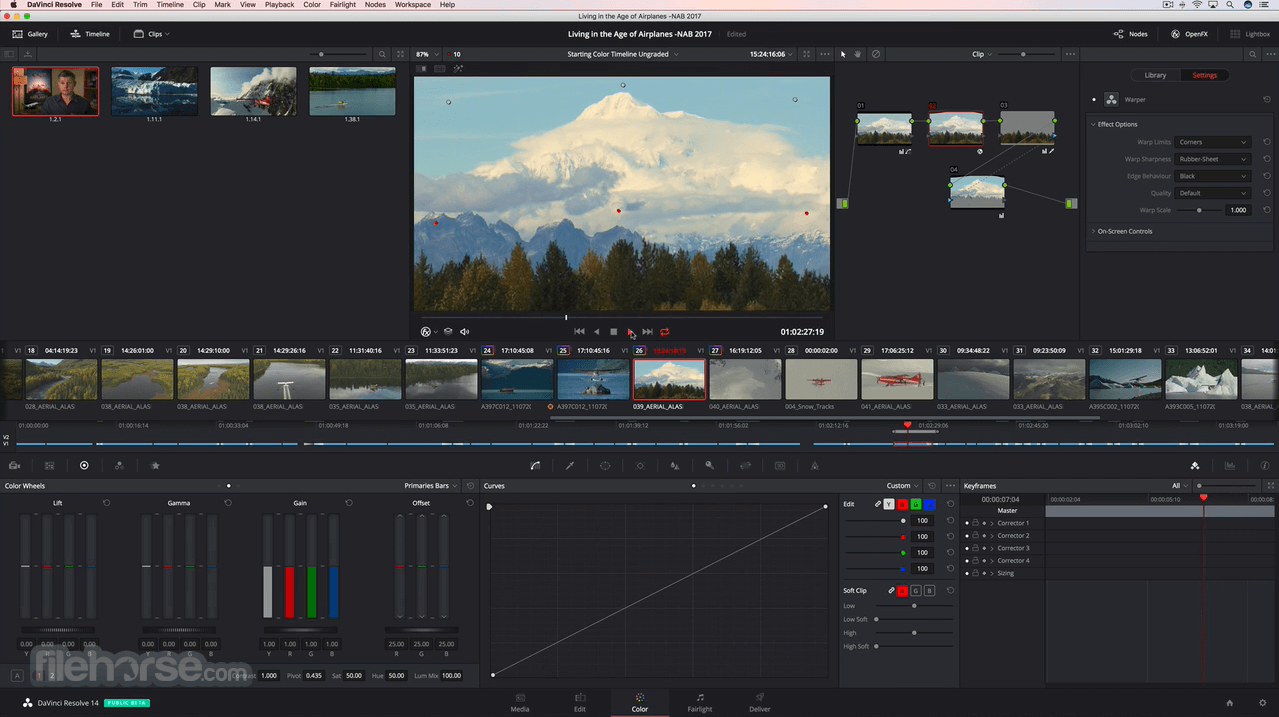 Davinci Resolve Video Editor easy to see why DaVinci Resolve is the standard for high-end post-production and finishing on more Hollywood feature films, television shows, and commercials than any other software.
Davinci Resolve 12 Free Download
In this new version of Davinci, you can find new features such as Davinci Resolve Free Video Editor 16 features a revolutionary new cut page designed explicitly for editors that need to work quickly and on tight deadlines! The new DaVinci Neural Engine uses machine learning to enable powerful new features such as facial recognition, speed warp, and more. Davinci Resolve Windows an alternate edit page with a streamlined interface and revolutionary new tools that will help you work faster than ever. The cut page lets you import, edit, trim, add transitions, titles, automatically match color, mix audio, and more. Whether you’re delivering for broadcast or YouTube, the cut page has everything you need to get the job done, all in one place. Plus, the regular edit page is still available so you can switch between edit and cut sheets to change editing style right in the middle of a job. Content Source. So, if you need this software then, follow the below link and download it.
The Features of Davinci Resolve Free Video Editor Download:
- Dual Timeline: A revolutionary dual timeline lets you quickly navigate the full edit and trim without wasting time zooming and scrolling.
- Source Tape: Quickly review all clips in a bin as if it was a single “tape” so you can select and add shots to the timeline without having to search a container.
- Dedicated Trim Interface: The new trim interface in the viewer lets you see both sides of an edit and trim in frame-accurate detail so you can create the perfect cut!.
- Intelligent Edit Modes: To save time, you don’t have to place in points in the timeline as the edit modes can intelligently sync clips and edits for you.
- Fast Review: Quickly review an entire timeline or clips with variable speed playback that’s automatically set based on clip length.
- Transform, Retime, and Stabilize Built-in tools for a picture in picture effects, retiming, stabilization, dynamic zoom, text, audio, and more, all in one place!
- Quick Export: Instantly render, upload, and share your project to popular online services such as YouTube and Vimeo!.
- Media Import: Quickly import individual files or entire directory structures with subfolders as bins into your project right from the Cut page.
- Portable Editing: The interface is scalable and works well on smaller laptop screens, giving you the highest amount of usable space!.
- Custom Timeline Settings: Now, you can create timelines with different frame rates, resolutions, monitoring, and output settings in the same project!.
- Adjustment Clips: Apply blend modes, transformations, ResolveFX, color grades, and more on top of a stack of clips in the timeline.
- Facial Recognition: Use the DaVinci Neural Engine to detect faces in your clips and automatically create bins based on the people in each shot.
- Speed Warp Retiming: Incredibly high-quality motion estimation speed changes and frame rate conversions powered by the DaVinci Neural Engine.
- Image Stabilization: Analyze shots and apply stabilization with full camera lock, zoom, smooth, and strength controls right on the Edit page.
- Keyframe Curve Editor: Ease controls for position along with ResolveFX and OpenFX keyframes in the timeline curve editor makes animating effects faster.
- Tape Style Audio Scrubbing: High quality, tape-style scrubbing with pitch correction makes it easier to understand dialogue while scrubbing.
- Faster, Smarter Encoding: Encode only the frames that have changed instead of re-encoding entire files for dramatically faster rendering when delivering!
- Frame.io Integration: Collaborate remotely by browsing Frame.io content, seeing comments, and synchronizing annotations, all without leaving DaVinci Resolve.
Davinci Resolve 13 Download Free

Davinci Resolve 15 Free Download For Mac
SYSTEM REQUIREMENTS:
- Intel, 64-bit processor
- Windows 10 or macOS 10.13.6 or later
- Minimum of 2GB of graphics memory and a fast hard disk for video
- 16GB of system memory
- At Least a 1440 x 900 resolution display.
- OpenCL
ChangeLog of Davinci Resolve Blackmagic Version 16.1.1:
- Improved behavior when navigating to previous or next Multicam angles by looping around to the last or first angle
- Addressed an issue where performing a replace with a Multicam clip in the source viewer would not select the correct angle
- Resolved an issue where shift-dragging a gain keyframe in an audio clip would not work correctly on the edit timeline
- Fixed an issue where H.264 clips would be rendered incorrectly if network optimization was enabled
- Fixed an issue where render jobs would sometimes fail on some systems
- Fixed an issue where archived projects would not include matters for stereoscopic 3D clips
- Fixed an issue where playback for 4K DNG clips would be slow
- Fixed an issue where some DNG clips would be decoded with an incorrect color science
- Fixed an issue where rendering to MXF XDCAM formats would sometimes show artifacts
- Fixed an issue where minimizing the application would not hide the clean video feed
- Fixed an issue where setting in and out points from a timeline duration marker would sometimes not work correctly in the edit page
- Fixed an issue where the show picker RGB value context option in the color viewer could not be toggled off
- Fixed an issue where AAFs with multiple embedded audio channels would be decoded incorrectly
- Addressed a question related to decoding Blackmagic RAW on macOS Catalina
- General performance and stability improvements.
How to Download and Install Davinci Resolve Video Editor into MacOSX?
- First of all, click on the below download button and go to the download page.
- On the download page, you will be able to download Davinci Resolve Video Editor for macOSX.
- After downloading, please installed setup into your Operating System.
- After that, you can be used to give medicine to enable all premium features.
- If you like our work then, don’t forget to share this website on your friends and family timeline, including Facebook, Twitter, Linkedin, and Reddit.